Master AWS Cost Optimization for Startups
Master AWS cost optimization for startups with proven strategies for EC2, Lambda, S3, and RDS. Reduce cloud spending by 30-40% while maintaining performance and reliability.
AWS cloud bills can spiral quickly without strategic management. Studies show that 30-40% of AWS cloud spend is wasted on unused or misallocated resources, with startups particularly vulnerable to unexpected cost spikes.
Companies like Canva have reduced AWS compute costs by 46% in less than 2 years through deliberate optimization.
This guide reveals proven AWS cost optimization strategies specifically tailored for startups.
You'll discover how to identify waste, implement automated monitoring, leverage pricing models effectively, and build a cost-conscious engineering culture to cut cloud costs by 30-40% without sacrificing performance or innovation.
Understanding AWS Pricing Models
AWS Lambda charges for requests ($0.20 per million), execution duration, and memory allocation. The critical insight is that Lambda charges for allocated memory, not used memory.
Reserved Instances offer up to 75% savings compared to On-Demand pricing for predictable workloads, though you're locked into specific configurations.
AWS Savings Plans provide similar discounts (up to 72%) with greater flexibility. Compute Savings Plans automatically apply to EC2, Fargate, and Lambda usage regardless of region or instance type. The median organization coverage jumped to 55% in 2024, with 64% using RIs or Savings Plans.
Spot Instances let you bid on unused EC2 capacity at discounts up to 90%, perfect for fault-tolerant workloads like batch processing, data analysis, or CI/CD pipelines. One startup reduced ML training costs by 70% by shifting non-critical jobs to Spot Instances.
AWS Free Tier provides limited free usage of many services for 12 months after account creation, including 750 hours of t2.micro or t3.micro instances monthly, 5GB of S3 storage, and substantial free usage of Lambda, DynamoDB, and CloudFront.
The AWS Activate program provides up to $100,000 in AWS credits for qualified startups.
Optimizing Compute Costs
Compute services account for 53% of total AWS spend. EC2 right-sizing is the low-hanging fruit—40% of EC2 instances run below 10% CPU utilization at peak times.
Use AWS Compute Optimizer to analyze usage patterns and recommend optimal instance types. A ticket distribution company achieved $145,000 in monthly savings by right-sizing 1,465 instances with no performance degradation.
Lambda for variable workloads often proves more cost-effective than maintaining always-on EC2 instances for sporadic tasks. You pay only for actual execution time, measured in 100ms increments.
For a typical API handling 1 million requests monthly with 200ms average execution, Lambda costs around $20 versus $70+ for the equivalent t3.medium instance running 24/7.
Fargate for containerized workloads eliminates the need to manage underlying EC2 instances while offering predictable pricing.
For startups embracing microservices, Fargate Spot provides up to 70% savings for fault-tolerant containers.
Auto Scaling isn't just for handling traffic spikes—it's a powerful cost optimization tool. Configure Auto Scaling groups to scale down during low-traffic periods.
For a B2B SaaS application with primarily weekday business-hours usage, you might run 20 instances during peak times but scale down to 5 instances overnight and on weekends, saving 60% on compute costs.
Instance Scheduler allows you to automatically stop EC2 and RDS instances during non-business hours.
For development and testing environments that don't need 24/7 availability, this single change typically delivers 65% savings on those resources.
Storage Optimization Strategies
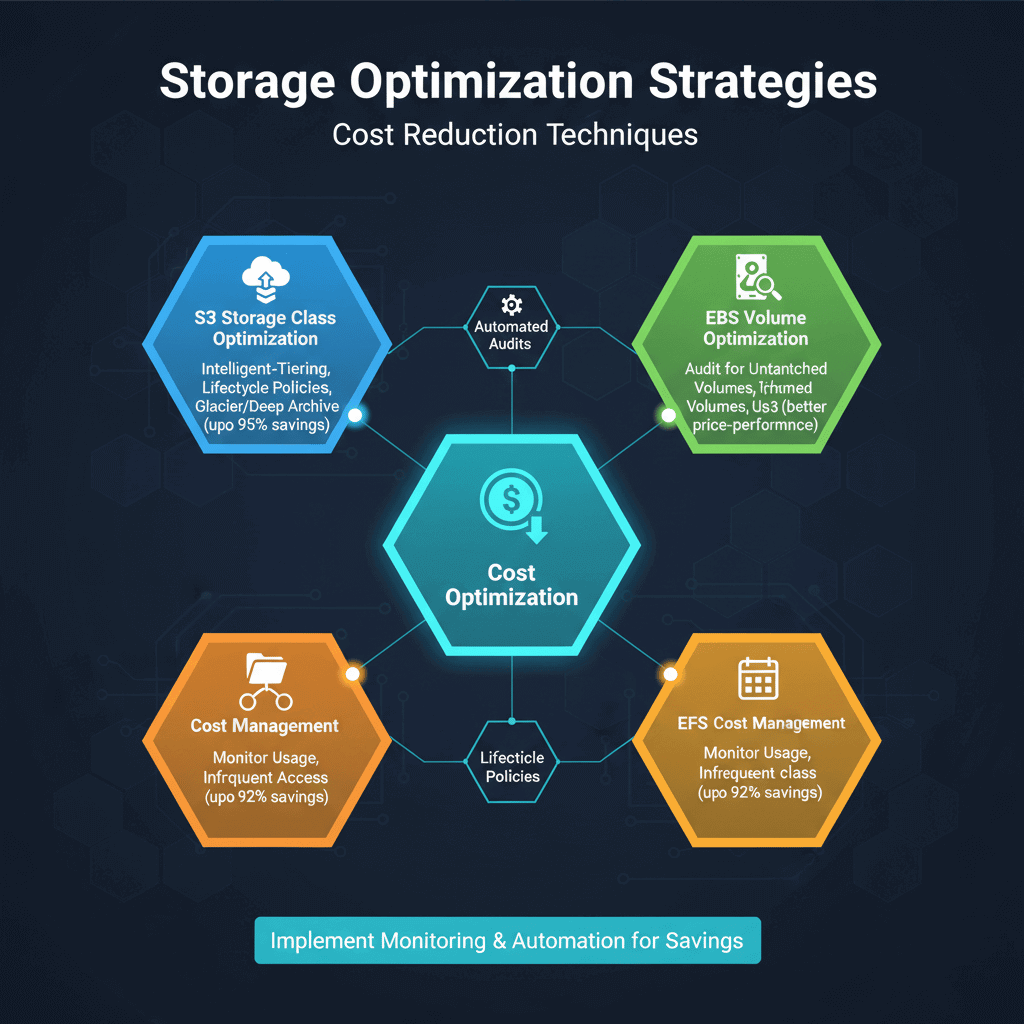
S3 storage class optimization can reduce costs by 95% for archival data. Use S3 Intelligent-Tiering for data with unpredictable access patterns—it automatically moves objects between tiers based on usage.
For known access patterns, implement lifecycle policies to transition data to S3 Glacier for infrequent access or S3 Glacier Deep Archive for long-term retention.
EBS volume optimization requires regular audits. Unattached EBS volumes sitting idle after instance terminations are a common source of waste.
Set up automation to identify and delete orphaned volumes. Consider gp3 volumes instead of older gp2 volumes for better price-performance ratios.
EFS cost management demands careful monitoring. While EFS offers convenient shared file systems, it's more expensive than S3 or EBS per GB.
Use EFS Infrequent Access storage class to save up to 92% on files not accessed regularly.
Database Cost Optimization
RDS Reserved Instances should be your first move for production databases. A three-year commitment to your primary database instance can cut costs by 60-70%.
Right-size your RDS instances based on actual usage metrics from CloudWatch—many startups overprovision database capacity unnecessarily.
Aurora Serverless makes sense for development environments and applications with variable usage patterns. You pay only for database capacity actually consumed, measured per second.
For a typical development database used 8 hours per day, Aurora Serverless costs 60% less than a continuously running Aurora instance.
DynamoDB On-Demand versus Provisioned Capacity requires analysis of your access patterns. On-Demand billing suits unpredictable workloads but costs more per request.
Once your traffic stabilizes, switching to Provisioned Capacity with Auto Scaling can reduce costs by 50% or more. Implement DynamoDB Time to Live to automatically delete expired items, reducing storage costs.
Network and Data Transfer Optimization
Data transfer into AWS is free, but data transfer out can become expensive at scale. CloudFront for content delivery reduces origin server load and data transfer costs.
By caching content at edge locations, you minimize requests to origin servers and reduce cross-region data transfer charges. CloudFront data transfer rates are also lower than EC2 rates.
VPC design for cost efficiency matters more than most realize. Keep your architecture within single regions when possible to avoid cross-region data transfer charges.
Use VPC endpoints for accessing S3 and DynamoDB instead of routing traffic through NAT Gateways, which charge both per-hour fees and data processing fees.
API Gateway optimization requires monitoring your request patterns. If you're processing millions of API requests, ensure you're not paying for unnecessary transformations or logging.
Consider HTTP APIs instead of REST APIs when you don't need the full feature set—they're up to 71% cheaper.
Cost Monitoring and Management Tools
AWS Cost Explorer provides up to 13 months of historical data with filtering and grouping capabilities to break down costs by service, account, or custom tags.
The forecasting feature predicts future costs based on historical patterns, helping you anticipate budget issues before they occur.
AWS Budgets enables proactive cost control through automated alerts. Create budgets based on cost, usage, or coverage targets, and configure alerts at 80%, 100%, and 120% thresholds.
For startups, start with simple monthly cost budgets per environment and gradually add more granular budgets as your architecture matures.
AWS Cost Optimization Hub (launched in 2024) consolidates cost-saving recommendations from across AWS services into a single centralized view.
It aggregates insights from Compute Optimizer, Trusted Advisor, and other services, making it easier to identify and prioritize optimization opportunities. Early adopters report finding 20-30% more optimization opportunities.
AWS Trusted Advisor provides real-time recommendations across cost optimization, performance, security, fault tolerance, and service limits.
Cost optimization checks identify idle resources, underutilized instances, and opportunities for Reserved Instance purchases. Full access requires Business or Enterprise Support plans.
Third-party platforms like CloudZero, CloudHealth by VMware, and ProsperOps often provide superior analytics, automation, and multi-cloud support beyond AWS native tools.
CloudZero excels at cost allocation and showback for engineering teams, mapping AWS costs to specific features, teams, or customers for unit economics analysis.
Implementing FinOps Practices
FinOps (Financial Operations) is an operational framework that maximizes cloud business value through collaboration between engineering, finance, and business teams. For startups, FinOps isn't about minimizing costs at all costs—it's about maximizing the value of every cloud dollar spent.
The FinOps Foundation defines three key phases: Inform (build visibility into cloud spending), Optimize (identify and implement cost-saving opportunities), and Operate (continuously monitor, govern, and improve cloud financial management). One startup reduced cloud costs by 80% over two years through FinOps practices without hiring a dedicated team.
Tagging strategy is foundational to FinOps. Implement a consistent tagging scheme that tracks resources by environment, team, feature, and project. Use AWS Tag Editor and AWS Organizations tag policies to enforce tagging compliance. With proper tagging, you can allocate costs accurately and identify which features or teams are driving spending.
Cost ownership means assigning specific engineering teams or individuals accountability for infrastructure costs. When engineers see how their architectural decisions impact the AWS bill, they make more cost-conscious choices. Share weekly cost reports with team leads showing their spending trends and optimization opportunities.
Advanced Cost-Saving Techniques
Multi-Region and Multi-Account strategies unlock volume discounts through consolidated billing. AWS Organizations centrally manages multiple accounts while maintaining security boundaries between environments or teams.
Region selection impact on costs is significant—not all AWS regions have the same pricing. us-east-1 is typically the cheapest for most services.
Unless you have specific latency requirements or data residency regulations, consolidating resources in lower-cost regions can reduce spending by 10-20%.
Containerization and Kubernetes cost optimization require specific strategies. Amazon EKS cost management uses cluster autoscaling to adjust node counts based on actual pod resource requests.
Implement pod priority and preemption to ensure critical workloads get resources while less important workloads use Spot Instances.
For high-frequency workflows, Step Functions Express Workflows can reduce costs by 98% compared to Standard Workflows. A workflow with 20 state transitions running 1 million times monthly costs $500 with Standard versus $9.84 with Express.
Conclusion
AWS cost optimization requires systematic attention to compute right-sizing, storage lifecycle management, database capacity planning, and network optimization. Start with high-impact wins like eliminating idle resources, implementing Spot Instances for training jobs, and configuring S3 lifecycle policies.
These quick wins demonstrate value and build momentum for more sophisticated optimizations like multi-model endpoints, FinOps practices, and architectural refactoring. Remember that cost optimization is not about minimizing spending at all costs—it's about maximizing business value per dollar invested.
By implementing monitoring, governance, and continuous improvement practices, you'll build AWS infrastructure that scales economically with your business. The path to optimized cloud costs isn't about heroic one-time cuts—it's about building systems, processes, and culture that make cost efficiency a natural outcome of how your team operates.
Frequently Asked Questions
How much can startups realistically save through AWS cost optimization?
Most startups can achieve 20-40% cost reductions within the first 90 days of focused optimization efforts. Industry case studies show savings ranging from 25% to 46% depending on the maturity of existing cost management practices.
Quick-wins optimization typically delivers 6-14% reduction in addressable waste, while comprehensive optimization programs can achieve 35-50% total savings over 12-18 months. The key is addressing multiple cost drivers rather than focusing on a single area.
Should our startup use Reserved Instances or Savings Plans?
AWS generally recommends Savings Plans for most startups due to their superior flexibility. Compute Savings Plans automatically apply to EC2, Fargate, and Lambda usage across regions and instance types, making them ideal for evolving architectures.
Choose Reserved Instances only if you have highly predictable, stable workloads using specific instance types that won't change, and you want slightly deeper discounts. Start with Compute Savings Plans covering 50-70% of your baseline usage, then evaluate annually.
What's the best way to get started with AWS cost optimization if we have no dedicated FinOps team?
Follow a phased approach. Start by establishing visibility through AWS Cost Explorer and budgets, then implement quick wins like right-sizing instances, deleting unused resources, and scheduling development environments to shut down after hours.
These actions require minimal time investment but deliver immediate results. Dedicate 2-4 hours weekly to cost optimization during the first month, then reduce to 1-2 hours monthly for ongoing monitoring once processes are established.
How often should we review and optimize our AWS costs?
Implement continuous monitoring through AWS Budgets and Cost Anomaly Detection for immediate awareness of unexpected spending. Conduct tactical optimization reviews weekly during your first 90 days to maintain momentum.
Once you've addressed obvious waste, shift to monthly operational reviews and quarterly strategic reviews to reassess commitments, evaluate new AWS services, and adjust optimization strategies based on business changes.
What are the biggest AWS cost optimization mistakes we should avoid?
The three most common and costly mistakes are: overoptimizing and causing performance issues always test in staging before production changes; ignoring data transfer costs a poorly designed multi-AZ architecture can generate thousands in unnecessary charges; and purchasing Reserved Instances without sufficient analysis committing to the wrong instance types or overcommitting locks you into paying for capacity you don't need.
Start conservatively with commitments covering 50-60% of baseline usage, then increase coverage as usage patterns stabilize.
Summarize this post with:
Ready to put this into production?
Our engineers have deployed these architectures across 100+ client engagements — from AWS migrations to Kubernetes clusters to AI infrastructure. We turn complex cloud challenges into measurable outcomes.