Serverless Architecture - Building Event-Driven Applications Without Managing Infrastructure
Master serverless architecture with AWS Lambda, Azure Functions, and Google Cloud Functions. Learn event-driven patterns, cold start optimization, cost management, and production-ready implementations.
TL;DR
- Serverless = no infrastructure management: Write functions that execute on events (HTTP, database changes, schedules). Cloud providers handle scaling, patching, and availability. You pay only for actual compute time—60%+ savings over 24/7 servers for variable traffic workloads.
- Ideal use cases: APIs with variable traffic, event processing (queues, streams), scheduled jobs, image processing, and MVPs. Avoid long-running processes (>15 min), persistent connections, or sustained high load where reserved capacity is cheaper.
- AWS Lambda is the mature leader: Use Serverless Framework for infrastructure as code. Optimize with provisioned concurrency for predictable latency, package minimization (slim dependencies, Lambda layers), and initialization outside handler to reduce cold starts.
- Cold starts are real—mitigate them: Python/Node.js cold starts: 150-400ms; Java: 500-1000ms. Strategies: increase memory (more CPU), keep functions warm (invoke every 5 min), use provisioned concurrency for critical paths, and initialize clients globally, not inside handler.
- Event-driven patterns are native: Functions trigger from API Gateway (HTTP), SQS/SNS (queues), DynamoDB Streams (data changes), S3 (file uploads), and CloudWatch Events (cron). Design for idempotency—functions may execute multiple times for the same event.
- Monitor ruthlessly: Track invocations, errors, duration, and throttles in CloudWatch. Set alerts on error rate spikes. Costs are per-invocation × duration × memory—right-size memory for each function.
Deploy applications that scale automatically from zero to thousands of concurrent executions while paying only for actual compute time. This guide covers serverless patterns, AWS Lambda, Azure Functions, Google Cloud Functions, event-driven architectures, cold start optimization, and production-ready implementations.
Learning about Serverless Computing
Serverless computing abstracts infrastructure management entirely. You write functions that execute in response to events. The cloud provider handles provisioning, scaling, patching, and monitoring automatically. Despite the name, servers still exist - you just never manage them.
Core serverless characteristics:
- Event-driven execution: Functions trigger on HTTP requests, database changes, file uploads, schedules
- Automatic scaling: Platform scales from zero to thousands of concurrent executions
- Pay-per-use: Billed for actual execution time in milliseconds, not idle capacity
- Stateless functions: Each invocation starts fresh, no persistent memory between calls
- Managed runtime: Provider handles operating system, runtime, and security patches
- Built-in fault tolerance: Platform retries failures and distributes across availability zones
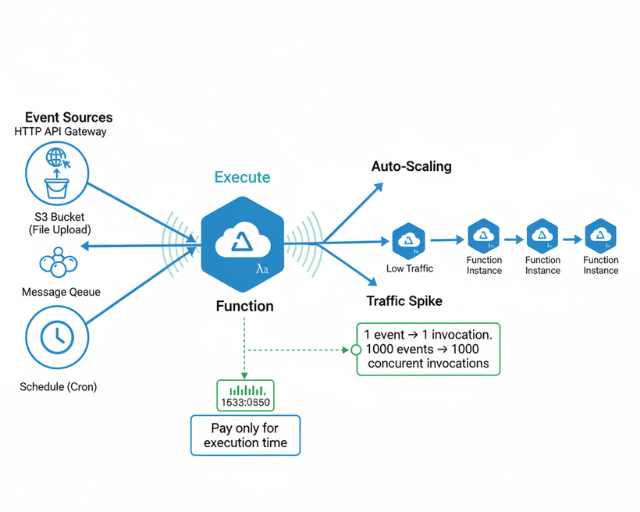
Serverless beyond FaaS:
Serverless extends beyond Function-as-a-Service to include managed databases (DynamoDB, Aurora Serverless), API gateways, message queues, storage, and authentication services.
When Serverless Makes Sense
Ideal use cases:
- APIs with variable or unpredictable traffic patterns
- Event processing from queues, streams, or webhooks
- Scheduled batch jobs and maintenance tasks
- Image/video processing and transformations
- Chatbots and notification systems
- Backend for mobile applications
- Prototypes and MVPs requiring fast iteration
Less suitable scenarios:
- Long-running processes exceeding 15-minute limits
- Applications requiring persistent connections (WebSockets for extended durations)
- Workloads with consistent high load where reserved capacity is cheaper
- Latency-sensitive applications where cold starts are unacceptable
- Applications requiring specialized hardware or custom operating system
Cost comparison example:
Traditional server: $50/month for t3.small running 24/7 = $600/year
Serverless: 1M requests/month at 200ms average = $20/month = $240/year (60% savings)
The break-even point depends on request volume and execution duration. Serverless wins for variable traffic and low-to-moderate consistent traffic. Reserved capacity wins for sustained high utilization.
AWS Lambda Deep Dive
AWS Lambda pioneered serverless computing in 2014. It remains the most mature and feature-rich FaaS platform with the largest ecosystem.
Lambda Function Anatomy
import json
import boto3
import os
from datetime import datetime

# Initialize AWS clients outside handler for reuse across invocations
dynamodb = boto3.resource('dynamodb')
table = dynamodb.Table(os.environ['TABLE_NAME'])
s3 = boto3.client('s3')

def lambda_handler(event, context):
 """
 Lambda handler function

 Args:
 event: Event data passed to the function
 context: Runtime information about the invocation

 Returns:
 Response object with statusCode, headers, and body
 """

 # Extract request details
 http_method = event.get('httpMethod')
 path = event.get('path')
 body = json.loads(event.get('body', '{}'))

 # Context provides runtime info
 request_id = context.request_id
 function_name = context.function_name
 memory_limit = context.memory_limit_in_mb
 remaining_time = context.get_remaining_time_in_millis()

 print(f"Processing {http_method} request to {path}")
 print(f"Request ID: {request_id}, Memory: {memory_limit}MB, Time remaining: {remaining_time}ms")

 try:
 if http_method == 'POST' and path == '/orders':
 result = create_order(body)
 return success_response(result, status_code=201)

 elif http_method == 'GET' and path.startswith('/orders/'):
 order_id = path.split('/')[-1]
 result = get_order(order_id)
 return success_response(result)

 else:
 return error_response(
 'Method not allowed',
 status_code=405
 )

 except ValueError as e:
 return error_response(str(e), status_code=400)

 except Exception as e:
 print(f"Unexpected error: {str(e)}")
 return error_response(
 'Internal server error',
 status_code=500
 )

def create_order(data):
 """Create new order in DynamoDB"""
 order_id = generate_order_id()

 order = {
 'id': order_id,
 'customerId': data['customerId'],
 'items': data['items'],
 'totalAmount': calculate_total(data['items']),
 'status': 'pending',
 'createdAt': datetime.utcnow().isoformat()
 }

 # Write to DynamoDB
 table.put_item(Item=order)

 # Publish event to EventBridge
 publish_order_event('order.created', order)

 return order

def get_order(order_id):
 """Retrieve order from DynamoDB"""
 response = table.get_item(Key={'id': order_id})

 if 'Item' not in response:
 raise ValueError(f"Order {order_id} not found")

 return response['Item']

def success_response(data, status_code=200):
 """Format successful response"""
 return {
 'statusCode': status_code,
 'headers': {
 'Content-Type': 'application/json',
 'Access-Control-Allow-Origin': '*',
 'X-Request-ID': context.request_id
 },
 'body': json.dumps(data, default=str)
 }

def error_response(message, status_code=400):
 """Format error response"""
 return {
 'statusCode': status_code,
 'headers': {
 'Content-Type': 'application/json',
 'Access-Control-Allow-Origin': '*'
 },
 'body': json.dumps({
 'error': message,
 'requestId': context.request_id
 })
 }
Infrastructure as Code with Serverless Framework
The Serverless Framework simplifies deploying serverless applications across AWS, Azure, and GCP.
service: order-api

frameworkVersion: '3'

provider:
 name: aws
 runtime: python3.11
 region: us-east-1
 stage: ${opt:stage, 'dev'}
 memorySize: 512
 timeout: 30

 environment:
 TABLE_NAME: ${self:service}-orders-${self:provider.stage}
 EVENT_BUS_NAME: ${self:service}-events-${self:provider.stage}
 LOG_LEVEL: INFO

 iam:
 role:
 statements:
 - Effect: Allow
 Action:
 - dynamodb:PutItem
 - dynamodb:GetItem
 - dynamodb:UpdateItem
 - dynamodb:Query
 - dynamodb:Scan
 Resource:
 - !GetAtt OrdersTable.Arn
 - !Sub "${OrdersTable.Arn}/index/*"

 - Effect: Allow
 Action:
 - events:PutEvents
 Resource:
 - !GetAtt EventBus.Arn

 - Effect: Allow
 Action:
 - logs:CreateLogGroup
 - logs:CreateLogStream
 - logs:PutLogEvents
 Resource: "*"

 logs:
 restApi:
 accessLogging: true
 executionLogging: true
 level: INFO
 fullExecutionData: true

functions:
 createOrder:
 handler: handlers/orders.create
 description: Create new customer order
 events:
 - http:
 path: /orders
 method: post
 cors: true
 authorizer:
 name: authorizer
 resultTtlInSeconds: 300
 reservedConcurrency: 100
 environment:
 FUNCTION_NAME: createOrder
 layers:
 - !Ref CommonLibsLayer
 tracing: Active

 getOrder:
 handler: handlers/orders.get
 description: Get order by ID
 events:
 - http:
 path: /orders/{orderId}
 method: get
 cors: true
 request:
 parameters:
 paths:
 orderId: true
 memorySize: 256
 tracing: Active

 listOrders:
 handler: handlers/orders.list
 events:
 - http:
 path: /orders
 method: get
 cors: true
 request:
 parameters:
 querystrings:
 limit: false
 cursor: false
 tracing: Active

 processOrderEvent:
 handler: handlers/events.process_order
 description: Process order events from EventBridge
 events:
 - eventBridge:
 eventBus: !GetAtt EventBus.Arn
 pattern:
 source:
 - order-service
 detail-type:
 - order.created
 - order.updated
 timeout: 60
 reservedConcurrency: 50
 destinations:
 onFailure: !GetAtt DeadLetterQueue.Arn

 scheduledCleanup:
 handler: handlers/maintenance.cleanup
 description: Clean up expired orders
 events:
 - schedule:
 rate: cron(0 2 * * ? *)
 enabled: true
 input:
 retention_days: 90
 timeout: 300

 authorizer:
 handler: handlers/auth.authorize
 description: JWT token authorizer
 environment:
 JWT_SECRET: ${ssm:/order-api/${self:provider.stage}/jwt-secret~true}
 memorySize: 256

layers:
 commonLibs:
 path: layers/common
 name: ${self:service}-common-${self:provider.stage}
 description: Shared libraries and utilities
 compatibleRuntimes:
 - python3.11

resources:
 Resources:
 OrdersTable:
 Type: AWS::DynamoDB::Table
 Properties:
 TableName: ${self:provider.environment.TABLE_NAME}
 BillingMode: PAY_PER_REQUEST
 StreamSpecification:
 StreamViewType: NEW_AND_OLD_IMAGES
 AttributeDefinitions:
 - AttributeName: id
 AttributeType: S
 - AttributeName: customerId
 AttributeType: S
 - AttributeName: createdAt
 AttributeType: S
 - AttributeName: status
 AttributeType: S
 KeySchema:
 - AttributeName: id
 KeyType: HASH
 GlobalSecondaryIndexes:
 - IndexName: CustomerIdIndex
 KeySchema:
 - AttributeName: customerId
 KeyType: HASH
 - AttributeName: createdAt
 KeyType: RANGE
 Projection:
 ProjectionType: ALL
 - IndexName: StatusIndex
 KeySchema:
 - AttributeName: status
 KeyType: HASH
 - AttributeName: createdAt
 KeyType: RANGE
 Projection:
 ProjectionType: ALL
 PointInTimeRecoverySpecification:
 PointInTimeRecoveryEnabled: true
 Tags:
 - Key: Environment
 Value: ${self:provider.stage}

 EventBus:
 Type: AWS::Events::EventBus
 Properties:
 Name: ${self:provider.environment.EVENT_BUS_NAME}

 DeadLetterQueue:
 Type: AWS::SQS::Queue
 Properties:
 QueueName: ${self:service}-dlq-${self:provider.stage}
 MessageRetentionPeriod: 1209600 # 14 days

plugins:
 - serverless-python-requirements
 - serverless-plugin-tracing
 - serverless-plugin-warmup

custom:
 pythonRequirements:
 dockerizePip: true
 slim: true
 strip: false
 layer: true

 warmup:
 default:
 enabled: true
 events:
 - schedule: rate(5 minutes)
 concurrency: 1
Cold Start Optimization
Cold starts occur when Lambda creates new execution environment. First request pays initialization cost.
Optimization strategies:
1. Minimize package size:
# Use slim dependencies
pip install --target ./package requests
cd package && zip -r ../function.zip . && cd ..

# Exclude unnecessary files
zip -d function.zip "*.pyc" "__pycache__/*"

# Use Lambda layers for shared dependencies
2. Use provisioned concurrency:
functions:
 criticalApi:
 handler: handler.main
 provisionedConcurrency: 5 # Keep 5 warm instances
3. Initialize outside handler:
# BAD - Initialize on every invocation
def lambda_handler(event, context):
 dynamodb = boto3.resource('dynamodb')
 table = dynamodb.Table('orders')
 # ...

# GOOD - Initialize once, reuse across invocations
dynamodb = boto3.resource('dynamodb')
table = dynamodb.Table('orders')

def lambda_handler(event, context):
 # Use pre-initialized client
 # ...
4. Choose faster runtimes:
- Python: 200-400ms cold start
- Node.js: 150-300ms cold start
- Go: 100-200ms cold start (compiled)
- Java: 500-1000ms cold start
- .NET: 400-800ms cold start
5. Keep functions warm:
Use CloudWatch Events to invoke functions every 5 minutes to prevent cold starts.
6. Increase memory allocation:
More memory = faster CPU = faster initialization. Test 512MB vs 128MB.
Azure Functions and Google Cloud Functions
Azure Functions
Azure Functions integrates deeply with Azure services and supports more trigger types than Lambda.
using Microsoft.Azure.Functions.Worker;
using Microsoft.Azure.Functions.Worker.Http;
using Microsoft.Extensions.Logging;
using System.Net;
using System.Text.Json;

public class OrderFunction
{
 private readonly ILogger _logger;
 private readonly CosmosClient _cosmosClient;

 public OrderFunction(ILoggerFactory loggerFactory, CosmosClient cosmosClient)
 {
 _logger = loggerFactory.CreateLogger<OrderFunction>();
 _cosmosClient = cosmosClient;
 }

 [Function("CreateOrder")]
 public async Task<HttpResponseData> CreateOrder(
 [HttpTrigger(AuthorizationLevel.Function, "post", Route = "orders")]
 HttpRequestData req)
 {
 _logger.LogInformation("Processing order creation request");

 var content = await new StreamReader(req.Body).ReadToEndAsync();
 var order = JsonSerializer.Deserialize<Order>(content);

 order.Id = Guid.NewGuid().ToString();
 order.CreatedAt = DateTime.UtcNow;
 order.Status = "pending";

 // Save to Cosmos DB
 var container = _cosmosClient.GetContainer("orders", "orders");
 await container.CreateItemAsync(order);

 // Return response
 var response = req.CreateResponse(HttpStatusCode.Created);
 await response.WriteAsJsonAsync(order);
 return response;
 }

 [Function("ProcessOrderEvent")]
 public async Task ProcessOrderEvent(
 [EventGridTrigger] EventGridEvent eventGridEvent,
 ILogger log)
 {
 log.LogInformation($"Processing event: {eventGridEvent.EventType}");

 var orderData = JsonSerializer.Deserialize<Order>(
 eventGridEvent.Data.ToString()
 );

 // Process order event
 await ProcessOrder(orderData);
 }

 [Function("ScheduledCleanup")]
 public async Task ScheduledCleanup(
 [TimerTrigger("0 0 2 * * *")] TimerInfo timer,
 ILogger log)
 {
 log.LogInformation($"Cleanup job started at: {DateTime.UtcNow}");

 // Clean up old orders
 await CleanupExpiredOrders();
 }
}
Google Cloud Functions
const { Firestore } = require('@google-cloud/firestore');
const { PubSub } = require('@google-cloud/pubsub');

const firestore = new Firestore();
const pubsub = new PubSub();

/**
 * HTTP Cloud Function for creating orders
 */
exports.createOrder = async (req, res) => {
 if (req.method !== 'POST') {
 res.status(405).send('Method Not Allowed');
 return;
 }

 try {
 const orderData = req.body;

 // Validate request
 if (!orderData.customerId || !orderData.items) {
 res.status(400).json({ error: 'Missing required fields' });
 return;
 }

 // Create order document
 const order = {
 ...orderData,
 id: firestore.collection('orders').doc().id,
 status: 'pending',
 createdAt: Firestore.Timestamp.now()
 };

 // Save to Firestore
 await firestore.collection('orders').doc(order.id).set(order);

 // Publish event to Pub/Sub
 const topic = pubsub.topic('order-events');
 await topic.publishMessage({
 json: {
 eventType: 'order.created',
 data: order
 }
 });

 res.status(201).json(order);

 } catch (error) {
 console.error('Error creating order:', error);
 res.status(500).json({ error: 'Internal server error' });
 }
};

/**
 * Background function triggered by Pub/Sub
 */
exports.processOrderEvent = async (message, context) => {
 const event = message.json;

 console.log(`Processing event: ${event.eventType}`);
 console.log(`Event data:`, event.data);

 // Process order event
 if (event.eventType === 'order.created') {
 await reserveInventory(event.data);
 await sendConfirmationEmail(event.data);
 }
};

/**
 * Scheduled function for cleanup
 */
exports.scheduledCleanup = async (context) => {
 console.log('Starting scheduled cleanup');

 const cutoffDate = new Date();
 cutoffDate.setDate(cutoffDate.getDate() - 90);

 const snapshot = await firestore.collection('orders')
 .where('createdAt', '<', Firestore.Timestamp.fromDate(cutoffDate))
 .where('status', '==', 'completed')
 .get();

 const batch = firestore.batch();
 snapshot.docs.forEach(doc => batch.delete(doc.ref));
 await batch.commit();

 console.log(`Cleaned up ${snapshot.size} orders`);
};
Event-Driven Serverless Patterns
Serverless functions excel at event-driven architectures. Events trigger functions automatically, enabling reactive systems.
Common Event Sources
HTTP API Gateway:
Synchronous request-response for RESTful APIs.
Message queues:
SQS, Service Bus, Pub/Sub for asynchronous task processing.
Database streams:
DynamoDB Streams, Cosmos DB Change Feed for reacting to data changes.
Object storage:
S3, Blob Storage, Cloud Storage for file processing.
Scheduled triggers:
CloudWatch Events, Timer triggers for cron jobs.
IoT and streaming:
Kinesis, Event Hubs, Dataflow for real-time data processing.
Event Processing Pattern
import json
import boto3
from datetime import datetime

dynamodb = boto3.resource('dynamodb')
sns = boto3.client('sns')

def process_stream_records(event, context):
 """
 Process DynamoDB stream records
 React to order status changes
 """

 for record in event['Records']:
 if record['eventName'] in ['INSERT', 'MODIFY']:
 new_image = record['dynamodb'].get('NewImage', {})
 old_image = record['dynamodb'].get('OldImage', {})

 order_id = new_image['id']['S']
 new_status = new_image['status']['S']

 # Check if status changed
 old_status = old_image.get('status', {}).get('S')

 if old_status != new_status:
 print(f"Order {order_id} status changed: {old_status} -> {new_status}")

 # Trigger appropriate action
 if new_status == 'paid':
 await fulfill_order(order_id)

 elif new_status == 'shipped':
 await send_shipping_notification(order_id)

 elif new_status == 'delivered':
 await request_review(order_id)

 return {
 'statusCode': 200,
 'body': json.dumps(f'Processed {len(event["Records"])} records')
 }
Serverless Best Practices
Design for idempotency:
Functions may execute multiple times for same event. make sure operations are idempotent.
Use appropriate timeouts:
Set realistic timeouts based on function purpose. Don't use maximum timeout for all functions.
Implement retry logic:
Handle transient failures with exponential backoff. Use dead letter queues for permanent failures.
Monitor and alert:
Track invocations, errors, duration, and throttles. Alert on error rate increases.
Optimize costs:
Right-size memory allocation. Use provisioned concurrency only where necessary. Clean up unused functions.
Security:
Apply least-privilege IAM policies. Encrypt environment variables. Use VPC for private resource access. Scan dependencies for vulnerabilities.
Serverless architecture reduces operational overhead while providing automatic scaling and cost efficiency. Choose serverless for event-driven workloads with variable traffic. Invest in observability and cost monitoring to maximize benefits.
Troubleshooting
Common issues and solutions:
Configuration not applying:
- Verify syntax in configuration files
- Check for typos in parameter names
- Review logs for specific error messages
- Ensure proper permissions on files and resources
Performance issues:
- Monitor resource utilization (CPU, memory, network)
- Check for bottlenecks using profiling tools
- Review query performance and optimize indexes
- Ensure proper scaling configuration
Connection failures:
- Verify network security groups and firewall rules
- Check DNS resolution and service discovery
- Ensure authentication credentials are correct
- Review SSL/TLS certificate configuration
Deployment failures:
- Validate configuration syntax and schema
- Check resource quotas and limits
- Verify container images are accessible
- Review deployment logs and events for errors
Best Practices
Follow these guidelines for optimal results:
- Start Simple: Begin with basic configuration and add complexity gradually
- Monitor Performance: Track key metrics from day one to identify issues early
- Automate Testing: Include automated tests in your deployment pipeline
- Document Decisions: Keep architecture decision records for future reference
- Security First: Implement security controls before deploying to production
- Plan for Scale: Design with future growth in mind but avoid premature optimization
- Regular Reviews: Conduct periodic reviews of configuration and performance
- Version Control: Track all infrastructure and configuration as code
Production Readiness
Ensure your implementation is production-ready:
- High Availability: Deploy across multiple availability zones or regions
- Backup Strategy: Implement automated backups with tested recovery procedures
- Disaster Recovery: Create and test disaster recovery plans
- Security Scanning: Run regular security scans and vulnerability assessments
- Load Testing: Perform load testing to understand system limits
- Runbook Creation: Document operational procedures and troubleshooting steps
- Monitoring Alerts: Set up comprehensive alerting for critical metrics
- Compliance: Ensure compliance with relevant regulations and standards
Conclusion
Serverless architecture fundamentally changes how you build and operate applications. The operational overhead of managing servers disappears. Scaling is automatic.
You pay for what you use, not what you provision. But serverless is not a silver bullet—it excels for event-driven, variable-traffic workloads and punishes sustained high load, long-running processes, and cold-start-sensitive latency requirements.
The key to success is matching patterns to problems: use serverless for APIs, event processing, and background jobs; avoid it for stateful real-time applications and consistently saturated workloads.
Invest in observability early—you can't SSH into a Lambda to debug. And always design for idempotency; in a distributed, event-driven world, functions will retry. When applied thoughtfully, serverless delivers faster development cycles, lower costs, and more reliable scaling than traditional server-based architectures.
FAQs
How do I choose between AWS Lambda, Azure Functions, and Google Cloud Functions?
Choose based on your cloud provider ecosystem. AWS Lambda has the largest ecosystem and most mature tooling (Serverless Framework, SAM). Azure Functions excels for .NET shops and deep integration with Azure services (Logic Apps, Event Grid).
Google Cloud Functions is ideal for GCP-native teams and event-driven workflows with Firestore, Pub/Sub, and BigQuery. All three support Python, Node.js, Java, and Go. The serverless patterns are transferable—core concepts are identical across platforms.
How do I handle database connections in serverless?
Don't create a new connection per invocation—this exhausts connection limits and adds latency. Instead:
- Initialize database clients outside the handler (global scope) for reuse across invocations.
- Use connection pooling with tools like RDS Proxy (AWS) or Azure SQL Database's serverless tier.
- For DynamoDB/Cosmos DB/Firestore, the SDKs manage connections automatically—just instantiate once globally.
- Set appropriate timeouts to prevent lingering connections.
When does serverless stop being cost-effective?
Serverless costs are a function of invocations × duration × memory allocation. At consistently high load, reserved instances become cheaper. The break-even point varies, but a rough heuristic: if a function runs at >50% CPU utilization 24/7, a dedicated instance will cost less. Example: 1M invocations/month at 200ms average = ~$20/month. 10M invocations/month at 1 second = ~$200/month.
At that scale, compare to a reserved t3.medium (~$30/month) if your workload can be containerized. Right-size functions—don't allocate 3GB memory for a function that runs fine on 512MB. Use AWS Compute Optimizer or similar for recommendations.
Summarize this post with:
Ready to put this into production?
Our engineers have deployed these architectures across 100+ client engagements — from AWS migrations to Kubernetes clusters to AI infrastructure. We turn complex cloud challenges into measurable outcomes.