How to Scale AWS for 10x Growth Without Downtime or Cost Explosions
Scale your AWS infrastructure for 10x user growth without downtime or budget overruns. Practical guide for startup CTOs and technical founders.
TLDR;
- First: Assess bottlenecks through load testing and monitoring
- Design for: Horizontal scaling with stateless applications
- Key strategies: Auto Scaling with limits, DB read replicas + caching, Multi-AZ, trend-based alerting
- Optimized architectures handle 10x growth with only 3-4x cost increase
Rapid growth exposes infrastructure weaknesses. A startup handling 1,000 daily users discovers that 10,000 users break their database, overwhelm their application servers, and trigger unexpected AWS bills. This article provides a practical framework for scaling AWS infrastructure to handle 10x growth while maintaining reliability and controlling costs.
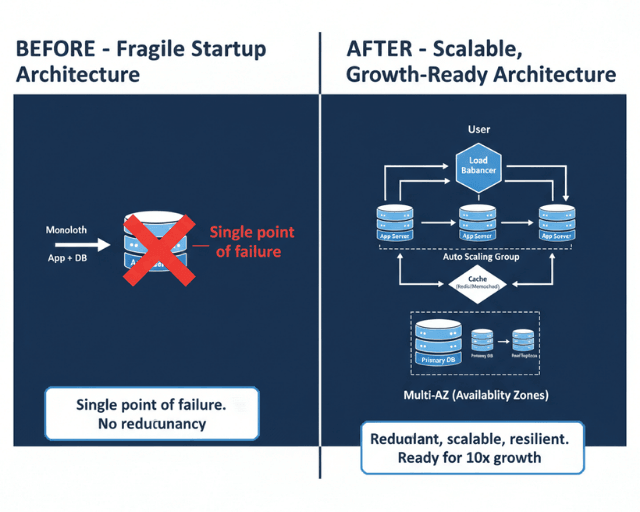
You will learn how to assess current bottlenecks, design scalable architectures, prepare for traffic spikes, and implement monitoring that prevents problems before users notice them. These approaches apply whether you are scaling from hundreds to thousands or from thousands to tens of thousands of users.
Why 10x Growth Breaks Most Startup Infrastructure
Early-stage architectures prioritize speed over scalability. Teams deploy monolithic applications on single instances, use basic database configurations, and skip redundancy to move fast. These decisions make sense at small scale but create brittleness.
According to Gartner's 2024 research, 76% of technology leaders cite infrastructure scalability as a top priority, yet many organizations lack mature practices. Growth amplifies technical debt exponentially. A slow database query that adds 200ms latency becomes unacceptable when query volume increases tenfold.
Downtime during growth phases damages customer trust precisely when first impressions matter most. Cost spikes strain budgets at the moment startups need capital for market expansion rather than unplanned infrastructure spending.
Assessing Your Current AWS Infrastructure Before Scaling
Before adding capacity, understand your current limits. Identify bottlenecks by examining where requests spend time. Use AWS X-Ray to trace requests through your application and pinpoint slow components.
Analyze traffic and usage patterns from CloudWatch metrics. Understand daily and weekly cycles, peak hours, and request distribution across endpoints. These patterns inform capacity planning and auto-scaling configurations.
Document current performance limits through load testing. Determine how many concurrent users your infrastructure supports before response times degrade or errors appear. This baseline guides scaling decisions and helps measure improvement.
Designing a Scalable AWS Architecture
Stateless application design enables horizontal scaling. When application instances store no session data locally, you can add or remove instances without disrupting users. Move session state to Amazon ElastiCache or DynamoDB.
Horizontal scaling, adding more instances, generally outperforms vertical scaling, using larger instances. Horizontal scaling offers finer cost control and eliminates single points of failure. Choose compute services that support horizontal scaling natively.
AWS provides multiple compute options for different workloads. EC2 offers full control, ECS and EKS handle containerized applications, and Lambda eliminates server management entirely. Select based on your team's expertise and application requirements rather than chasing trends.
Preparing for Traffic Spikes and Load Surges
Auto Scaling groups automatically adjust capacity based on demand. Configure scaling policies that respond to CPU utilization, request count, or custom metrics. Set minimum and maximum instance counts to balance responsiveness with cost control.
Application Load Balancers distribute traffic across healthy instances and handle SSL termination, reducing load on application servers. Enable connection draining to allow in-flight requests to complete before removing instances during scale-down events.
Sudden growth events like product launches or media coverage require pre-scaling. Schedule increased capacity before anticipated events rather than waiting for auto-scaling to react. Reaction time matters when thousands of users arrive simultaneously.
Database and Data Layer Scaling Strategies
Single database instances become bottlenecks during growth. Amazon RDS read replicas offload read traffic from your primary database. Most applications read data far more often than they write, making read replicas effective for common scaling patterns.
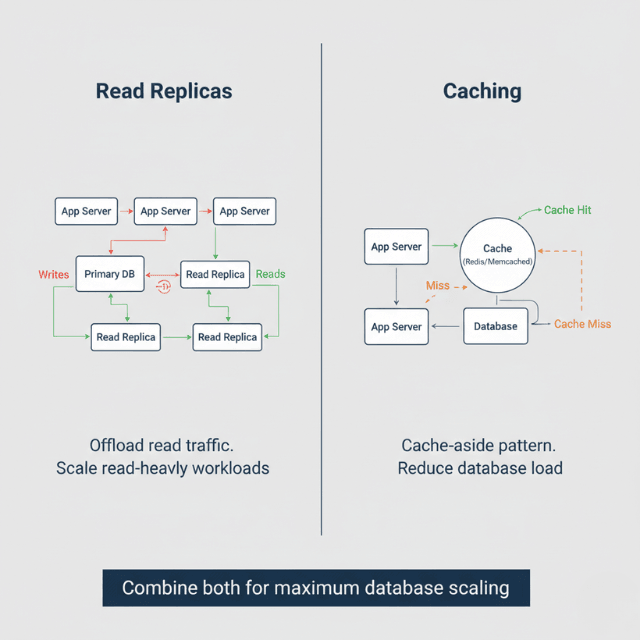
Implement caching to reduce database load further. ElastiCache stores frequently accessed data in memory, serving requests in microseconds rather than milliseconds. Cache invalidation requires careful implementation but delivers significant performance improvements.
Data partitioning distributes data across multiple database instances based on logical boundaries like customer ID or region. This approach supports growth beyond single-instance limits but introduces complexity. Plan for partitioning before you need it rather than retrofitting under pressure.
Optimizing Performance Before Scaling Users
Latency reduction often delivers better results than raw capacity increases. Profile your application to identify slow operations. Database query optimization, connection pooling, and efficient serialization frequently improve performance without infrastructure changes.
Caching strategies vary by data characteristics. Cache static assets aggressively, cache personalized content carefully, and avoid caching data that changes frequently. Measure cache hit rates to verify effectiveness.
Amazon CloudFront CDN serves static assets from edge locations worldwide, reducing latency for European users accessing content stored in other regions. Configure CloudFront for static assets as a baseline, then expand to dynamic content where appropriate.
Ensuring High Availability and Fault Tolerance
Multi-AZ deployments distribute resources across physically separate data centers within a region. If one availability zone experiences problems, traffic shifts to healthy zones automatically. AWS services like RDS and ElastiCache offer Multi-AZ configurations with automatic failover.
Identify and eliminate single points of failure throughout your architecture. Every component should have redundancy or the ability to recover quickly. Document failure modes and recovery procedures for each critical service.
Backup and recovery readiness matters before you need it. Test database restoration procedures regularly. Verify that your recovery time objectives align with business requirements. European data residency requirements may affect backup location choices.
Monitoring, Alerts and Observability at Scale
Metrics that matter during growth include error rates, latency percentiles (p50, p95, p99), throughput, and resource utilization. Amazon CloudWatch collects these metrics automatically for AWS services and supports custom metrics from your applications.
Configure proactive alerting that notifies teams before users experience problems. Alert on trends, not just thresholds. A gradually increasing error rate signals trouble earlier than waiting for errors to exceed a fixed percentage.
Identify issues before users report them through synthetic monitoring. CloudWatch Synthetics runs scripted checks against your application continuously, detecting problems during low-traffic periods when real user monitoring provides less signal.
Cost Control While Scaling Fast
Scaling does not require proportional cost increases. Efficient architectures handle more load without linear infrastructure growth through caching, optimization, and smart service selection.
Right-size instances during growth phases. Auto Scaling handles demand fluctuations, but base instance sizes should match actual requirements. Review sizing quarterly as traffic patterns stabilize.
Balance performance with spend through informed trade-offs. Slightly longer response times might be acceptable if they reduce costs by 30%. Make these decisions explicitly rather than defaulting to maximum performance at any price.
Security and Access Controls for Rapid Growth
IAM best practices become critical during scaling. Implement least-privilege access, requiring users and services to have only the permissions they need. Review and audit IAM policies regularly as team size grows.
Protect infrastructure during scale by maintaining security standards even under time pressure. Security vulnerabilities discovered during growth phases cause disproportionate damage because they affect more users and attract more attention.
Prevent misconfigurations through infrastructure as code. Terraform or CloudFormation templates ensure consistent, reviewed deployments. Manual console changes during rapid scaling introduce errors and make troubleshooting difficult.
Testing Your Infrastructure for 10x Growth
Load and stress testing validates scaling assumptions before real users test them involuntarily. Tools like Apache JMeter and AWS-native options simulate traffic patterns and identify breaking points.
Simulate real-world growth by gradually increasing load while monitoring system behavior. Note where bottlenecks appear first. These observations guide optimization priorities.
Fix issues before launch by making testing a gate in your deployment process. Running production-like load tests against staging environments catches problems early when they are cheaper to fix.
When Startups Should Get Expert Help
Signs that internal teams are stretched include delayed feature work, reactive firefighting, and scaling issues recurring despite fixes. Engineers spending more time on infrastructure than product signals a need for additional expertise.
Trial-and-error scaling carries risks that external expertise mitigates. Experienced consultants have seen common patterns across many startups and can identify solutions faster than teams encountering problems for the first time.
Startup-focused AWS consulting provides targeted guidance without enterprise overhead. The investment accelerates scaling timelines and reduces the risk of costly mistakes.
How EaseCloud Helps Startups Scale AWS Confidently
EaseCloud provides infrastructure readiness audits that assess your current architecture against scaling requirements. We identify bottlenecks, single points of failure, and optimization opportunities before growth exposes them.
Our scalable architecture design services help startups build foundations that support growth without requiring complete rebuilds. We work within your existing technology choices and team capabilities.
Ongoing growth support includes quarterly architecture reviews, incident response assistance, and guidance as your infrastructure evolves. European startups benefit from our understanding of GDPR requirements and data residency considerations during scaling decisions.
Final Thoughts: Scale with Confidence, Not Guesswork
Scaling AWS infrastructure for 10x growth requires preparation, not heroics. Assess your current limits, design for horizontal scaling, implement robust monitoring, and control costs deliberately. Test your assumptions before growth arrives.
Preparation beats reaction every time. Startups that invest in scalable foundations spend their growth phases acquiring customers rather than fighting fires.
FAQs About Scaling AWS for High Growth
When should startups prepare for 10x growth?
Start preparing when you see consistent growth trends or anticipate events that could drive sudden traffic increases. Three to six months of lead time allows thorough preparation without panic.
Can AWS handle sudden user spikes?
AWS infrastructure scales to meet virtually any demand, but your application must be architected to use that capacity. Auto Scaling, load balancing, and stateless design enable your application to benefit from AWS scalability.
What usually breaks first during rapid growth?
Databases fail first in most architectures because they cannot scale horizontally as easily as application servers. Connection limits, slow queries, and lock contention become visible before compute capacity exhausts.
How much does it cost to scale AWS infrastructure?
Costs depend on current efficiency and scaling approach. Optimized architectures might handle 10x growth with 3-4x cost increase. Inefficient architectures can see costs increase proportionally or worse.
Should startups redesign architecture before scaling?
Incremental improvements usually outperform complete rewrites. Address the most pressing bottlenecks first. Full redesigns make sense only when fundamental architectural limitations prevent meaningful optimization.
Summarize this post with:
Ready to put this into production?
Our engineers have deployed these architectures across 100+ client engagements — from AWS migrations to Kubernetes clusters to AI infrastructure. We turn complex cloud challenges into measurable outcomes.