Optimizing Database Connections and Connection Pooling
Master database connection pooling with PgBouncer, SQLAlchemy, and RDS Proxy. Learn pool configuration, troubleshooting, and best practices for high-performance database access.
TL;DR
- Pools reuse connections – New connections cost 10-50ms (TCP + TLS + auth). Don't open/close per request.
- Key settings:
pool_size(baseline),max_overflow(spike capacity),pool_timeout(wait limit),pool_recycle(max lifetime),pool_pre_ping(health check). - External poolers (PgBouncer, RDS Proxy) – Needed when app instances × pool size exceeds database limits. Use
pool_mode = transaction. - Connection exhaustion is #1 failure – Causes: long queries, leaked connections, uncommitted transactions, or pool too small.
- Monitor:
pool.checkedout()vspool.size()and database-sidepg_stat_activity. - Best practices: Always release connections (
finallyor context managers), setpool_recycle< database timeout, enablepool_pre_ping, test under load.
Database connections are expensive resources. Establishing a connection requires authentication, network handshaking, and memory allocation. Opening and closing connections for every query wastes resources and creates latency. Connection pooling maintains reusable connections, dramatically improving performance and enabling efficient resource utilization.
The Cost of Database Connections
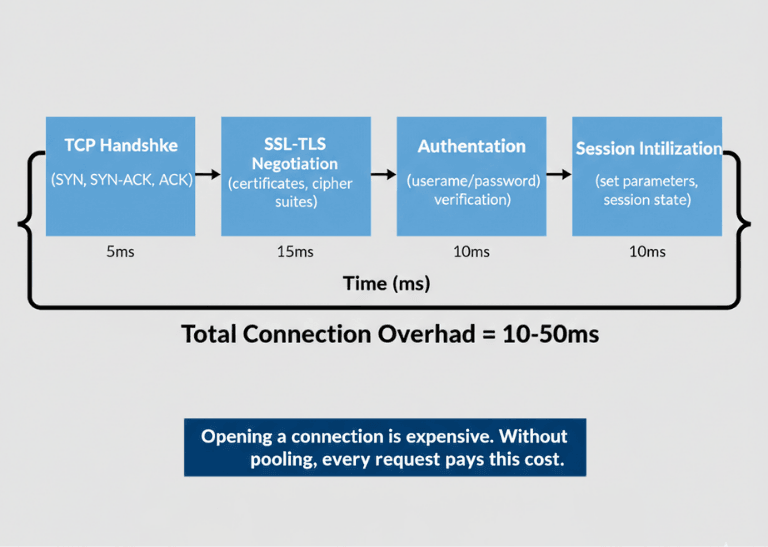
Opening a database connection involves multiple round trips. TCP handshake, SSL/TLS negotiation (if encrypted), authentication, and session initialization all take time. This overhead adds 10-50ms per connection under good conditions.
Database servers allocate memory per connection. PostgreSQL allocates several megabytes per connection. MySQL allocates configurable but significant per-connection memory. Connection limits exist because memory is finite.
Network connections consume operating system resources. File descriptors, socket buffers, and kernel structures support each connection. Limits on these resources constrain total connections.
Connection exhaustion causes failures. When all connections are in use, new requests fail or queue. This condition often manifests during traffic spikes when connection overhead would be most costly.
Without pooling, each request bears full connection overhead. A request needing one query pays 50ms connection cost for a 5ms query. This 10x overhead is entirely avoidable.
| Cost Factor | Impact |
|---|---|
| Connection establishment overhead | TCP handshake + SSL/TLS + authentication + session initialization = 10-50ms per connection |
| Memory per connection (PostgreSQL) | Several megabytes per connection |
| Memory per connection (MySQL) | Configurable but significant per-connection memory |
| OS resources per connection | File descriptors, socket buffers, kernel structures |
| Without pooling overhead | 50ms connection cost for a 5ms query = 10x overhead |
High concurrency multiplies the problem. Hundreds of concurrent requests each opening connections overwhelms database servers. Connection pooling enables high concurrency with manageable connection counts.
How Connection Pooling Works
Connection pooling works in the following manner:
- Maintains sets of established connections - When code requests a connection, receives already-open connection from pool. When done, the connection returns to the pool rather than closing.
- Pool initialization - Creates proactive minimum connections on startup (warm connections). These warm connections serve initial requests without startup delay.
- Connection lifecycle management - Pools detect broken connections and replace them. Health checks verify connections remain usable.
- Request queuing - Handles temporary exhaustion; requests wait briefly for availability. Timeout settings prevent indefinite waiting.
- Connection reuse - A connection used for 1,000 queries amortizes its establishment cost across all of them.
- Pool size determines capacity - Larger pools handle more concurrent requests but consume more memory and database connections. Sizing requires balancing resource availability against demand.
Pool Configuration Parameters
Minimum pool size sets baseline connections. These connections remain open even during idle periods, ensuring capacity for initial requests.
Maximum pool size caps total connections. This limit prevents overwhelming databases or exhausting local resources. Set based on database capacity and expected concurrency.
| Parameter | Purpose | Example Value |
|---|---|---|
pool_size |
Baseline connections (remain open even during idle) | 20 |
max_overflow |
Additional connections allowed under load | 10 |
pool_timeout |
Wait time for available connection before failing (seconds) | 30 |
pool_recycle |
Recycle connections after this duration (seconds) | 1800 (30 min) |
pool_pre_ping |
Verify connections before use | True |
idle timeout |
Close unused connections beyond this threshold | Varies |
| Connection lifetime | Prevents stale connections from accumulating state | Varies |
Connection timeout prevents indefinite waiting. When pools are exhausted, requests wait this duration before failing. Balance user experience against resource constraints.
Idle timeout closes unused connections. Connections idle beyond this threshold close, freeing resources. Balance responsiveness against resource consumption.
Connection lifetime limits prevent stale connections. Long-lived connections may accumulate state or hit server-side timeouts. Periodic recycling ensures fresh connections.
Validation queries verify connection health. Simple queries (like SELECT 1) executed before use catch broken connections. Some pools include automatic validation.
Application-Level Pooling
Most database libraries include pooling. SQLAlchemy, Django ORM, ActiveRecord, and similar frameworks manage pools automatically.
Configure pools through framework settings. Each framework has specific configuration mechanisms. Consult framework documentation for syntax.
# Django database configuration with pooling
DATABASES = {
    'default': {
        'ENGINE': 'django.db.backends.postgresql',
        'NAME': 'mydb',
        'CONN_MAX_AGE': 600,  # Connection lifetime in seconds
        'CONN_HEALTH_CHECKS': True,
    }
}
Connection release matters critically. Failing to release connections back to pools causes exhaustion. Ensure proper cleanup in all code paths, including error handlers.
| Step | Code Pattern |
|---|---|
| 1. Context manager | @contextmanager def get_db_connection(): |
| 2. Get connection | conn = pool.getconn() |
| 3. Try block | try: yield conn |
| 4. Finally block | finally: pool.putconn(conn) |
| 5. Usage | with get_db_connection() as conn: |
Multi-tenant applications need careful pooling. Connection pools per tenant may not scale. Shared pools with tenant switching can be more efficient.
Async frameworks require async-compatible pools. asyncpg for PostgreSQL, aiomysql for MySQL, and similar libraries provide async connection pooling.
Connection Pooling Done Right – We Handle the Details.
The code above works. But production-ready pooling requires:
- Proper pool sizing – Based on your actual concurrency patterns
- Health check configuration –
pool_pre_ping, validation queries - Connection lifecycle management – Recycle intervals, leak detection
- Framework-specific tuning – SQLAlchemy, Django, ActiveRecord, each different
Our backend engineers build scalable database layers that just work.
External Connection Poolers
PgBouncer provides external PostgreSQL connection pooling. Running between applications and PostgreSQL, it multiplexes many application connections onto fewer database connections.
# PgBouncer configuration
[databases]
mydb = host=localhost port=5432 dbname=mydb

[pgbouncer]
pool_mode = transaction
max_client_conn = 1000
default_pool_size = 20
ProxySQL provides external MySQL connection pooling and more. Query routing, read/write splitting, and connection multiplexing extend beyond simple pooling.
RDS Proxy offers managed pooling for AWS databases. Automatic failover handling and IAM authentication integration simplify operations.
External poolers enable more application instances than direct connections would allow. Hundreds of application instances can share tens of database connections.
PgBouncer pool modes comparison.
| Mode | Behavior | Best For |
|---|---|---|
| Session mode | Exclusive connections per session | Legacy applications requiring session state |
| Transaction mode | Shares connections between transactions | Most workloads (recommended) |
| Statement mode | Shares between statements | Very high concurrency with simple queries |
Prepared statements require consideration. Some poolers have limited prepared statement support in pooled modes. Verify compatibility with your query patterns.
Troubleshooting Connection Issues
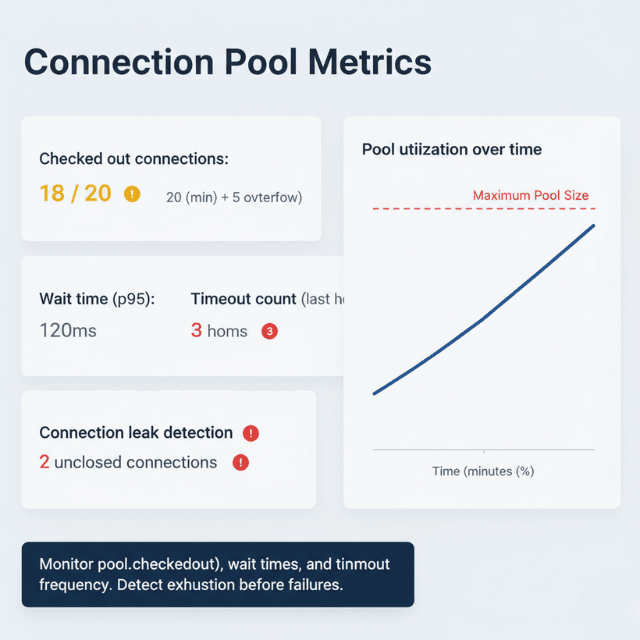
Connection exhaustion manifests as timeouts or errors. Monitor pool utilization to detect approaching exhaustion before failures.
# Monitor connection pool statistics
from sqlalchemy import event

@event.listens_for(engine, "checkout")
def log_checkout(dbapi_conn, connection_record, connection_proxy):
    pool = engine.pool
    logger.info(f"Pool: {pool.checkedout()}/{pool.size()} checked out")
Slow query identification helps diagnose exhaustion. Long-running queries hold connections. Identify and optimize slow queries to reduce connection hold times.
Connection leaks cause gradual exhaustion. Connections acquired but never released consume pool capacity. Enable logging to track connection lifecycle.
Transaction left open holds connections. Uncommitted transactions prevent connection release. Ensure all transactions commit or rollback.
Network issues cause connection failures. Broken connections trigger pool recovery. Monitor for elevated connection replacement activity.
Database server limits constrain total connections. Even with perfect pooling, database limits apply. Verify database configuration accommodates expected connections.
Best Practices
Best practices for this situation are:
- Size pools based on expected concurrency - Start with pool size matching typical concurrent requests; add overflow for spikes.
- Monitor pool metrics continuously - Track utilization, wait times, timeout frequency. Adjust configuration based on observed behavior.
- Set appropriate timeouts - Long timeouts queue during exhaustion; short timeouts fail fast. Balance user experience against resource constraints.
- Enable connection health checks - Validating before use prevents errors from broken connections.
- Implement connection release guarantees - Use try/finally or context managers to ensure connections return to pools.
- Configure connection lifetime limits - Periodic recycling prevents issues from long-lived connections.
- Test pool behavior under load - Verify configuration handles expected traffic patterns. Load test to find exhaustion thresholds.
- Consider external poolers for high-scale deployments - When app instance count × pool size exceeds database capacity.
Conclusion
Connection pooling is not optional for production databases. Application-level pooling works for many deployments, but external poolers (PgBouncer) become essential when scaling beyond hundreds of app instances.
Configuration requires tuning based on actual workload—not set-and-forget. A well-tuned pool handles thousands of concurrent requests with tens of database connections. A misconfigured pool causes mysterious timeouts and failures. Start conservative, monitor, adjust.
FAQs
1. How to choose pool size?
- Start:
pool_size= expected concurrent database operations (not total users) - Set
max_overflow= 50-100% ofpool_sizefor traffic spikes - Monitor
pool.checkedout()- if it regularly hits the limit, increase pool size - Memory constraint reminder: Each PostgreSQL connection uses ~5-10MB of database memory
2. Application-level pooling vs. PgBouncer?
| Aspect | Application-Level Pooling | PgBouncer (External) |
|---|---|---|
| Architecture | Pool per process | Multiplexes many app connections onto fewer DB connections |
| Example | 10 pods × 20 pool = 200 DB connections | 200 app connections → 20 DB connections |
| Best for | Simpler deployments | Many app instances (K8s, serverless), tight DB connection limits, need centralized pooling |
3. Why are connections leaking?
Common causes:
- Failing to release connections back to the pool (exception, early return, missing
finally) - Uncommitted transactions (
BEGINwithoutCOMMIT) - they hold connections even afterputconn()in some libraries
Fixes:
- Use
try/finallyor context managers - Enable pool logging to find acquires without matching releases
Summarize this post with:
