Deploy Production LLMs on OKE Kubernetes
Deploy LLMs on Oracle Kubernetes Engine with GPU support. Complete guide covers OKE cluster setup, GPU nodes, vLLM deployments, auto-scaling, and monitoring patterns.
TLDR;
- Zero control plane costs versus $73/month on AWS EKS and Azure AKS
- 3x VM.GPU.A10.1 nodes handle 200-300 requests/min at $3,395/month total
- HPA scales pods on CPU/memory with 5-minute scale-down stabilization
- NVIDIA DCGM Exporter tracks GPU utilization, temperature, and power draw
Deploy large language models on Oracle Kubernetes Engine with GPU support.
This guide covers OKE cluster setup from zero to production, GPU node pool configuration with A10 and A100 instances, and production-grade deployments using vLLM.
Kubernetes provides the orchestration layer needed for scalable LLM inference. OKE delivers fully managed Kubernetes clusters with zero control plane costs and native OCI service integration.
Deploy containerized LLM workloads that scale from 2 to 20+ GPU nodes based on traffic demand.
Learn production patterns including GPU device plugins for proper resource allocation, horizontal pod autoscaling, zero-downtime rolling deployments for model updates, and monitoring stacks using Prometheus and Grafana.
OKE clusters handle 200-300 requests per minute on small deployments and scale to thousands of requests for enterprise workloads.
OKE Architecture Overview
Oracle Kubernetes Engine provides a fully managed Kubernetes service optimized for GPU workloads. OKE integrates with OCI networking, storage, and security services for enterprise-grade deployments.
Key Components: Fully managed Kubernetes control plane (free), GPU-enabled worker nodes, OCI Container Registry (OCIR) for private Docker images, managed load balancer with SSL termination, Block Storage for persistent volumes, and File Storage for shared NFS access across pods.
Architecture Benefits: Zero control plane costs, native OCI service integration, automatic OS patching, mixed CPU/GPU node pools, regional and multi-AD deployments, and built-in pod security policies.
Create Production OKE Cluster
Set up a production-ready Kubernetes cluster with high availability. Create a Virtual Cloud Network with public and private subnets. Configure node pools across multiple availability domains for fault tolerance.
Enable cluster add-ons including CoreDNS, kube-proxy, and the NVIDIA GPU device plugin. Cluster creation typically takes 7-10 minutes.
Configure GPU Node Pools
Add GPU-enabled worker nodes with optimized configurations. Select VM.GPU.A10.1 or VM.GPU.A100.1 shapes based on model size. Configure the node pool with a minimum of 2 nodes for high availability.
Apply a taint of nvidia.com/gpu=present:NoSchedule to ensure only GPU workloads are scheduled on these nodes. Install the NVIDIA Device Plugin as a DaemonSet to expose GPU resources to Kubernetes.
Deploy LLM Workloads with vLLM
Production deployment of Llama 2 7B using vLLM for high-throughput inference. Build a container image with vLLM installed, expose port 8000 for the OpenAI-compatible API server, and push to OCIR.
In the Kubernetes Deployment, request nvidia.com/gpu: 1 as a resource limit to ensure GPU scheduling. Set a readiness probe on the /health endpoint with a 60-second initial delay to allow model loading before traffic is routed. Use a Service of type LoadBalancer to expose the endpoint externally.
Horizontal Pod Autoscaling
Auto-scale deployments based on GPU and CPU metrics. Install the Kubernetes Metrics Server to enable HPA.
Configure an HPA resource targeting 70% CPU utilization with a minimum of 2 and maximum of 10 replicas. Set a scale-down stabilization window of 5 minutes to prevent flapping.
For custom GPU metrics, install DCGM Exporter and configure the Prometheus Adapter to expose GPU utilization as a custom metric for more precise autoscaling.
Monitoring with Prometheus and Grafana
Deploy the kube-prometheus-stack Helm chart to get Prometheus, Grafana, and AlertManager in a single install.
Add NVIDIA DCGM Exporter to collect GPU-specific metrics: utilization, memory used, temperature, and power draw.
Import the NVIDIA DCGM dashboard into Grafana for pre-built GPU visibility. Set alerts for GPU memory > 90% and inference latency P95 > 500ms.
Cost Analysis
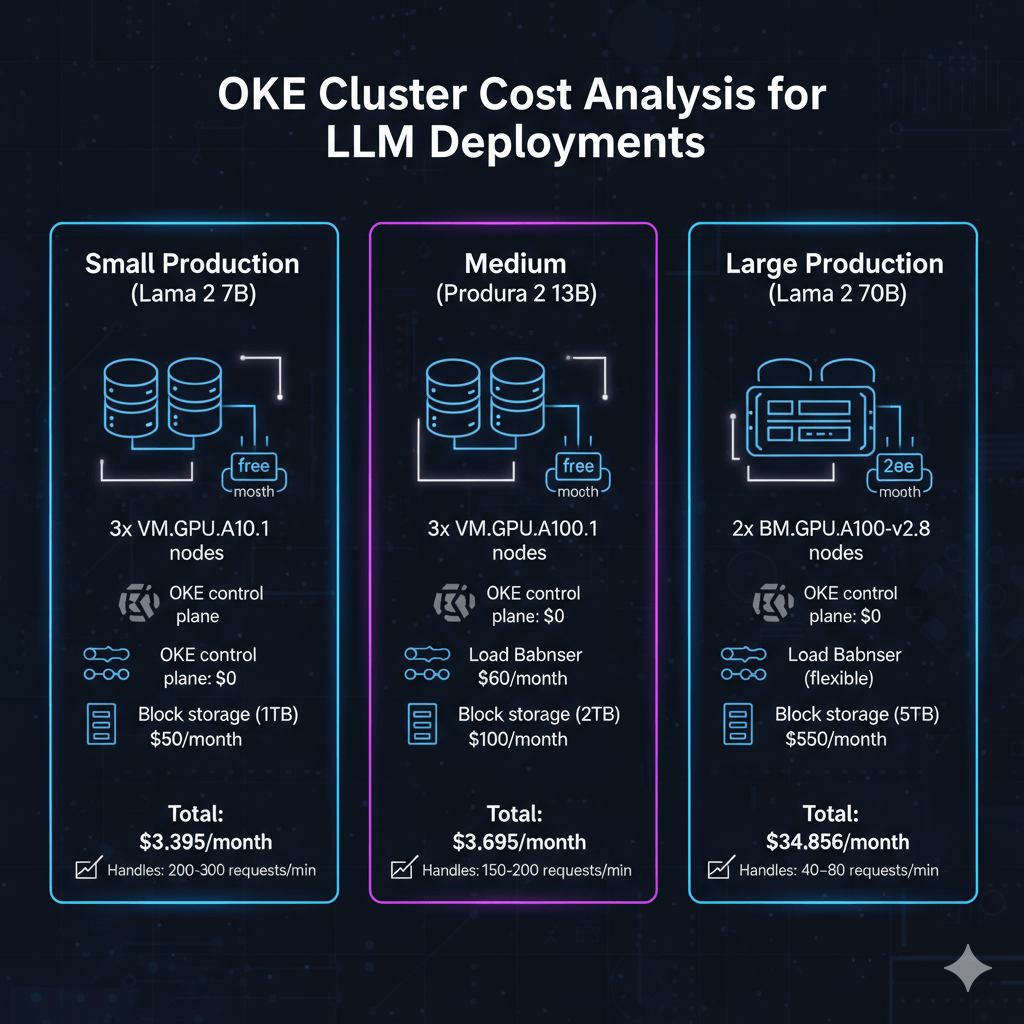
Small Production (Llama 2 7B): 3x VM.GPU.A10.1 = $3,285/month + $0 control plane + $60 load balancer + $50 block storage = $3,395/month, handling 200-300 requests/min.
Medium Production (Llama 2 13B): 3x VM.GPU.A100.1 = $6,459/month + $0 control plane + $60 load balancer + $100 block storage = $6,619/month, handling 150-200 requests/min.
Large Production (Llama 2 70B): 2x BM.GPU.A100-v2.8 = $34,456/month + $0 control plane + $150 load balancer + $250 block storage = $34,856/month, handling 40-80 requests/min.
Conclusion
Oracle Kubernetes Engine provides production-ready infrastructure for scalable LLM deployments. OKE eliminates control plane costs while delivering managed Kubernetes masters and automatic OS patching.
GPU node pools with A10 and A100 instances support models from 7B to 70B+ parameters with horizontal scaling from 2 to 20+ nodes. Container-based deployments enable zero-downtime updates through rolling deployment strategies.
Monitor GPU utilization and inference performance using Prometheus and Grafana dashboards. Start with small 3-node clusters for development, then scale to multi-node production configurations as traffic grows.
For the complete Oracle Cloud LLM deployment strategy, including GPU shape selection, cost optimization, and platform comparison, see our Oracle Cloud LLM deployment guide.
Frequently Asked Questions
What are the key differences between OKE and AWS EKS or Azure AKS for LLM deployments?
OKE offers zero control plane costs versus $73/month on EKS and AKS. GPU compute is 25-35% lower on OCI: VM.GPU.A100.1 at $2,153/month versus $2,920 on AWS.
Network egress is dramatically cheaper at $0.0085/GB versus AWS $0.09/GB. A 3-node A100 cluster costs $6,619/month on OCI versus $9,133/month on AWS and $8,523/month on Azure — saving $30,168 annually.
EKS offers superior ecosystem integration with SageMaker and Bedrock; AKS provides better Azure OpenAI integration.
How do I implement zero-downtime deployments for LLM model updates on OKE?
Use Kubernetes Deployments with RollingUpdate strategy, setting maxSurge to 1 and maxUnavailable to 0 — new pods start before old pods terminate. Configure readiness probes with 60-second initialDelaySeconds to allow model loading.
For blue-green deployments, create a parallel deployment with a v2 label, verify functionality via an internal testing service, then switch ingress traffic atomically by updating the service selector.
Use init containers to pre-download model weights to shared PersistentVolume, reducing startup from 180 seconds to 30 seconds.
What storage options work best for LLM model weights on OKE to optimize pod startup times?
For models under 50GB (Llama 2 7B), use OCI Block Volumes with Ultra High Performance tier — loads 20GB in 15-20 seconds.
For multi-replica deployments across multiple nodes, use OCI File Storage (NFS) with ReadWriteMany access, delivering 6.4 GB/s throughput and loading Llama 2 13B across 5 simultaneous pods in 8-12 seconds.
For models exceeding 100GB, store on Object Storage and cache 3 copies on File Storage across availability domains. A DaemonSet pre-caching models on all GPU nodes reduces pod startup to 5 seconds by eliminating network transfers.
Summarize this post with:
Ready to put this into production?
Our engineers have deployed these architectures across 100+ client engagements — from AWS migrations to Kubernetes clusters to AI infrastructure. We turn complex cloud challenges into measurable outcomes.