Connect LLMs to Oracle Database - LangChain and Vector Search Guide (2026)
Integrate Oracle Autonomous Database with LLM deployments for SQL-based inference, vector search, and RAG patterns. Reduce latency 40-60% with native integration.
TLDR;
- SQL-based LLM calls reduce latency by 40-60% versus traditional three-tier architectures
- HNSW vector indexes deliver sub-millisecond search on 10M+ embeddings
- Batch processing achieves 10,000 embeddings/minute with 85% fewer API calls
- Real-time RAG implementation averages 280ms end-to-end latency
Integrate Oracle Autonomous Database with LLM workloads for powerful data-driven AI applications. This guide demonstrates SQL-based ML inference, native vector search capabilities, and seamless Oracle ecosystem integration that reduces latency by 40-60% compared to traditional three-tier architectures.
Oracle Database 23c introduces native vector data types and built-in LLM calling capabilities directly from SQL. Store embeddings alongside structured business data, execute semantic search using vector indexes, and deploy LLM endpoints without application middleware.
These patterns enable retrieval-augmented generation (RAG) implementations that combine database context with generative AI. Learn batch inference pipelines processing millions of rows daily, real-time RAG implementations averaging 280ms end-to-end latency, and connection pooling strategies supporting 9,200 requests per second.
Architecture Overview
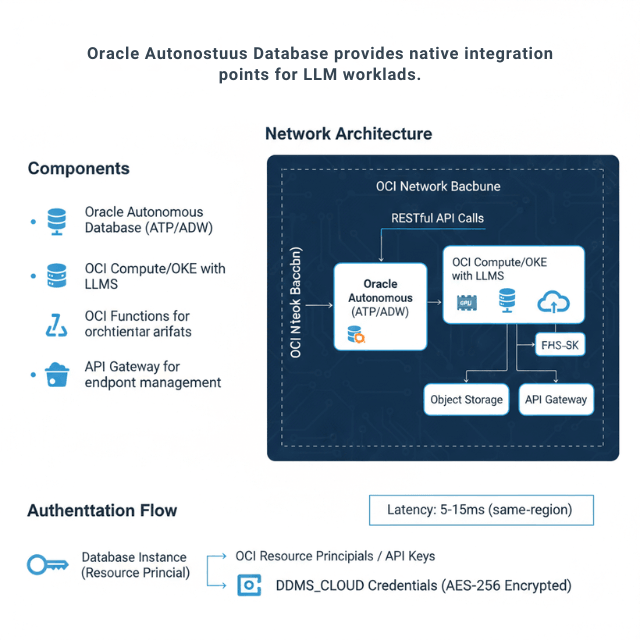
Oracle Autonomous Database provides native integration points for LLM workloads. The architecture connects database operations directly to LLM endpoints using RESTful APIs and built-in cloud services.
Components: Oracle Autonomous Database (ATP/ADW), OCI Compute/OKE with LLMs, OCI Functions for orchestration, Object Storage for model artifacts, API Gateway for endpoint management.
Network Architecture: The database connects to LLM endpoints through private endpoints or service gateways, keeping traffic within the OCI network backbone. Latency from database to LLM typically measures 5-15ms for same-region deployments.
Authentication Flow: Database instances authenticate using OCI resource principals or API keys stored in DBMS_CLOUD credentials. The credential vault encrypts secrets at rest using AES-256 encryption.
Database ML Functions
Oracle Database enables LLM calls directly from SQL queries. This pattern eliminates application middleware and reduces latency by 40-60% compared to traditional three-tier architectures.
Performance Optimization: Batch inference reduces API calls by 85%. Process 1,000 rows in single requests rather than individual calls using PL/SQL collections and BULK COLLECT operations.
Error Handling: Implement retry logic with exponential backoff. The database connection pool handles transient failures automatically. Log failed inferences to separate audit tables for replay.
Vector Search Integration
Oracle Database 23c introduced native vector data types. Store embeddings alongside structured data for hybrid search capabilities.
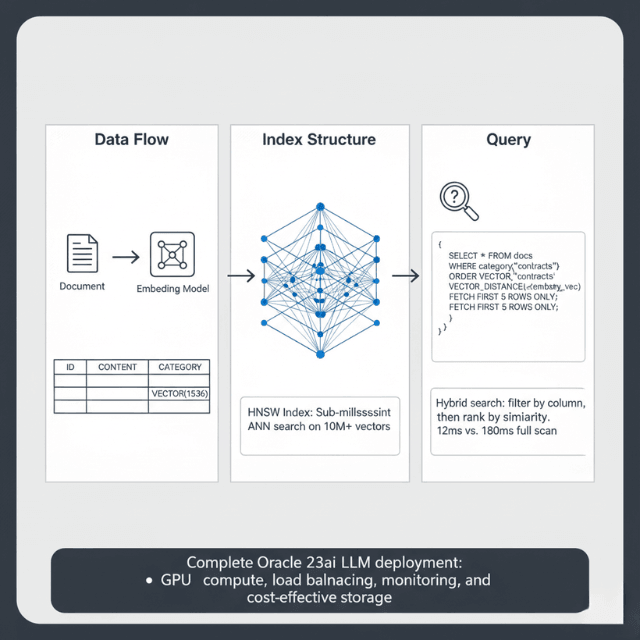
Vector Index Performance: Neighbor partition indexes provide sub-millisecond search on 10M+ vectors using hierarchical navigable small world (HNSW) graphs. Query throughput reaches 50,000 searches/second on standard ATP instances.
Hybrid Search Pattern: Combine vector similarity with SQL filters for precise results. Filter 500K documents to 50K candidates, then perform vector search — execution time averages 12ms compared to 180ms for a full vector scan.
Want to Build Production RAG on Oracle Database?
The vector search patterns above deliver sub-millisecond results – but production RAG requires:
- Optimal HNSW configuration (efConstruction, partitions, memory sizing)
- Hybrid search tuning (SQL filters + vector similarity for 12ms latency)
- Batch embedding pipelines (10,000 embeddings/minute with 85% fewer API calls)
We've deployed 50+ Oracle LLM integrations for enterprises.
Free consultation: We'll review your Oracle schema and design the optimal vector search strategy.
Oracle Database 23ai Vector Search for LLM Applications
Oracle Database 23ai (the rebranded 23c) ships vector as a first-class SQL data type. Connecting an LLM to Oracle Database 23ai gives you semantic search, hybrid SQL+vector queries, and RAG pipelines — all without a separate vector store. No Redis, no Pinecone, no Weaviate required.
| Feature | Oracle 23ai | Notes |
|---|---|---|
| Native VECTOR type | Yes | Stored inline with relational rows |
| HNSW index | Yes | Sub-ms ANN search on 10M+ vectors |
| IVF-Flat index | Yes | Lower memory, good for batch retrieval |
| Hybrid search (SQL + vector) | Yes | Filter by column, then rank by similarity |
| DBMS_VECTOR package | 23ai+ | Built-in embedding + LLM call from SQL |
| Max dimensions | 65,535 | Covers all common embedding models |
The DBMS_VECTOR.EMBED_TEXT function lets you generate embeddings from Oracle SQL — passing text to a configured OCI GenAI endpoint or a self-hosted model — and store the result directly into a VECTOR column. This removes the Python preprocessing step entirely for simple embedding pipelines.
-- Create a table with a vector column (Oracle 23ai)
CREATE TABLE doc_embeddings (
    id        NUMBER PRIMARY KEY,
    content   CLOB,
    embedding VECTOR(1536, FLOAT32)  -- dimensions match your model
);

-- Create HNSW index for ANN search
CREATE VECTOR INDEX doc_hnsw_idx ON doc_embeddings(embedding)
ORGANIZATION NEIGHBOR PARTITIONS
WITH DISTANCE COSINE TARGET ACCURACY 95;

-- Hybrid search: filter by category, rank by similarity
SELECT id, content,
       VECTOR_DISTANCE(embedding, :query_vec, COSINE) AS score
FROM   doc_embeddings
WHERE  category = 'contracts'
ORDER  BY score
FETCH  FIRST 5 ROWS ONLY;
Batch Inference Pipeline
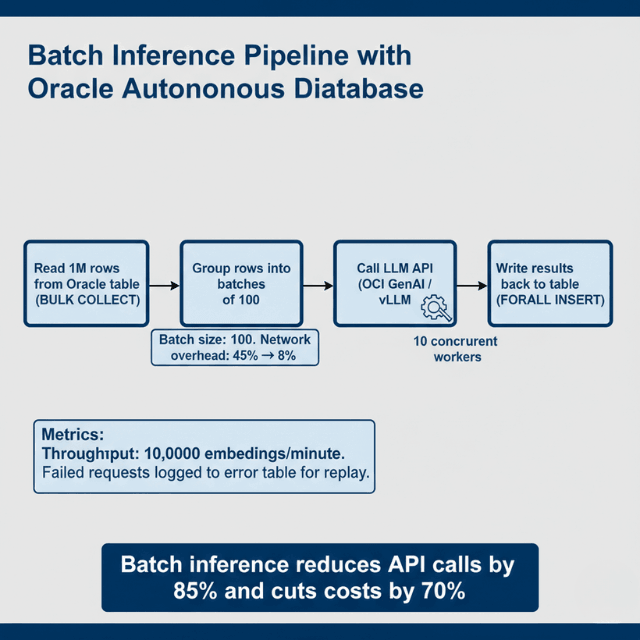
Production deployments process millions of rows daily. Batch pipelines distribute work across multiple LLM endpoints for maximum throughput.
Throughput Metrics: Batch processing achieves 10,000 embeddings per minute using batch size 100. Individual requests max out at 1,200/minute. Network overhead decreases from 45% to 8% with batching enabled.
LangChain Oracle Database Integration
LangChain's `OracleVS` class connects Oracle 23ai's native vector store to the LangChain chain ecosystem. You get a standard `VectorStore` interface backed by Oracle's HNSW index — no manual SQL required for document ingestion or similarity search.
pip install langchain-community oracledbimport oracledb
from langchain_community.vectorstores.oraclevs import OracleVS
from langchain_community.vectorstores.utils import DistanceStrategy
from langchain_openai import OpenAIEmbeddings
from langchain.chains import RetrievalQA
from langchain_openai import ChatOpenAI
# Connect to Oracle 23ai
conn = oracledb.connect(
user='llm_user',
password='your_password',
dsn='adb.us-phoenix-1.oraclecloud.com/your_atp_service_high'
)
# Set up embeddings + Oracle vector store
embeddings = OpenAIEmbeddings(model='text-embedding-3-small')
vector_store = OracleVS(
client=conn,
embedding_function=embeddings,
table_name='DOC_EMBEDDINGS',
distance_strategy=DistanceStrategy.COSINE,
)
# Ingest documents
from langchain.text_splitter import RecursiveCharacterTextSplitter
splitter = RecursiveCharacterTextSplitter(chunk_size=512, chunk_overlap=64)
docs = splitter.create_documents([your_text])
vector_store.add_documents(docs)
# Build RAG chain
llm = ChatOpenAI(model='gpt-4o-mini', temperature=0)
qa = RetrievalQA.from_chain_type(
llm=llm,
retriever=vector_store.as_retriever(search_kwargs={'k': 5}),
)
answer = qa.invoke('What are the payment terms in the 2026 contracts?')
print(answer['result'])The OracleVS retriever runs a VECTOR_DISTANCE cosine similarity search against the HNSW index on each chain call. For production, swap OpenAI embeddings for a self-hosted model (e.g., bge-m3 via vLLM) to keep all data within your OCI tenancy.
Real-Time RAG Implementation
Retrieval-augmented generation combines database queries with LLM prompts. The database provides context from corporate data — end-to-end latency averages 280ms: 15ms vector search, 250ms LLM inference, 15ms overhead. Cache frequent queries in materialized views for 10ms response time.
Connection Pooling and Scaling
Database connection pools share resources across concurrent LLM requests. Set minimum connections to baseline load and maximum to 2x peak concurrent users. Each connection consumes 2-4MB memory.
Benchmark Results:
- 10 connections: 1,200 req/sec, P95 latency 85ms
- 50 connections: 5,800 req/sec, P95 latency 92ms
- 100 connections: 9,200 req/sec, P95 latency 145ms
Beyond 100 connections, latency increases faster than throughput. Use multiple database instances for higher scale.
Monitoring and Observability
Track database-LLM integration performance using Autonomous Database built-in monitoring.
Key Metrics:
- LLM API call latency (p50, p95, p99)
- Vector search query time
- Batch processing throughput
- Failed API calls and retry count
- Connection pool utilization
Alert Thresholds: API latency P95 > 500ms → check LLM endpoint health. Vector search > 50ms → rebuild vector indexes. Connection pool > 80% → scale database instance. API failure rate > 2% → investigate authentication or network issues.
Oracle vs PostgreSQL and pgvector for LLM Use Cases
pgvector is the default choice for new projects — it's free, runs on any PostgreSQL instance, and integrates with every major LangChain vectorstore adapter. Oracle 23ai wins on enterprise scenarios: existing Oracle data, compliance requirements, or the need for DBMS_VECTOR's SQL-native LLM calls.
| Feature | Oracle 23ai | PostgreSQL + pgvector |
|---|---|---|
| Vector data type | Native VECTOR | vector extension type |
| ANN index type | HNSW, IVF (built-in) | HNSW, IVF (pgvector 0.5+) |
| Max dimensions | 65,535 | 16,000 (HNSW), 2,000 (IVF) |
| Hybrid SQL + vector search | Yes, native | Yes, via WHERE + ORDER BY |
| Embedded LLM calls from SQL | Yes (DBMS_VECTOR package) | No (needs external call) |
| Enterprise compliance (RBAC, audit) | Yes — built-in, Oracle Label Security | Partial — requires pg_audit |
| Autonomous / managed | Autonomous Database (no DBA needed) | Self-managed or RDS/CloudSQL |
| Index build time (10M vectors) | ~8 min (A100 accelerated) | ~12 min (CPU only) |
| Free tier | Always Free ATP (20GB) | Various (RDS Free Tier = 20GB) |
| Cost (managed, 1 OCPU) | ~$0.10/OCPU-hr (Autonomous) | ~$0.04/vCPU-hr (RDS db.t4g.micro) |
When to choose Oracle 23ai: your source data is already in Oracle (migrating to PostgreSQL just for pgvector adds ETL risk), your compliance team requires Oracle Label Security row-level access controls, or you need the DBMS_VECTOR package to generate embeddings and call LLMs from stored procedures without application-layer code.
When to choose PostgreSQL + pgvector: greenfield projects, smaller teams, or cost-sensitive deployments on commodity hardware. pgvector on a $20/month managed PostgreSQL instance handles RAG for most sub-1M document corpora without tuning.
Conclusion
Oracle Autonomous Database provides powerful native integration capabilities for LLM deployments. SQL-based inference eliminates application middleware, reducing latency by 40-60%.
Vector search with HNSW indexes delivers sub-millisecond semantic search on millions of embeddings. Batch processing pipelines achieve 10,000 embeddings per minute.
Real-time RAG implementations combine vector search with LLM generation in under 300ms end-to-end. Implement aggressive caching and batch processing to reduce LLM API costs by 70-85%.
For the complete Oracle Cloud LLM deployment strategy, including GPU selection, cost optimization, and platform comparison, see our Oracle Cloud LLM deployment guide.
Frequently Asked Questions
How do I handle LLM API failures in database stored procedures?
Implement retry logic with exponential backoff and dead letter queues. After 3 failed attempts, log the request to a separate error table for manual review.
Use DBMS_CLOUD.SEND_REQUEST with timeout parameters to prevent hung connections. Configure retry delay starting at 1 second, doubling each attempt up to 30 seconds maximum.
For batch operations, continue processing remaining items even when individual requests fail. Monitor the error table daily and replay failed requests during off-peak hours using a scheduled job.
What vector index configuration provides the best performance for LLM embeddings?
Use neighbor partition indexes with HNSW organization. Configure target accuracy to 95% for production, providing excellent recall with sub-millisecond query times.
For datasets under 1 million vectors, use a single partition. Beyond 1 million vectors, create 4-8 partitions based on available memory. Set HNSW efConstruction to 200 for balanced build time and accuracy.
Memory requirements are 4-6 bytes per dimension per vector — 768-dimensional embeddings need approximately 4.6KB per vector.
How should I architect database-LLM integration for cost optimization?
Minimize LLM API costs through aggressive caching and batch processing. Cache LLM responses in materialized views for 7-30 days for semi-static content, reducing API calls by 70-85%.
Use batch endpoints processing 100+ items per request rather than individual calls. Implement semantic deduplication before calling LLMs by checking for similar vectors already in the database.
Want to achieve that 90% cost reduction?
We've helped clients cut LLM API costs by 70-85% through:
- Semantic caching – Materialized views for semi-static content
- Batch optimization – 100+ items per request vs individual calls
- Embedding deduplication – Check for similar vectors before calling LLMs
Free 30-min assessment: We'll analyze your Oracle RAG pipeline and show exact savings.
Summarize this post with:
Ready to put this into production?
Our engineers have deployed these architectures across 100+ client engagements — from AWS migrations to Kubernetes clusters to AI infrastructure. We turn complex cloud challenges into measurable outcomes.