Achieve 99.99% Uptime with Multi-Region AWS
Deploy LLMs across multiple AWS regions for global reach and high availability. This guide shows you proven patterns for multi-region architectures that deliver <100ms latency worldwide.
TLDR;
- Route 53 latency routing reduces response times by 50-80% for international users
- Active-active deployment achieves 99.99% uptime with sub-1-minute RTO during failures
- S3 Cross-Region Replication synchronizes models across regions in 5-15 minutes
- DynamoDB Global Tables provide sub-second replication for consistent global state
Deploy LLMs across multiple AWS regions for global reach and high availability. This guide shows you proven patterns for multi-region architectures that deliver <100ms latency worldwide.
Global applications demand global infrastructure. Users in Tokyo should not wait for responses from us-east-1 data centers. Multi-region LLM deployment solves this challenge by distributing inference endpoints across geographic regions, reducing latency by 50-80% for international users.
This guide covers three proven architecture patterns for multi-region deployments including active-active configurations for maximum availability, active-passive for cost optimization, and geo-routing for compliance requirements.
You'll learn how to configure:
| Service | Role in Multi-Region LLM |
|---|---|
| Route 53 | Latency-based routing, geolocation routing, health checks |
| S3 | Cross-Region Replication for model artifacts |
| DynamoDB | Global Tables for consistent state |
| CloudFront | API caching |
| CloudWatch | Cross-region monitoring |
Implementation includes automatic failover through health checks, cost optimization through regional pricing strategies, and monitoring across regions with CloudWatch dashboards.
Whether you need GDPR-compliant EU deployments, sub-100ms latency for global users, or 99.99% availability SLAs, this tutorial provides production-ready code and proven patterns for building resilient multi-region LLM infrastructure.
Benefits and Use Cases
Key benefits:
| Benefit | Improvement |
|---|---|
| Reduced latency | 50-80% improvement |
| High availability | 99.99% uptime achievable |
| Disaster recovery | RTO <1 minute |
| Compliance | Data residency requirements |
| Load distribution | Better resource utilization |
Deploy multi-region when:
| Requirement | Threshold/Trigger |
|---|---|
| Global user base | Users across continents |
| Latency SLA | <100ms required |
| Availability need | Exceeds 99.9% |
| Regulatory requirement | Data residency mandate |
| Traffic volume | Exceeds single-region capacity |
Architecture Patterns
Choose based on requirements and budget.
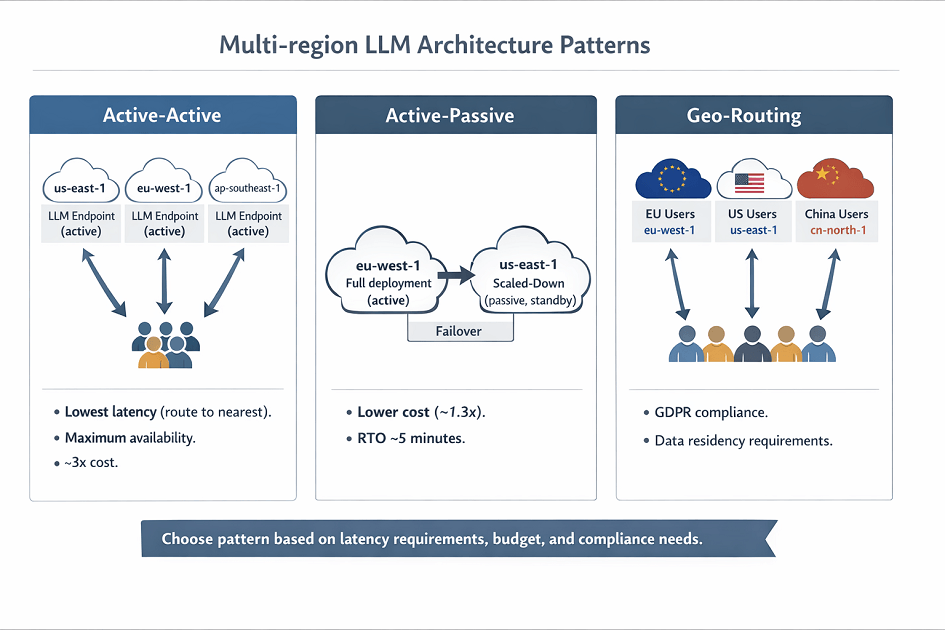
Active-Active Pattern
All regions serve production traffic simultaneously.
Architecture:
- Deploy LLM endpoints in 3+ regions
- Route 53 latency-based routing
- DynamoDB Global Tables for state
- S3 Cross-Region Replication for models
- CloudFront for API caching
Benefits:
- Lowest latency (route to nearest region)
- Maximum availability (any region can fail)
- Best performance (distribute load)
Costs:
- Highest (run full stack in each region)
- ~3x single-region costs for 3 regions
Active-Passive Pattern
Primary region serves traffic. Secondary region on standby.
Architecture:
- Primary region: Full deployment
- Secondary region: Scaled-down deployment
- Route 53 health checks for failover
- Scheduled scaling for disaster recovery
Benefits:
- Lower cost than active-active
- Good availability (RTO ~5 minutes)
- Simple architecture
Costs:
- ~1.3x single-region costs
Geo-Routing Pattern
Region selection based on user location.
Architecture:
- Deploy in regions matching user geography
- Route 53 geolocation routing
- Regional data stores
- Cross-region backup
Use cases:
- GDPR compliance (EU data in EU)
- China deployment (cn-north-1)
- Government workloads (GovCloud)
| Requirement | Single-Region | Active-Passive | Active-Active | Geo-Routing |
|---|---|---|---|---|
| Latency <100ms global | ❌ | ❌ | ✅ | ✅ |
| 99.99% availability | ❌ | ⚠️ (RTO 5min) | ✅ | ⚠️ |
| Cost sensitive | ✅ | ✅ | ❌ | ⚠️ |
| GDPR data residency | ❌ | ❌ | ❌ | ✅ |
| Simple operations | ✅ | ⚠️ | ❌ | ⚠️ |
Implementation Guide
Deploy active-active multi-region architecture.
Step 1: Deploy Endpoints in Each Region
Deploy SageMaker endpoints in target regions:
import boto3

regions = ['us-east-1', 'eu-west-1', 'ap-southeast-1']

for region in regions:
    session = boto3.Session(region_name=region)
    sagemaker = session.client('sagemaker')

    # Deploy endpoint
    response = sagemaker.create_endpoint(
        EndpointName=f'llama-endpoint-{region}',
        EndpointConfigName=f'llama-config-{region}'
    )

    print(f"Deployed to {region}: {response['EndpointArn']}")
Step 2: Configure Route 53 Latency Routing
import boto3

route53 = boto3.client('route53')

# Create hosted zone
zone_response = route53.create_hosted_zone(
    Name='llm-api.example.com',
    CallerReference=str(hash(datetime.now()))
)
zone_id = zone_response['HostedZone']['Id']

# Create latency-based records
regions_config = [
    {'region': 'us-east-1', 'value': 'llm-us.example.com'},
    {'region': 'eu-west-1', 'value': 'llm-eu.example.com'},
    {'region': 'ap-southeast-1', 'value': 'llm-ap.example.com'}
]

for config in regions_config:
    route53.change_resource_record_sets(
        HostedZoneId=zone_id,
        ChangeBatch={
            'Changes': [{
                'Action': 'CREATE',
                'ResourceRecordSet': {
                    'Name': 'api.llm-api.example.com',
                    'Type': 'CNAME',
                    'SetIdentifier': config['region'],
                    'Region': config['region'],
                    'TTL': 60,
                    'ResourceRecords': [{'Value': config['value']}]
                }
            }]
        }
    )
Step 3: Setup Global State with DynamoDB
import boto3

# Create global table
dynamodb = boto3.client('dynamodb')

response = dynamodb.create_global_table(
    GlobalTableName='llm-sessions',
    ReplicationGroup=[
        {'RegionName': 'us-east-1'},
        {'RegionName': 'eu-west-1'},
        {'RegionName': 'ap-southeast-1'}
    ]
)

# Table replicates automatically across regions
# Sub-second replication lag typical
Step 4: Model Synchronization
Replicate models across regions:
import boto3

s3 = boto3.client('s3')

# Enable cross-region replication
replication_config = {
    'Role': 'arn:aws:iam::account:role/s3-replication',
    'Rules': [
        {
            'ID': 'model-replication',
            'Status': 'Enabled',
            'Priority': 1,
            'Destination': {
                'Bucket': 'arn:aws:s3:::models-eu-west-1',
                'ReplicationTime': {
                    'Status': 'Enabled',
                    'Time': {'Minutes': 15}
                }
            },
            'Filter': {'Prefix': 'models/'}
        }
    ]
}

s3.put_bucket_replication(
    Bucket='models-us-east-1',
    ReplicationConfiguration=replication_config
)
Health Checks and Failover
Automatic failover on region failure.
Route 53 Health Checks
route53 = boto3.client('route53')

# Create health check for each endpoint
health_check = route53.create_health_check(
    HealthCheckConfig={
        'Type': 'HTTPS',
        'ResourcePath': '/health',
        'FullyQualifiedDomainName': 'llm-us.example.com',
        'Port': 443,
        'RequestInterval': 30,
        'FailureThreshold': 3
    }
)

# Associate with Route 53 record
route53.change_resource_record_sets(
    HostedZoneId=zone_id,
    ChangeBatch={
        'Changes': [{
            'Action': 'UPSERT',
            'ResourceRecordSet': {
                'Name': 'api.llm-api.example.com',
                'Type': 'CNAME',
                'SetIdentifier': 'us-east-1',
                'Region': 'us-east-1',
                'TTL': 60,
                'ResourceRecords': [{'Value': 'llm-us.example.com'}],
                'HealthCheckId': health_check['HealthCheck']['Id']
            }
        }]
    }
)
CloudWatch Alarms
Monitor regional health:
cloudwatch = boto3.client('cloudwatch')

cloudwatch.put_metric_alarm(
    AlarmName='llm-us-east-1-errors',
    ComparisonOperator='GreaterThanThreshold',
    EvaluationPeriods=2,
    MetricName='ModelInvocationErrors',
    Namespace='AWS/SageMaker',
    Period=300,
    Statistic='Sum',
    Threshold=10,
    ActionsEnabled=True,
    AlarmActions=['arn:aws:sns:us-east-1:account:llm-alerts'],
    Dimensions=[
        {'Name': 'EndpointName', 'Value': 'llama-endpoint-us-east-1'}
    ]
)
Cost Optimization
Reduce multi-region costs.
Regional Pricing Differences
Leverage price variations:
# Monthly costs for ml.g5.2xlarge (24/7)
regional_pricing = {
    'us-east-1': 1080,      # $1.50/hour
    'us-west-2': 1080,      # $1.50/hour
    'eu-west-1': 1166,      # $1.62/hour (8% more)
    'ap-southeast-1': 1296,  # $1.80/hour (20% more)
    'ap-northeast-1': 1382   # $1.92/hour (28% more)
}

# Deploy primary in us-east-1
# Use cheaper regions when possible
Traffic-Based Scaling
Scale each region based on actual traffic:
# us-east-1: High traffic (5 instances)
# eu-west-1: Medium traffic (3 instances)
# ap-southeast-1: Low traffic (1 instance)

import boto3

regions_scaling = {
    'us-east-1': {'min': 3, 'max': 10, 'desired': 5},
    'eu-west-1': {'min': 2, 'max': 6, 'desired': 3},
    'ap-southeast-1': {'min': 1, 'max': 4, 'desired': 1}
}

for region, config in regions_scaling.items():
    session = boto3.Session(region_name=region)
    autoscaling = session.client('application-autoscaling')

    autoscaling.register_scalable_target(
        ServiceNamespace='sagemaker',
        ResourceId=f'endpoint/llama-endpoint-{region}/variant/AllTraffic',
        ScalableDimension='sagemaker:variant:DesiredInstanceCount',
        MinCapacity=config['min'],
        MaxCapacity=config['max']
    )
Scheduled Scaling
Align with traffic patterns:
# Scale down APAC region during US business hours
autoscaling.put_scheduled_action(
    ServiceNamespace='sagemaker',
    ScheduledActionName='scale-down-apac-night',
    ResourceId='endpoint/llama-endpoint-ap-southeast-1/variant/AllTraffic',
    ScalableDimension='sagemaker:variant:DesiredInstanceCount',
    Schedule='cron(0 0 * * ? *)',  # Midnight UTC
    ScalableTargetAction={'MinCapacity': 0, 'MaxCapacity': 2}
)
ap-southeast-1 costs 28% more than us-east-1. We help you optimize regional spend.
Regional pricing differences: us-east-1 (baseline), eu-west-1 (+8%), ap-southeast-1 (+20%), ap-northeast-1 (+28%). Traffic-based scaling: primary region (5 instances), secondary (3), tertiary (1).
Our AI cost optimization helps you:
- Deploy primary in cheapest region – us-east-1 or us-west-2 for baseline workloads
- Scale instances per region – Match capacity to actual traffic patterns, not equal distribution
- Schedule scaling for time zones – Scale down APAC during US business hours, scale up before regional peaks
- Use S3 CRR for model sync – Each region pulls from local S3, eliminates cross-region transfer charges ($0.02/GB saved)
Monitoring Global Deployment
Track performance across regions.
CloudWatch Cross-Region Dashboard
import boto3
import json

cloudwatch = boto3.client('cloudwatch')

dashboard_body = {
    "widgets": [
        {
            "type": "metric",
            "properties": {
                "metrics": [
                    ["AWS/SageMaker", "ModelLatency", {"region": "us-east-1"}],
                    ["...", {"region": "eu-west-1"}],
                    ["...", {"region": "ap-southeast-1"}]
                ],
                "period": 300,
                "stat": "Average",
                "region": "us-east-1",
                "title": "Global Latency"
            }
        }
    ]
}

cloudwatch.put_dashboard(
    DashboardName='LLMGlobalDeployment',
    DashboardBody=json.dumps(dashboard_body)
)
Conclusion
Multi-region LLM deployment delivers global scale with reduced latency and high availability. Active-active patterns provide zero-downtime failover, while active-passive configurations balance cost and resilience.
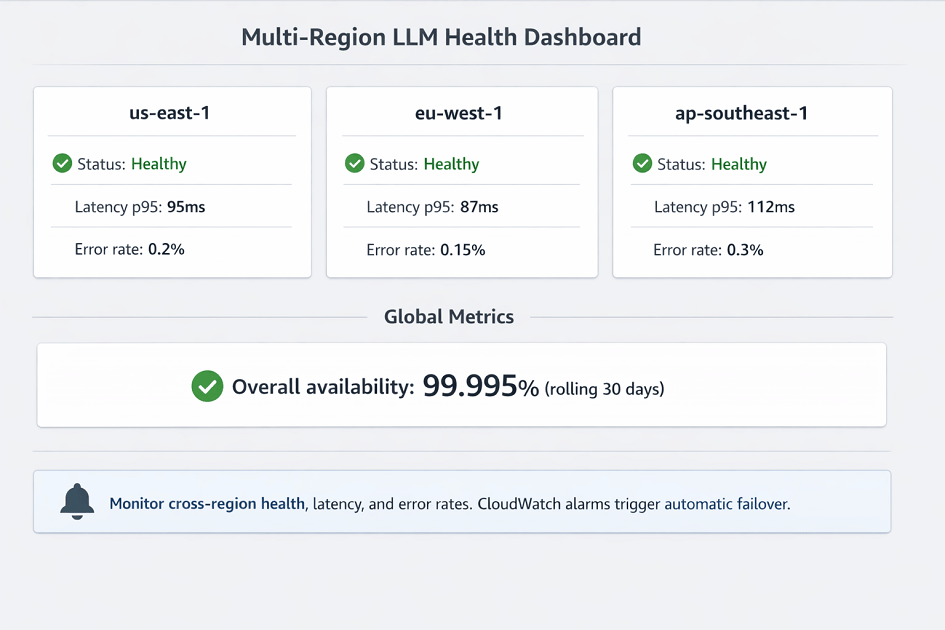
Route 53 latency-based routing automatically directs users to their nearest endpoint, improving response times by 50-80%. S3 Cross-Region Replication synchronizes model artifacts across regions, and DynamoDB Global Tables maintain consistent state worldwide.
Cost optimization through regional pricing differences and traffic-based scaling reduces infrastructure costs while maintaining performance. Health checks and CloudWatch monitoring ensure automatic failover during outages.
For applications serving global audiences, requiring sub-100ms latency, or needing 99.99% availability SLAs, multi-region architecture provides the foundation for production-scale LLM deployments.
Start with three regions for true high availability, implement automated failover testing, and monitor performance across all regions to ensure consistent user experience worldwide.
Frequently Asked Questions
How do I handle model synchronization across regions?
| Strategy | Method | Replication Time | Cost | Best For |
|---|---|---|---|---|
| S3 Cross-Region Replication (CRR) | Native S3 CRR | 5-15 minutes | Standard S3 transfer ($0.02/GB) | Most workloads |
| Lambda on S3 PUT | Event-triggered copy | 1-3 minutes | Lambda + cross-region transfer (higher) | Fast sync requirements |
| DynamoDB Global Tables | Real-time metadata sync | Milliseconds | DynamoDB global tables pricing | Version tracking |
Implementation steps:
- Upload model to primary S3 bucket
- Wait for CRR completion (or Lambda replication)
- Trigger endpoint updates in all regions simultaneously via Step Functions
- Store model registry metadata in DynamoDB Global Tables
Key principle: Each region's SageMaker endpoints pull from their local S3 bucket → eliminates cross-region data transfer charges ($0.02/GB saved)
Prevent split-brain: DynamoDB Global Tables ensures real-time version tracking across regions → no region serves a different model version.
What's the latency impact of global load balancing?
| Component | Latency Overhead | Impact on LLM Inference |
|---|---|---|
| Route 53 latency-based routing | 1-5ms | Negligible (model execution is 200-2000ms) |
| Geographic routing | -40 to -120ms (savings) | Net positive – routing to nearest region saves latency |
| CloudFront | -15 to -30ms (API Gateway reduction) | Minor benefit (can't cache dynamic responses) |
| Global Accelerator | 20-50ms improvement | Use anycast IPs + AWS backbone |
Latency savings example (US East user):
- Single region (eu-west-1): baseline
- Multi-region routing to us-east-1: saves ~80ms
Cost: Global Accelerator = $0.025/hour per accelerator
Bottom line: Geographic routing benefits far outweigh 1-5ms routing overhead, especially for global user bases spanning continents.
How do I test failover without impacting production?
| Strategy | Configuration | Purpose |
|---|---|---|
| Continuous warm traffic | 5% of traffic to secondary region | Keep region validated and ready |
| Weighted routing shift | 10% → 25% → 50% → 100% (off-peak) | Gradual failover testing |
| AWS Fault Injection Simulator | Automate region failure simulation | Validate automatic failover |
| Manual runbooks | Documented procedures | Backup for automation failures |
Test scenarios to simulate:
- Primary region endpoint health checks failing
- SageMaker endpoint throttling
- S3 availability issues
Metrics to track during failover tests:
- Failover completion time
- Data consistency
- User impact (error rates during switch)
Best practices:
- Run drills quarterly
- Always test during off-peak hours
- Never test during major launches or peak traffic
Golden rule: Keep secondary region warm with 5% traffic continuously → failover is instantaneous when needed, not a cold start.
Summarize this post with:
