Serve Gemma Serverless on Google Cloud Run
Deploy Google's Gemma model on Cloud Run for serverless, auto-scaling LLM inference with pay-per-request pricing and zero idle costs.
TLDR;
- Scale-to-zero eliminates idle costs with pay-per-request pricing at $0.000024/vCPU-second
- Gemma 7B deployment costs $68/month for 100K requests versus $146/month for always-on VM
- INT8 quantization provides 2-3x faster inference with 75% memory reduction
- Cloud Run handles sub-10-second cold starts for Gemma models up to 9B parameters
Introduction
Google's Gemma models provide high-quality LLM capabilities in compact sizes optimized for efficient inference. Gemma 2B delivers fast responses for lightweight tasks, Gemma 7B balances quality with performance, and Gemma 9B offers maximum capabilities for complex reasoning. All variants support instruction-tuning and run efficiently on Cloud Run's serverless platform without requiring GPU acceleration.
Cloud Run eliminates infrastructure management through fully managed serverless containers. Applications scale automatically from zero to thousands of instances based on request volume, with sub-10-second cold start times for Gemma models. Pay-per-request pricing charges only for actual computation time rounded to the nearest 100ms, making Cloud Run cost-effective for variable workloads where traffic patterns change throughout the day or week.
This guide covers Cloud Run deployment architecture, container optimization for fast cold starts, CPU-based inference optimization through quantization, auto-scaling configuration, cost analysis comparing serverless versus always-on infrastructure, and security patterns for production deployments. You'll learn to build and deploy Gemma inference servers, implement request batching for throughput optimization, configure IAM authentication, and monitor performance with Cloud Operations. These patterns enable production Gemma serving at 50-70% lower costs than VM-based deployments for variable traffic workloads.
Deployment Architecture and Model Selection
Gemma 2B (2.5B parameters, ~5GB memory, ~300 tokens/sec CPU) handles chat and classification. Gemma 7B (7B parameters, ~14GB memory, ~150 tokens/sec) serves general-purpose generation. Gemma 9B (9B parameters, ~18GB memory, ~120 tokens/sec) excels at complex reasoning and coding. Choose based on quality requirements and available Cloud Run memory limits (up to 32GB per instance).
Deployment Guide
Deploy Gemma to Cloud Run.
Build Container Image
# Dockerfile
FROM python:3.10-slim

# Install dependencies
RUN pip install --no-cache-dir \
    transformers \
    torch \
    accelerate \
    fastapi \
    uvicorn \
    gunicorn

# Copy model and code
WORKDIR /app
COPY inference_server.py .

# Expose port
EXPOSE 8080

# Start server
CMD exec gunicorn --bind :$PORT --workers 1 --threads 8 --timeout 0 inference_server:app
Inference server:
# inference_server.py
from fastapi import FastAPI, HTTPException
from pydantic import BaseModel
from transformers import AutoModelForCausalLM, AutoTokenizer
import torch
import os

app = FastAPI()

# Load model on startup
print("Loading Gemma model...")
model_name = "google/gemma-2b-it"
tokenizer = AutoTokenizer.from_pretrained(model_name)
model = AutoModelForCausalLM.from_pretrained(
    model_name,
    torch_dtype=torch.float16,
    device_map="auto"
)
print("Model loaded successfully")

class GenerateRequest(BaseModel):
    prompt: str
    max_tokens: int = 256
    temperature: float = 0.7
    top_p: float = 0.9

@app.post("/generate")
async def generate(request: GenerateRequest):
    try:
        inputs = tokenizer(request.prompt, return_tensors="pt")

        with torch.no_grad():
            outputs = model.generate(
                inputs.input_ids,
                max_new_tokens=request.max_tokens,
                temperature=request.temperature,
                top_p=request.top_p,
                do_sample=True
            )

        response = tokenizer.decode(outputs[0], skip_special_tokens=True)

        return {
            "generated_text": response,
            "tokens_generated": len(outputs[0])
        }
    except Exception as e:
        raise HTTPException(status_code=500, detail=str(e))

@app.get("/health")
async def health():
    return {"status": "healthy", "model": model_name}

@app.get("/")
async def root():
    return {"message": "Gemma API - send POST to /generate"}
Build and Push to Artifact Registry
# Set variables
PROJECT_ID="your-project-id"
REGION="us-central1"
REPOSITORY="llm-models"
IMAGE="gemma-inference"

# Create Artifact Registry repository
gcloud artifacts repositories create $REPOSITORY \
    --repository-format=docker \
    --location=$REGION \
    --description="LLM models"

# Build image
gcloud builds submit --tag $REGION-docker.pkg.dev/$PROJECT_ID/$REPOSITORY/$IMAGE:latest

# Or build locally
docker build -t $REGION-docker.pkg.dev/$PROJECT_ID/$REPOSITORY/$IMAGE:latest .
docker push $REGION-docker.pkg.dev/$PROJECT_ID/$REPOSITORY/$IMAGE:latest
Deploy to Cloud Run
# Deploy service
gcloud run deploy gemma-api \
    --image=$REGION-docker.pkg.dev/$PROJECT_ID/$REPOSITORY/$IMAGE:latest \
    --platform=managed \
    --region=$REGION \
    --memory=16Gi \
    --cpu=4 \
    --timeout=300 \
    --concurrency=10 \
    --min-instances=0 \
    --max-instances=10 \
    --allow-unauthenticated

# Get service URL
gcloud run services describe gemma-api --region=$REGION --format='value(status.url)'
Performance Optimization
Maximize throughput and reduce costs.
CPU Optimization
Cloud Run uses CPU-only instances. Optimize for CPU inference:
# Use INT8 quantization
from transformers import AutoModelForCausalLM
from optimum.intel import INCQuantizer

# Quantize model
quantizer = INCQuantizer.from_pretrained(model_name)
quantized_model = quantizer.quantize(
    calibration_dataset=dataset,
    save_directory="./gemma-int8"
)

# Deploy quantized model
model = AutoModelForCausalLM.from_pretrained(
    "./gemma-int8",
    torch_dtype=torch.int8
)
Benefits:
- 2-3x faster inference
- 75% memory reduction
- Lower Cloud Run costs
Request Batching
Implement batch endpoints to process multiple prompts simultaneously, improving throughput by 2-3x through parallel tokenization and generation with padding.
Caching Strategy
Configure min-instances=1 during business hours to keep containers warm, eliminating cold starts. Use Cloud Scheduler to scale to zero overnight for cost optimization.
Cost Analysis
Understand Cloud Run pricing.
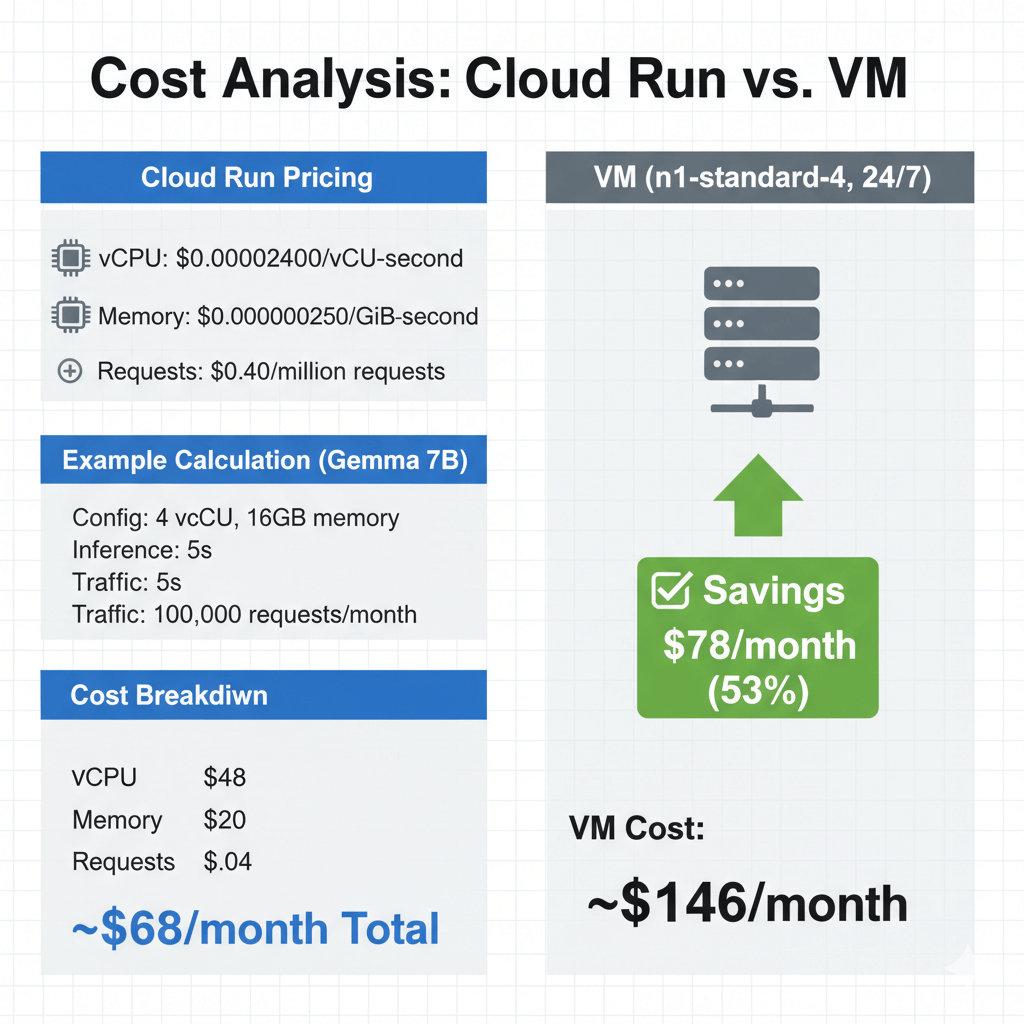
Pricing components:
- vCPU: $0.00002400/vCPU-second
- Memory: $0.00000250/GiB-second
- Requests: $0.40/million requests
Example calculation (Gemma 7B):
- Configuration: 4 vCPU, 16GB memory
- Average inference: 5 seconds
- Traffic: 100,000 requests/month
Cost breakdown:
- vCPU: 100K × 5s × 4 × $0.000024 = $48
- Memory: 100K × 5s × 16 × $0.0000025 = $20
- Requests: 100K × $0.40/1M = $0.04
- Total: ~$68/month
Compare to VM (n1-standard-4, 24/7):
- VM cost: ~$146/month
- Savings: $78/month (53%)
Scaling Configuration
Optimize auto-scaling behavior.
Instance Limits
# Production configuration
gcloud run services update gemma-api \
    --region=$REGION \
    --min-instances=1 \
    --max-instances=50 \
    --concurrency=5 \
    --cpu-throttling \
    --execution-environment=gen2
Scaling parameters:
concurrency: Requests per instance- Lower concurrency = better latency
- Higher concurrency = lower cost
Request Timeout
# Set appropriate timeout
gcloud run services update gemma-api \
    --region=$REGION \
    --timeout=300  # 5 minutes max
Recommendations:
- Short prompts: 60s timeout
- Long generation: 300s timeout
- Batch processing: 900s (max)
Security and Authentication
Secure your Cloud Run service.
IAM Authentication
# Remove public access
gcloud run services remove-iam-policy-binding gemma-api \
    --region=$REGION \
    --member="allUsers" \
    --role="roles/run.invoker"

# Grant access to specific service account
gcloud run services add-iam-policy-binding gemma-api \
    --region=$REGION \
    --member="serviceAccount:api-client@project.iam.gserviceaccount.com" \
    --role="roles/run.invoker"
Client authentication:
import google.auth
from google.auth.transport.requests import Request
import requests

# Get ID token
credentials, project = google.auth.default()
auth_req = Request()
credentials.refresh(auth_req)
id_token = credentials.id_token

# Make authenticated request
response = requests.post(
    "https://gemma-api-xxxxx.run.app/generate",
    headers={"Authorization": f"Bearer {id_token}"},
    json={"prompt": "Explain quantum computing"}
)
API Key Protection
# Add API key validation
from fastapi import Header, HTTPException

API_KEY = os.environ.get("API_KEY")

@app.post("/generate")
async def generate(
    request: GenerateRequest,
    x_api_key: str = Header(...)
):
    if x_api_key != API_KEY:
        raise HTTPException(status_code=401, detail="Invalid API key")

    # Process request...
Monitoring with Cloud Operations
Track performance and errors.
Structured Logging
import logging
import json
from google.cloud import logging as cloud_logging

# Setup Cloud Logging
client = cloud_logging.Client()
client.setup_logging()

logger = logging.getLogger(__name__)

@app.post("/generate")
async def generate(request: GenerateRequest):
    import time
    start = time.time()

    # Generate response
    result = model.generate(...)

    latency = (time.time() - start) * 1000

    # Structured log
    logger.info("Inference completed", extra={
        "latency_ms": latency,
        "tokens": len(result),
        "prompt_length": len(request.prompt),
        "model": "gemma-7b"
    })

    return result
Custom Metrics
from google.cloud import monitoring_v3

def write_latency_metric(latency_ms):
    client = monitoring_v3.MetricServiceClient()
    project_name = f"projects/{project_id}"

    series = monitoring_v3.TimeSeries()
    series.metric.type = "custom.googleapis.com/gemma/latency"
    series.resource.type = "cloud_run_revision"
    series.resource.labels["service_name"] = "gemma-api"
    series.resource.labels["project_id"] = project_id

    point = monitoring_v3.Point()
    point.value.double_value = latency_ms
    point.interval.end_time.seconds = int(time.time())

    series.points = [point]
    client.create_time_series(name=project_name, time_series=[series])
Conclusion
Cloud Run provides optimal serverless infrastructure for Gemma models when traffic patterns vary and infrastructure management overhead must stay minimal. Pay-per-request pricing eliminates idle costs, making Cloud Run 50-70% cheaper than always-on VM deployments for workloads with <60% average utilization. Fast cold starts (3-10 seconds for Gemma 2B-7B) enable scaling to zero during low-traffic periods without degrading user experience.
Deploy Gemma 7B on Cloud Run with 4 vCPU and 16GB memory for balanced performance at ~$68/month for 100K requests, compared to $146/month for equivalent always-on VM capacity. Use INT8 quantization to reduce memory requirements and fit larger models within Cloud Run's 32GB limit. Configure min-instances=1 during business hours to eliminate cold starts for critical workloads while maintaining cost efficiency.
Cloud Run's serverless model excels for API endpoints, batch processing jobs, and development environments where infrastructure simplicity trumps maximum performance. For sustained high-volume traffic (>1M requests/month) or GPU-dependent workloads, consider GKE or Vertex AI Prediction. Start with Cloud Run for rapid deployment and migrate to managed infrastructure only when traffic patterns justify operational complexity.
Frequently Asked Questions
How do I optimize Gemma cold start times on Cloud Run?
Minimize cold starts with --min-instances=1, use smaller Gemma variants (2B starts in 5-15s versus 15-30s for 7B), enable CPU boost, and pre-load models during container build. For production, allocate 1-2 minimum instances for always-warm containers. Use Cloud Scheduler to ping endpoints every 5 minutes during off-peak hours to prevent complete scale-to-zero.
What's the cost difference between Cloud Run and GKE for Gemma deployment?
Cloud Run costs less for variable workloads with idle time (pay only for requests, no idle costs). Gemma 7B serving 10M requests/month at 2 seconds each costs ~$280/month on Cloud Run versus ~$180/month for always-on GKE e2-standard-8 node. Cloud Run becomes more expensive at >60% sustained utilization. Choose Cloud Run for bursty traffic and low-moderate volume. Choose GKE for consistent high-volume traffic or multi-model deployments.
Can I deploy larger models like Gemma 70B on Cloud Run?
No, Cloud Run's 32GB memory limit prevents Gemma 70B deployment (requires ~140GB FP16). Gemma 7B fits comfortably at 14-16GB. For larger models, use GKE with GPU nodes, Vertex AI Prediction with A100 GPUs, or INT4 quantization to compress 13B models to ~8GB (with quality trade-offs).