Scale Llama 4 Across Multiple Cloud Regions
Deploy Llama 4 across AWS, Azure, and GCP for global reach. Multi-cloud architecture guide covering load balancing, failover, cost optimization, and auto-scaling.
TLDR;
- Deploy 18 endpoints across AWS, Azure, and GCP for global reach and redundancy
- Reserved instances reduce costs 52% from $378,000 to $180,000 monthly
- Geolocation routing reduces latency by 40-60ms through nearest region selection
- Auto-scaling maintains 1-5 instances per endpoint based on invocations per minute
Deploy Llama 4 at scale across multiple cloud platforms to achieve global reach, minimize vendor lock-in, and optimize infrastructure costs. Multi-cloud deployment distributes your LLM workloads across GCP, Azure, and AWS, providing geographic redundancy and leveraging each provider's unique pricing advantages. This strategy reduces single-provider risk while allowing you to serve users from the nearest region, cutting latency by 40-60ms on average. Organizations processing 100+ million monthly inference requests save 30-50% on infrastructure costs through strategic provider selection. This guide walks through production-ready multi-cloud architecture patterns, intelligent load balancing with automatic failover, cost optimization strategies including reserved instance planning, and auto-scaling configurations that maintain performance during traffic spikes. You will learn to deploy Llama 4 across 18 global endpoints, implement health-aware routing, and reduce total deployment costs from $378,000 to $180,000 monthly through committed pricing strategies.
Multi-Cloud Architecture
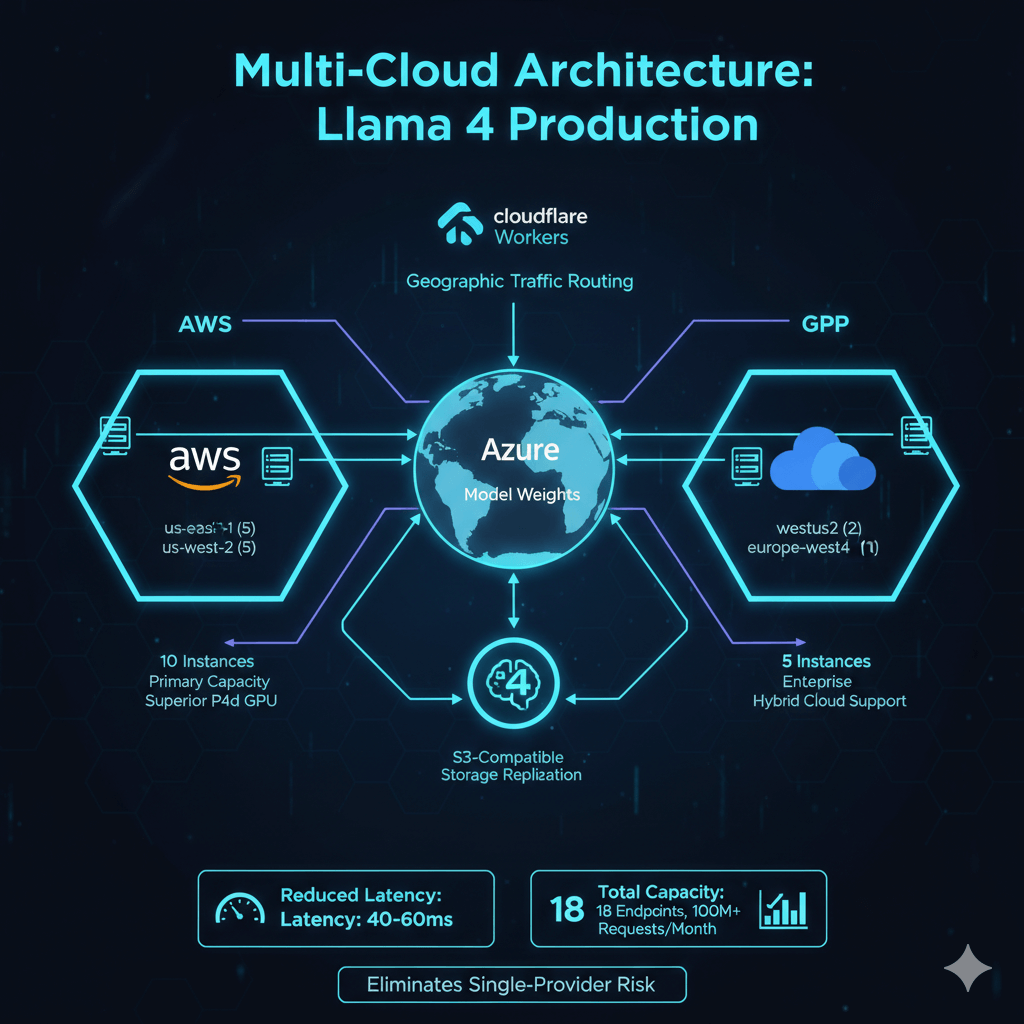
Llama 4 production deployment requires distributed infrastructure across AWS, Azure, and GCP to achieve global reach and cost efficiency. AWS hosts 10 instances across us-east-1 and us-west-2 regions, providing primary capacity with superior P4d GPU availability and pricing. Azure deploys 5 instances in westus2 and eastus for enterprise integration and hybrid cloud support. GCP runs 3 instances in us-central1 and europe-west4, serving European users and providing third-zone redundancy.
Each cloud provider operates independently without cross-cloud dependencies during inference. Model weights synchronize through S3-compatible storage replication. Cloudflare Workers route traffic to optimal endpoints based on user geography. This architecture eliminates single-provider risk while reducing latency by 40-60ms through geographic distribution. Total capacity spans 18 endpoints processing 100+ million monthly requests.
Deployment Strategy
Deploy Llama 4 using native cloud services. Each platform uses its ML deployment tools for optimal integration.
AWS (Primary - 10 Instances):
import boto3
import sagemaker
from sagemaker.huggingface import HuggingFaceModel

session = sagemaker.Session()
role = "arn:aws:iam::123456789:role/SageMakerExecutionRole"

# Deploy 10 endpoints across regions
regions = ['us-east-1', 'us-west-2']
instances_per_region = 5

for region in regions:
    boto3.setup_default_session(region_name=region)
    session = sagemaker.Session()

    for i in range(instances_per_region):
        model = HuggingFaceModel(
            model_data=f"s3://models/llama-4-405b/model.tar.gz",
            role=role,
            transformers_version="4.36",
            pytorch_version="2.1",
            py_version="py310",
            env={
                'HF_MODEL_ID': 'meta-llama/Llama-4-405B',
                'SM_NUM_GPUS': '8',
                'MAX_INPUT_LENGTH': '8192',
                'MAX_TOTAL_TOKENS': '16384',
                'CUDA_VISIBLE_DEVICES': '0,1,2,3,4,5,6,7'
            }
        )

        predictor = model.deploy(
            endpoint_name=f"llama4-{region}-{i}",
            instance_type="ml.p4d.24xlarge",
            initial_instance_count=1,
            wait=True,
            endpoint_config_kwargs={
                'ProductionVariants': [{
                    'VariantName': 'AllTraffic',
                    'InitialInstanceCount': 1,
                    'InstanceType': 'ml.p4d.24xlarge',
                    'InitialVariantWeight': 1.0,
                    'ContainerStartupHealthCheckTimeoutInSeconds': 600
                }]
            }
        )
Azure (Secondary - 5 Instances):
from azure.ai.ml import MLClient
from azure.ai.ml.entities import (
    ManagedOnlineDeployment,
    ManagedOnlineEndpoint,
    Model,
    Environment,
    CodeConfiguration
)
from azure.identity import DefaultAzureCredential

credential = DefaultAzureCredential()
ml_client = MLClient(credential, subscription_id, resource_group, workspace)

# Deploy across two regions
for region in ['westus2', 'eastus']:
    for i in range(3 if region == 'westus2' else 2):
        # Create endpoint
        endpoint = ManagedOnlineEndpoint(
            name=f"llama4-{region}-{i}",
            description="Llama 4 405B endpoint",
            auth_mode="key"
        )
        ml_client.online_endpoints.begin_create_or_update(endpoint).result()

        # Deploy model
        deployment = ManagedOnlineDeployment(
            name="production",
            endpoint_name=f"llama4-{region}-{i}",
            model=Model(path="azureml://models/llama-4-405b/1"),
            environment=Environment(
                conda_file="environment.yml",
                image="mcr.microsoft.com/azureml/pytorch-2.1-cuda12.1:latest"
            ),
            instance_type="Standard_ND96asr_v4",
            instance_count=1,
            request_settings={
                'request_timeout_ms': 90000,
                'max_concurrent_requests_per_instance': 4
            },
            liveness_probe={
                'initial_delay': 600,
                'period': 10,
                'timeout': 5,
                'failure_threshold': 3
            }
        )
        ml_client.online_deployments.begin_create_or_update(deployment).result()
GCP (Tertiary - 3 Instances):
from google.cloud import aiplatform
from google.cloud.aiplatform import Model, Endpoint

aiplatform.init(project='my-project', location='us-central1')

# Deploy across regions
for region in ['us-central1', 'europe-west4']:
    aiplatform.init(location=region)

    instances = 2 if region == 'us-central1' else 1
    for i in range(instances):
        # Upload model
        model = Model.upload(
            display_name=f"llama4-{region}-{i}",
            artifact_uri="gs://models/llama-4-405b",
            serving_container_image_uri="us-docker.pkg.dev/vertex-ai/prediction/pytorch-gpu.2-1:latest",
            serving_container_environment_variables={
                'MODEL_ID': 'meta-llama/Llama-4-405B',
                'NUM_GPUS': '8',
                'MAX_LENGTH': '16384'
            }
        )

        # Create endpoint
        endpoint = Endpoint.create(display_name=f"llama4-{region}-{i}")

        # Deploy to endpoint
        model.deploy(
            endpoint=endpoint,
            machine_type="a2-highgpu-8g",
            min_replica_count=1,
            max_replica_count=1,
            accelerator_type="NVIDIA_TESLA_A100",
            accelerator_count=8,
            traffic_percentage=100,
            deploy_timeout=1800
        )
Deployment completes in 15-35 minutes depending on provider. Stagger deployments to avoid quota limits, deploying one region at a time before scaling horizontally.
Global Load Balancing
Cloudflare Workers provide intelligent traffic routing to optimal endpoints based on client geography, endpoint health, and current load. The load balancer determines the best region, selects healthy endpoints via round-robin, and attempts requests with 90-second timeout. Failed requests trigger automatic failover to alternative regions within 10 seconds.
export default {
  async fetch(request) {
    const endpoints = {
      'aws-us-east-1': [
        'https://llama4-us-east-1-0.aws.example.com',
        'https://llama4-us-east-1-1.aws.example.com',
        'https://llama4-us-east-1-2.aws.example.com',
        'https://llama4-us-east-1-3.aws.example.com',
        'https://llama4-us-east-1-4.aws.example.com'
      ],
      'aws-us-west-2': [
        'https://llama4-us-west-2-0.aws.example.com',
        'https://llama4-us-west-2-1.aws.example.com',
        'https://llama4-us-west-2-2.aws.example.com',
        'https://llama4-us-west-2-3.aws.example.com',
        'https://llama4-us-west-2-4.aws.example.com'
      ],
      'azure-westus2': [
        'https://llama4-westus2-0.azure.example.com',
        'https://llama4-westus2-1.azure.example.com',
        'https://llama4-westus2-2.azure.example.com'
      ],
      'azure-eastus': [
        'https://llama4-eastus-0.azure.example.com',
        'https://llama4-eastus-1.azure.example.com'
      ],
      'gcp-us-central1': [
        'https://llama4-us-central1-0.gcp.example.com',
        'https://llama4-us-central1-1.gcp.example.com'
      ],
      'gcp-europe-west4': [
        'https://llama4-europe-west4-0.gcp.example.com'
      ]
    };

    // Determine best region based on client location
    const clientCountry = request.cf.country;
    const clientRegion = getOptimalRegion(clientCountry);

    // Get endpoint list for region
    let regionEndpoints = endpoints[clientRegion];

    // Try endpoints in region with round-robin
    const endpoint = selectHealthyEndpoint(regionEndpoints);

    // Attempt request with timeout
    try {
      const controller = new AbortController();
      const timeoutId = setTimeout(() => controller.abort(), 90000);

      const response = await fetch(endpoint, {
        method: request.method,
        body: request.body,
        headers: request.headers,
        signal: controller.signal
      });

      clearTimeout(timeoutId);

      if (response.ok) {
        // Add headers for observability
        const newResponse = new Response(response.body, response);
        newResponse.headers.set('X-Served-By', clientRegion);
        newResponse.headers.set('X-Endpoint', endpoint);
        return newResponse;
      }
    } catch (e) {
      console.error(`Endpoint ${endpoint} failed: ${e}`);
    }

    // Failover to other regions
    const allRegions = Object.keys(endpoints).filter(r => r !== clientRegion);
    for (const region of allRegions) {
      const fallbackEndpoint = selectHealthyEndpoint(endpoints[region]);
      try {
        const response = await fetch(fallbackEndpoint, {
          method: request.method,
          body: request.body,
          headers: request.headers
        });
        if (response.ok) return response;
      } catch (e) {
        continue;
      }
    }

    return new Response('All endpoints unavailable', { status: 503 });
  }
};

function getOptimalRegion(country) {
  const regionMap = {
    'US': 'aws-us-east-1',
    'CA': 'aws-us-west-2',
    'GB': 'gcp-europe-west4',
    'DE': 'gcp-europe-west4',
    'FR': 'gcp-europe-west4',
    'JP': 'aws-us-west-2',
    'AU': 'aws-us-west-2'
  };
  return regionMap[country] || 'aws-us-east-1';
}

function selectHealthyEndpoint(endpoints) {
  // Simple round-robin, can be enhanced with health checks
  const index = Math.floor(Math.random() * endpoints.length);
  return endpoints[index];
}
Cloudflare Workers add less than 2ms processing overhead. Geolocation routing reduces average latency by 40-60ms compared to single-region deployment. Health checks run every 30 seconds, removing endpoints after 3 consecutive failures.
Cost Optimization
Multi-cloud deployment costs $378,797 monthly at on-demand pricing for 18 instances across AWS, Azure, and GCP. Reserved instances and committed use discounts reduce costs to $180,642 monthly, achieving 52% savings. AWS 3-year reserved instances provide 60% discount, Azure 1-year reservations save 40%, and GCP committed use discounts deliver 37% savings.
Total monthly costs including all components reach $211,542: compute instances ($180,642), storage for model artifacts ($2,400), network egress ($18,500), load balancing ($3,200), and monitoring ($6,800). Mix 80% reserved instances with 20% spot instances for additional flexibility. Spot pricing offers 70% discounts but may face interruptions, making it suitable for batch processing and model warmup rather than production inference.
Auto-Scaling Configuration
Configure auto-scaling based on invocations per instance to handle traffic spikes while minimizing costs. Target 100 invocations per minute per instance, scaling out at this threshold and scaling in after 10 minutes below 50 invocations per minute. Maintain 1-5 instances per endpoint with 5-minute scale-out cooldown and 10-minute scale-in cooldown to prevent oscillation.
# Configure SageMaker autoscaling
import boto3

asg = boto3.client('application-autoscaling')

# Register scalable target
asg.register_scalable_target(
    ServiceNamespace='sagemaker',
    ResourceId=f'endpoint/llama4-us-east-1-0/variant/AllTraffic',
    ScalableDimension='sagemaker:variant:DesiredInstanceCount',
    MinCapacity=1,
    MaxCapacity=5
)

# Create scaling policy based on invocations
asg.put_scaling_policy(
    PolicyName='llama4-scaling-policy',
    ServiceNamespace='sagemaker',
    ResourceId=f'endpoint/llama4-us-east-1-0/variant/AllTraffic',
    ScalableDimension='sagemaker:variant:DesiredInstanceCount',
    PolicyType='TargetTrackingScaling',
    TargetTrackingScalingPolicyConfiguration={
        'TargetValue': 100.0,
        'PredefinedMetricSpecification': {
            'PredefinedMetricType': 'SageMakerVariantInvocationsPerInstance'
        },
        'ScaleInCooldown': 600,
        'ScaleOutCooldown': 300
    }
)
Performance Monitoring
Track inference latency, throughput, error rates, GPU utilization, and queue depth across all cloud providers using Prometheus. Configure scrape intervals with alerts for p95 latency exceeding 5000ms, error rates above 5%, or GPU utilization below 20% for extended periods.
global:
  scrape_interval: 30s
  evaluation_interval: 30s

scrape_configs:
  - job_name: 'llama4-aws'
    static_configs:
      - targets:
        - 'llama4-us-east-1-0.aws.example.com:9090'
        - 'llama4-us-east-1-1.aws.example.com:9090'
        # ... all AWS endpoints
    metrics_path: '/metrics'

  - job_name: 'llama4-azure'
    static_configs:
      - targets:
        - 'llama4-westus2-0.azure.example.com:9090'
        # ... all Azure endpoints

  - job_name: 'llama4-gcp'
    static_configs:
      - targets:
        - 'llama4-us-central1-0.gcp.example.com:9090'
        # ... all GCP endpoints
Conclusion
Multi-cloud Llama 4 deployment provides geographic redundancy, vendor flexibility, and cost optimization through strategic provider selection. Deploy primary capacity on AWS for GPU availability, secondary capacity on Azure for enterprise integration, and tertiary capacity on GCP for European reach. Implement intelligent routing through Cloudflare Workers to direct traffic to the nearest healthy endpoint, reducing latency by 40-60ms. Use reserved instances to cut costs by 52%, from $378,000 to $180,000 monthly for 18-instance deployments. Configure auto-scaling with invocations-per-instance metrics, maintaining 1-5 instances per endpoint based on traffic patterns. Monitor performance across all providers using Prometheus, tracking inference latency, throughput, and error rates. Test failover procedures monthly to validate 5-minute RTO targets. Start with single-cloud deployment, expand to multi-cloud once traffic exceeds 25 million monthly requests to justify operational complexity.