Reduce Azure ML Costs by 40-70% in Production
Learn how to cut Azure ML production costs by 40–70% using reserved and spot instances, autoscaling, storage tiering, budgets, and governance policies to keep LLM deployments performant while preventing cloud spend from spiraling out of control.
TLDR;
- 3-year reserved instances save 60% reducing monthly costs from $5,358 to $2,143
- Auto-scaling reduces fixed 5-instance costs by 40% to $8,037/month average
- Spot instances provide 70% discount for development and testing workloads
- Azure Policy prevents resource sprawl by limiting instance counts and requiring tags
Introduction
LLM deployments consume significant resources. GPU instances cost $3-30/hour. Storage fees accumulate quickly. Monitoring adds overhead. Without active cost management, cloud spending spirals out of control. Many organizations discover their ML infrastructure costs exceed budgets by 200-300% within the first six months of production deployment.
Azure provides robust cost management tools specifically designed for machine learning workloads. Track spending by resource and tag. Set budgets with automated alerts. Optimize based on actual usage patterns. Implement governance policies that prevent cost overruns. Organizations using these strategies achieve 40-70% cost savings without sacrificing performance or reliability. This guide shows you how to track every dollar, optimize resource allocation, implement automated controls, and reduce total cost of ownership for production LLM deployments. The typical 70B model deployment costs break down as GPU compute 65-75%, storage 10-15%, networking 5-10%, monitoring 5-10%, and management overhead 5% of total spending.
Azure ML Pricing and Cost Breakdown
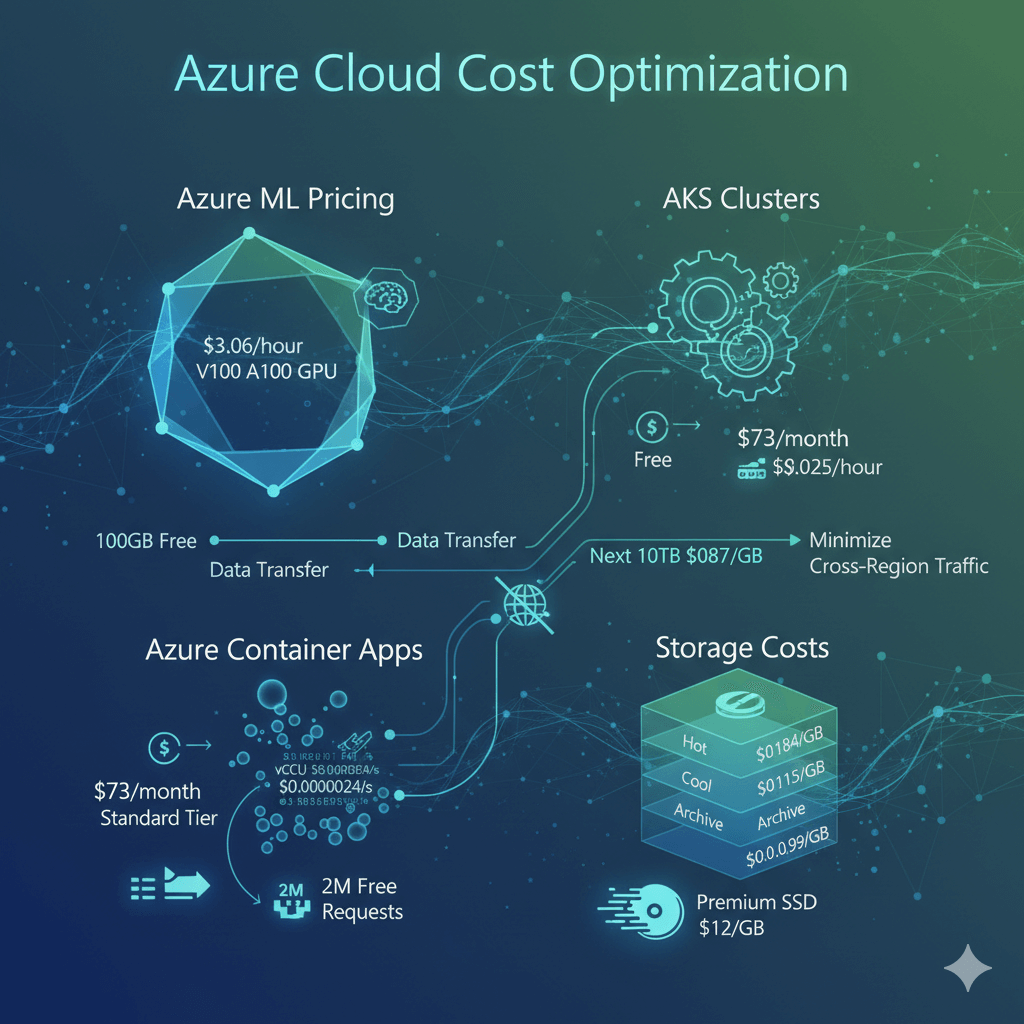
Understanding Azure pricing helps you identify optimization opportunities. Managed endpoints charge per hour for deployed instances with no separate control plane costs. Standard_NC6s_v3 with V100 GPU costs $3.06/hour. Standard_NC24ads_A100_v4 with A100 GPU costs $3.67/hour. Standard_ND96asr_v4 with 8x A100 GPUs costs $27.20/hour.
AKS clusters separate control plane costs from worker nodes. Basic tier provides free control plane. Standard tier costs $73/month. Worker nodes use standard VM pricing. Load balancer adds $0.025/hour plus data transfer costs.
Azure Container Apps uses consumption-based pricing. vCPU costs $0.000024 per vCPU-second. Memory costs $0.000003 per GiB-second. First 2 million requests are free monthly.
Storage costs vary by performance tier. Azure Blob Hot tier costs $0.0184/GB/month. Cool tier reduces costs to $0.0115/GB/month. Archive tier drops to $0.00099/GB/month for rarely accessed models. Azure Files Premium costs $0.15/GB/month for faster model loading. Premium SSD managed disks cost $0.12/GB/month while Standard SSD costs $0.048/GB/month.
Data transfer charges apply to egress. First 100GB monthly is free. Next 100GB to 10TB costs $0.087/GB. Inter-region transfer costs $0.02/GB. Plan network architecture to minimize cross-region traffic.
Cost Tracking and Budget Management
Monitor spending in real-time to catch cost overruns before they impact budgets.
az consumption usage list \
--start-date 2025-01-01 \
--end-date 2025-01-31 \
--query "[?contains(instanceName, 'llama')].{Resource:instanceName, Cost:pretaxCost}" \
--output table
Tag resources for granular cost tracking:
az resource tag \
--ids /subscriptions/.../endpoints/llama-endpoint \
--tags \
Environment=Production \
Model=Llama-70B \
CostCenter=ML-Team \
Owner=john@company.com
# Query costs by tag
az consumption usage list \
--start-date 2025-01-01 \
--query "[?tags.Environment=='Production'].{Resource:instanceName, Cost:pretaxCost}" \
--output table
Create budgets with automated alerts:
from azure.mgmt.consumption.models import *
budget = Budget(
category="Cost",
amount=15000, # $15,000/month
time_grain="Monthly",
time_period=BudgetTimePeriod(start_date="2025-01-01"),
notifications={
"Actual_GreaterThan_80_Percent": Notification(
enabled=True,
operator="GreaterThan",
threshold=80,
contact_emails=["finance@company.com", "ml-team@company.com"],
threshold_type="Actual"
),
"Forecasted_GreaterThan_100_Percent": Notification(
enabled=True,
operator="GreaterThan",
threshold=100,
contact_emails=["finance@company.com"],
threshold_type="Forecasted"
)
}
)
Azure provides anomaly detection to identify unusual spending patterns automatically. Enable alerts when costs exceed forecasted amounts by 20% or more.
Optimization Strategies and Reserved Instances
Reserved Instances provide the largest cost savings for predictable workloads. Commit to 1-year or 3-year terms for significant discounts.
az reservations reservation-order purchase \
--reservation-order-id "order-id" \
--sku Standard_NC24ads_A100_v4 \
--location eastus \
--quantity 2 \
--term P1Y \
--billing-frequency Monthly
Savings comparison for 2x NC24ads_A100_v4 instances:
- On-demand: $5,358/month
- 1-year reserved: $3,215/month (save $2,143/month or 40%)
- 3-year reserved: $2,143/month (save $3,215/month or 60%)
Auto-scaling reduces costs during low-traffic periods:
deployment.scale_settings = {
"type": "target_utilization",
"min_instances": 1,
"max_instances": 10,
"target_utilization_percentage": 70,
"polling_interval": 60,
"scale_down_delay": 300
}
Cost impact of auto-scaling:
- Fixed 5 instances: $13,395/month
- Auto-scale averaging 3 instances: $8,037/month
- Savings: $5,358/month (40% reduction)
Spot instances work well for development and testing:
az aks nodepool add \
--resource-group ml-dev \
--cluster-name dev-cluster \
--name spotpool \
--priority Spot \
--eviction-policy Delete \
--spot-max-price -1 \
--node-vm-size Standard_NC24ads_A100_v4 \
--min-count 0 \
--max-count 3
Spot pricing provides 70% discount compared to regular instances. Regular A100 instance costs $3.67/hour. Spot instance costs approximately $1.10/hour. Save $2.57/hour or $1,886/month per instance for non-production workloads.
Storage optimization reduces ongoing costs:
az storage blob set-tier \
--account-name mlstorage \
--container-name models \
--name old-model-v1.tar.gz \
--tier Cool
Implement lifecycle policies to automate storage tier transitions:
"rules": [{
"name": "move-old-models",
"enabled": true,
"definition": {
"filters": {
"blobTypes": ["blockBlob"],
"prefixMatch": ["models/"]
},
"actions": {
"baseBlob": {
"tierToCool": {"daysAfterModificationGreaterThan": 30},
"tierToArchive": {"daysAfterModificationGreaterThan": 90},
"delete": {"daysAfterModificationGreaterThan": 365}
}
}
}
}]
}
Governance and Automated Controls
Azure Policy enforces cost controls across your organization. Prevent resource sprawl with policy-based limits.
"mode": "All",
"policyRule": {
"if": {
"allOf": [
{
"field": "type",
"equals": "Microsoft.MachineLearningServices/workspaces/onlineEndpoints/deployments"
},
{
"field": "Microsoft.MachineLearningServices/workspaces/onlineEndpoints/deployments/instanceCount",
"greater": 5
}
]
},
"then": {"effect": "deny"}
},
"displayName": "Limit ML endpoint instance count to 5"
}
Require cost allocation tags on all ML resources:
"mode": "Indexed",
"policyRule": {
"if": {
"allOf": [
{
"field": "type",
"equals": "Microsoft.MachineLearningServices/workspaces/onlineEndpoints"
},
{
"anyOf": [
{"field": "tags['CostCenter']", "exists": false},
{"field": "tags['Owner']", "exists": false}
]
}
]
},
"then": {"effect": "deny"}
},
"displayName": "Require CostCenter and Owner tags"
}
Generate monthly cost reports for showback and chargeback:
def generate_cost_report(resource_group, start_date, end_date):
result = cost_client.query.usage(
scope=f"/subscriptions/{subscription_id}/resourceGroups/{resource_group}",
parameters=query
)
df = pd.DataFrame(result.rows, columns=[col.name for col in result.columns])
summary = df.groupby("ServiceName")["Cost"].sum().sort_values(ascending=False)
print(f"Total: ${df['Cost'].sum():.2f}")
print(summary.to_string())
return df
Right-sizing analysis identifies overprovisioned resources:
query = f"""
AmlOnlineEndpointTrafficLog
| where EndpointName == "{endpoint_name}"
| where TimeGenerated > ago({days}d)
| summarize
AvgCPU=avg(CpuUtilizationPercentage),
AvgMemory=avg(MemoryUtilizationPercentage)
"""
results = run_log_analytics_query(query)
if results["AvgCPU"] < 30 and results["AvgMemory"] < 40:
return "Overprovisioned - consider smaller instance"
elif results["AvgCPU"] > 80 or results["AvgMemory"] > 85:
return "Underprovisioned - consider larger instance"
else:
return "Appropriately sized"
Conclusion
Azure ML cost management requires continuous monitoring and optimization. Track spending with tags and budgets. Purchase reserved instances for predictable workloads achieving 40-60% savings. Implement auto-scaling to match capacity with demand. Use spot instances for development saving 70% on compute costs. Apply governance policies to prevent resource sprawl. Organizations following these practices reduce ML infrastructure costs by 40-70% while maintaining performance. Start with cost tracking and budgets, analyze utilization patterns, then implement reserved instances and auto-scaling. Regular optimization reviews keep costs under control as your deployment scales.