Deploy Production LLMs on OKE Kubernetes
Deploy LLMs on Oracle Kubernetes Engine with GPU support. Complete guide covers OKE cluster setup, GPU nodes, vLLM deployments, auto-scaling, and monitoring patterns.
TLDR;
- Zero control plane costs versus $73/month on AWS EKS and Azure AKS
- 3x VM.GPU.A10.1 nodes handle 200-300 requests/min at $3,395/month total
- HPA scales pods on CPU/memory with 5-minute scale-down stabilization
- NVIDIA DCGM Exporter tracks GPU utilization, temperature, and power draw
Deploy large language models on Oracle Kubernetes Engine with GPU support. This guide covers OKE cluster setup from zero to production, GPU node pool configuration with A10 and A100 instances, and production-grade deployments using vLLM.
Kubernetes provides the orchestration layer needed for scalable LLM inference. OKE delivers fully managed Kubernetes clusters with zero control plane costs and native OCI service integration. Deploy containerized LLM workloads that scale from 2 to 20+ GPU nodes based on traffic demand.
Learn production patterns including GPU device plugins for proper resource allocation, horizontal pod autoscaling based on utilization metrics, zero-downtime rolling deployments for model updates, and monitoring stacks using Prometheus and Grafana. OKE clusters handle 200-300 requests per minute on small deployments and scale to thousands of requests for enterprise workloads.
OKE Architecture Overview
Oracle Kubernetes Engine provides a fully managed Kubernetes service optimized for GPU workloads. OKE integrates with OCI networking, storage, and security services for enterprise-grade deployments.
Key Components:
- Control Plane: Fully managed Kubernetes masters (free)
- Worker Nodes: GPU-enabled compute instances
- Container Registry (OCIR): Private Docker registry
- Load Balancer: Managed ingress with SSL termination
- Block Storage: Persistent volumes for model storage
- File Storage: Shared NFS for multi-pod access
Architecture Benefits:
- Zero control plane costs
- Native integration with OCI services
- Automatic OS patching and updates
- Support for mixed CPU/GPU node pools
- Regional and multi-AD deployments
- Built-in pod security policies
Create Production OKE Cluster
Set up a production-ready Kubernetes cluster with high availability.
# Create VCN for cluster
oci network vcn create \
    --compartment-id $COMPARTMENT_ID \
    --display-name llm-vcn \
    --cidr-blocks '["10.0.0.0/16"]' \
    --dns-label llmvcn

# Create subnets
oci network subnet create \
    --compartment-id $COMPARTMENT_ID \
    --vcn-id $VCN_ID \
    --display-name control-plane-subnet \
    --cidr-block 10.0.1.0/24 \
    --dns-label k8sapi

oci network subnet create \
    --compartment-id $COMPARTMENT_ID \
    --vcn-id $VCN_ID \
    --display-name worker-subnet \
    --cidr-block 10.0.10.0/24 \
    --dns-label workers

oci network subnet create \
    --compartment-id $COMPARTMENT_ID \
    --vcn-id $VCN_ID \
    --display-name loadbalancer-subnet \
    --cidr-block 10.0.20.0/24 \
    --dns-label loadbalancer

# Create OKE cluster
oci ce cluster create \
    --compartment-id $COMPARTMENT_ID \
    --name llm-production-cluster \
    --kubernetes-version v1.28.2 \
    --vcn-id $VCN_ID \
    --endpoint-subnet-id $CONTROL_PLANE_SUBNET_ID \
    --service-lb-subnet-ids "[$LB_SUBNET_ID]" \
    --cluster-pod-network-options '[{
        "cni-type": "FLANNEL_OVERLAY"
    }]' \
    --options '{
        "service-lb-config": {
            "subnet-ids": ["'$LB_SUBNET_ID'"]
        },
        "kubernetes-network-config": {
            "pods-cidr": "10.244.0.0/16",
            "services-cidr": "10.96.0.0/16"
        }
    }' \
    --wait-for-state ACTIVE

# Get kubeconfig
oci ce cluster create-kubeconfig \
    --cluster-id $CLUSTER_ID \
    --file ~/.kube/config \
    --region us-ashburn-1 \
    --token-version 2.0.0

# Verify cluster access
kubectl cluster-info
kubectl get nodes
Cluster creation time: 7-10 minutes
Configure GPU Node Pools
Add GPU-enabled worker nodes with optimized configurations.
Create GPU Node Pool:
# gpu-startup.sh - Node initialization script
cat << 'EOF' > gpu-startup.sh
#!/bin/bash
# Install NVIDIA drivers
dnf install -y kernel-devel-$(uname -r) kernel-headers-$(uname -r)
dnf config-manager --add-repo https://developer.download.nvidia.com/compute/cuda/repos/rhel8/x86_64/cuda-rhel8.repo
dnf install -y nvidia-driver-535 nvidia-utils-535

# Install NVIDIA Container Toolkit
distribution=$(. /etc/os-release;echo $ID$VERSION_ID)
curl -s -L https://nvidia.github.io/libnvidia-container/$distribution/libnvidia-container.repo | tee /etc/yum.repos.d/nvidia-container-toolkit.repo
dnf install -y nvidia-container-toolkit
systemctl restart docker

# Verify GPU
nvidia-smi
EOF

# Create node pool with A100 GPUs
oci ce node-pool create \
    --cluster-id $CLUSTER_ID \
    --compartment-id $COMPARTMENT_ID \
    --name gpu-a100-pool \
    --node-shape VM.GPU.A100.1 \
    --node-source-details '{
        "source-type": "IMAGE",
        "image-id": "'$IMAGE_ID'"
    }' \
    --size 3 \
    --placement-configs '[{
        "availability-domain": "US-ASHBURN-AD-1",
        "subnet-id": "'$WORKER_SUBNET_ID'"
    }]' \
    --node-config-details '{
        "size": 3,
        "placement-configs": [{
            "availability-domain": "US-ASHBURN-AD-1",
            "subnet-id": "'$WORKER_SUBNET_ID'"
        }],
        "node-metadata": {
            "user_data": "'$(base64 -w 0 gpu-startup.sh)'"
        }
    }' \
    --node-shape-config '{
        "ocpus": 15,
        "memory-in-gbs": 240
    }' \
    --wait-for-state ACTIVE

# Create auto-scaling node pool for A10 GPUs
oci ce node-pool create \
    --cluster-id $CLUSTER_ID \
    --compartment-id $COMPARTMENT_ID \
    --name gpu-a10-autoscale \
    --node-shape VM.GPU.A10.1 \
    --size 2 \
    --placement-configs '[{
        "availability-domain": "US-ASHBURN-AD-1",
        "subnet-id": "'$WORKER_SUBNET_ID'"
    }]' \
    --node-config-details '{
        "size": 2,
        "is-pv-encryption-in-transit-enabled": true
    }' \
    --node-shape-config '{
        "ocpus": 15,
        "memory-in-gbs": 240
    }'
Install NVIDIA Device Plugin:
# Deploy NVIDIA device plugin
kubectl create -f - <<EOF
apiVersion: apps/v1
kind: DaemonSet
metadata:
  name: nvidia-device-plugin-daemonset
  namespace: kube-system
spec:
  selector:
    matchLabels:
      name: nvidia-device-plugin-ds
  updateStrategy:
    type: RollingUpdate
  template:
    metadata:
      labels:
        name: nvidia-device-plugin-ds
    spec:
      tolerations:
      - key: nvidia.com/gpu
        operator: Exists
        effect: NoSchedule
      priorityClassName: system-node-critical
      containers:
      - image: nvcr.io/nvidia/k8s-device-plugin:v0.14.1
        name: nvidia-device-plugin-ctr
        env:
          - name: FAIL_ON_INIT_ERROR
            value: "false"
        securityContext:
          allowPrivilegeEscalation: false
          capabilities:
            drop: ["ALL"]
        volumeMounts:
        - name: device-plugin
          mountPath: /var/lib/kubelet/device-plugins
      volumes:
      - name: device-plugin
        hostPath:
          path: /var/lib/kubelet/device-plugins
EOF

# Verify GPU nodes
kubectl get nodes -l node.kubernetes.io/instance-type=GPU
kubectl describe nodes | grep -A 10 "Allocatable"
Deploy LLM Workloads with vLLM
Production deployment of Llama 2 7B using vLLM for high-throughput inference.
Build Container Image:
# Dockerfile
FROM nvidia/cuda:11.8.0-runtime-ubuntu22.04

WORKDIR /app

# Install Python and dependencies
RUN apt-get update && apt-get install -y \
    python3.10 \
    python3-pip \
    git \
    && rm -rf /var/lib/apt/lists/*

# Install vLLM and dependencies
RUN pip install --no-cache-dir \
    vllm==0.2.7 \
    transformers==4.36.0 \
    torch==2.1.0 \
    fastapi==0.109.0 \
    uvicorn==0.27.0

# Download model (or mount from storage)
RUN python3 -c "from transformers import AutoModelForCausalLM, AutoTokenizer; \
    AutoModelForCausalLM.from_pretrained('meta-llama/Llama-2-7b-chat-hf'); \
    AutoTokenizer.from_pretrained('meta-llama/Llama-2-7b-chat-hf')"

COPY serve.py /app/

EXPOSE 8000

CMD ["python3", "serve.py"]
serve.py:
from vllm import LLM, SamplingParams
from fastapi import FastAPI, HTTPException
from pydantic import BaseModel
import uvicorn
import logging

logging.basicConfig(level=logging.INFO)
logger = logging.getLogger(__name__)

app = FastAPI()

# Initialize vLLM
llm = LLM(
    model="meta-llama/Llama-2-7b-chat-hf",
    tensor_parallel_size=1,
    gpu_memory_utilization=0.95,
    max_num_batched_tokens=8192,
    max_num_seqs=256
)

class GenerateRequest(BaseModel):
    prompt: str
    max_tokens: int = 256
    temperature: float = 0.8
    top_p: float = 0.95

@app.post("/generate")
async def generate(request: GenerateRequest):
    try:
        sampling_params = SamplingParams(
            temperature=request.temperature,
            top_p=request.top_p,
            max_tokens=request.max_tokens
        )
        outputs = llm.generate([request.prompt], sampling_params)
        return {
            "text": outputs[0].outputs[0].text,
            "tokens": len(outputs[0].outputs[0].token_ids)
        }
    except Exception as e:
        logger.error(f"Generation error: {e}")
        raise HTTPException(status_code=500, detail=str(e))

@app.get("/health")
async def health():
    return {"status": "healthy"}

if __name__ == "__main__":
    uvicorn.run(app, host="0.0.0.0", port=8000)
Build and push to OCIR:
# Login to Oracle Container Registry
docker login us-ashburn-1.ocir.io -u $TENANCY_NAMESPACE/oracleidentitycloudservice/$USERNAME

# Build image
docker build -t llama-vllm:v1.0 .

# Tag and push
docker tag llama-vllm:v1.0 us-ashburn-1.ocir.io/$TENANCY_NAMESPACE/llama-vllm:v1.0
docker push us-ashburn-1.ocir.io/$TENANCY_NAMESPACE/llama-vllm:v1.0
Kubernetes Deployment:
# llama-deployment.yaml
apiVersion: v1
kind: Namespace
metadata:
  name: llm-inference
---
apiVersion: v1
kind: Secret
metadata:
  name: ocir-secret
  namespace: llm-inference
type: kubernetes.io/dockerconfigjson
data:
  .dockerconfigjson: <base64-encoded-docker-config>
---
apiVersion: apps/v1
kind: Deployment
metadata:
  name: llama-7b-inference
  namespace: llm-inference
spec:
  replicas: 3
  selector:
    matchLabels:
      app: llama-7b
      version: v1
  template:
    metadata:
      labels:
        app: llama-7b
        version: v1
    spec:
      imagePullSecrets:
      - name: ocir-secret
      nodeSelector:
        node.kubernetes.io/instance-type: GPU
      containers:
      - name: vllm
        image: us-ashburn-1.ocir.io/namespace/llama-vllm:v1.0
        resources:
          requests:
            nvidia.com/gpu: 1
            memory: 32Gi
            cpu: 8
          limits:
            nvidia.com/gpu: 1
            memory: 48Gi
            cpu: 12
        ports:
        - containerPort: 8000
          name: http
        livenessProbe:
          httpGet:
            path: /health
            port: 8000
          initialDelaySeconds: 60
          periodSeconds: 10
          timeoutSeconds: 5
          failureThreshold: 3
        readinessProbe:
          httpGet:
            path: /health
            port: 8000
          initialDelaySeconds: 30
          periodSeconds: 5
        env:
        - name: CUDA_VISIBLE_DEVICES
          value: "0"
        - name: VLLM_LOGGING_LEVEL
          value: "INFO"
---
apiVersion: v1
kind: Service
metadata:
  name: llama-7b-service
  namespace: llm-inference
spec:
  selector:
    app: llama-7b
  ports:
  - port: 80
    targetPort: 8000
    protocol: TCP
  type: ClusterIP
---
apiVersion: networking.k8s.io/v1
kind: Ingress
metadata:
  name: llama-7b-ingress
  namespace: llm-inference
  annotations:
    kubernetes.io/ingress.class: "nginx"
    cert-manager.io/cluster-issuer: "letsencrypt-prod"
spec:
  tls:
  - hosts:
    - llm.example.com
    secretName: llm-tls-cert
  rules:
  - host: llm.example.com
    http:
      paths:
      - path: /
        pathType: Prefix
        backend:
          service:
            name: llama-7b-service
            port:
              number: 80
Deploy to cluster:
# Apply configurations
kubectl apply -f llama-deployment.yaml

# Verify deployment
kubectl get pods -n llm-inference
kubectl get svc -n llm-inference
kubectl logs -n llm-inference -l app=llama-7b --tail=50

# Test inference
POD=$(kubectl get pod -n llm-inference -l app=llama-7b -o jsonpath='{.items[0].metadata.name}')
kubectl exec -n llm-inference $POD -- curl -X POST http://localhost:8000/generate \
    -H "Content-Type: application/json" \
    -d '{"prompt": "What is machine learning?", "max_tokens": 100}'
Horizontal Pod Autoscaling
Auto-scale deployments based on GPU and CPU metrics.
# hpa.yaml
apiVersion: autoscaling/v2
kind: HorizontalPodAutoscaler
metadata:
  name: llama-7b-hpa
  namespace: llm-inference
spec:
  scaleTargetRef:
    apiVersion: apps/v1
    kind: Deployment
    name: llama-7b-inference
  minReplicas: 2
  maxReplicas: 10
  metrics:
  - type: Resource
    resource:
      name: cpu
      target:
        type: Utilization
        averageUtilization: 70
  - type: Resource
    resource:
      name: memory
      target:
        type: Utilization
        averageUtilization: 80
  behavior:
    scaleDown:
      stabilizationWindowSeconds: 300
      policies:
      - type: Percent
        value: 50
        periodSeconds: 60
    scaleUp:
      stabilizationWindowSeconds: 60
      policies:
      - type: Percent
        value: 100
        periodSeconds: 30
      - type: Pods
        value: 2
        periodSeconds: 30
      selectPolicy: Max
Install Metrics Server:
# Deploy metrics server
kubectl apply -f https://github.com/kubernetes-sigs/metrics-server/releases/latest/download/components.yaml

# Apply HPA
kubectl apply -f hpa.yaml

# Monitor autoscaling
kubectl get hpa -n llm-inference -w
Monitoring with Prometheus and Grafana
Track inference performance and GPU utilization.
Deploy Prometheus Stack:
# Add Helm repo
helm repo add prometheus-community https://prometheus-community.github.io/helm-charts
helm repo update

# Install kube-prometheus-stack
helm install prometheus prometheus-community/kube-prometheus-stack \
    --namespace monitoring \
    --create-namespace \
    --set prometheus.prometheusSpec.serviceMonitorSelectorNilUsesHelmValues=false \
    --set grafana.adminPassword=admin123

# Install NVIDIA DCGM Exporter for GPU metrics
kubectl create -f - <<EOF
apiVersion: apps/v1
kind: DaemonSet
metadata:
  name: dcgm-exporter
  namespace: monitoring
spec:
  selector:
    matchLabels:
      app: dcgm-exporter
  template:
    metadata:
      labels:
        app: dcgm-exporter
    spec:
      nodeSelector:
        node.kubernetes.io/instance-type: GPU
      containers:
      - name: dcgm-exporter
        image: nvcr.io/nvidia/k8s/dcgm-exporter:3.1.7-3.1.4-ubuntu20.04
        ports:
        - containerPort: 9400
          name: metrics
        securityContext:
          runAsNonRoot: false
          runAsUser: 0
        volumeMounts:
        - name: pod-gpu-resources
          readOnly: true
          mountPath: /var/lib/kubelet/pod-resources
      volumes:
      - name: pod-gpu-resources
        hostPath:
          path: /var/lib/kubelet/pod-resources
EOF

# Access Grafana
kubectl port-forward -n monitoring svc/prometheus-grafana 3000:80
Cost Analysis
OKE cluster costs for LLM deployments.
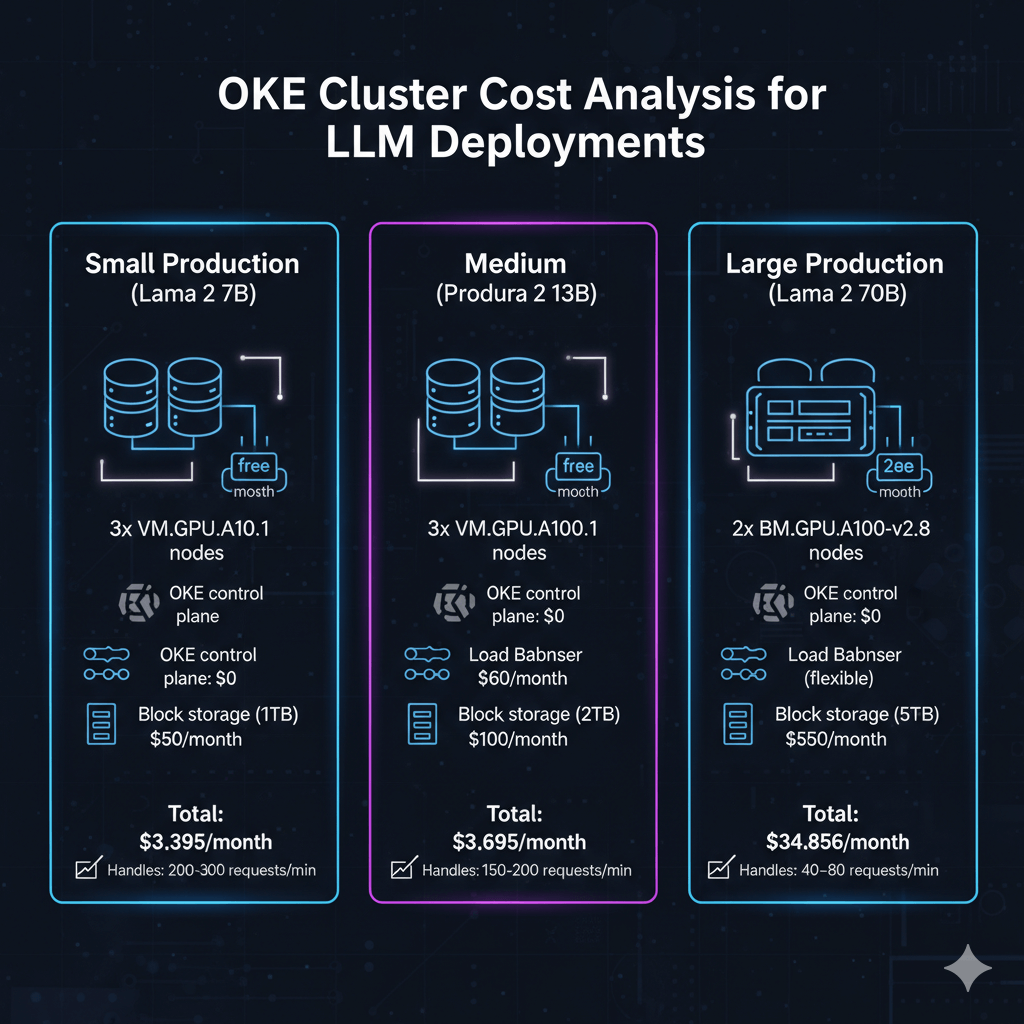
Small Production (Llama 2 7B):
- 3x VM.GPU.A10.1 nodes: $3,285/month
- OKE control plane: $0 (free)
- Load Balancer: $60/month
- Block storage (1TB): $50/month
- Total: $3,395/month
- Handles: 200-300 requests/min
Medium Production (Llama 2 13B):
- 3x VM.GPU.A100.1 nodes: $6,459/month
- OKE control plane: $0
- Load Balancer: $60/month
- Block storage (2TB): $100/month
- Total: $6,619/month
- Handles: 150-200 requests/min
Large Production (Llama 2 70B):
- 2x BM.GPU.A100-v2.8 nodes: $34,456/month
- OKE control plane: $0
- Load Balancer (flexible): $150/month
- Block storage (5TB): $250/month
- Total: $34,856/month
- Handles: 40-80 requests/min
Conclusion
Oracle Kubernetes Engine provides production-ready infrastructure for scalable LLM deployments. OKE eliminates control plane costs while delivering managed Kubernetes masters and automatic OS patching. GPU node pools with A10 and A100 instances support models from 7B to 70B+ parameters with horizontal scaling from 2 to 20+ nodes. Container-based deployments enable zero-downtime updates through rolling deployment strategies and rapid scaling with sub-5-minute node provisioning. Horizontal pod autoscaling adjusts replica counts based on CPU and memory utilization automatically. Monitor GPU utilization and inference performance using Prometheus and Grafana dashboards. Storage options including Block Volumes and File Storage optimize for different access patterns and pod startup times. Start with small 3-node clusters for development, then scale to multi-node production configurations as traffic grows.
Frequently Asked Questions
What are the key differences between deploying LLMs on OKE versus managed services like AWS EKS or Azure AKS, and how do costs compare?
Oracle Kubernetes Engine offers significant advantages for LLM deployments compared to AWS EKS and Azure AKS. The most substantial difference is zero control plane costs: OKE provides fully managed Kubernetes masters at no charge, while EKS costs $73/month per cluster and AKS charges $73/month for uptime SLA. For GPU compute, OKE pricing is 25-35% lower: VM.GPU.A100.1 runs $2,153/month versus $2,920 on AWS (p3.2xlarge) and $2,750 on Azure (NC6s v3). Network egress is dramatically cheaper on OCI at $0.0085/GB versus AWS $0.09/GB, critical for high-throughput LLM APIs serving millions of tokens daily. OKE integrates natively with OCI services: block volumes attach in 10 seconds versus 45-60 seconds on EKS, and OCIR (container registry) provides unlimited storage at no additional cost. Load balancer costs are comparable: OCI charges $60/month for 100 Mbps versus AWS ALB at $22/month plus $0.008/LCU-hour. However, EKS offers superior ecosystem integration with AWS services like SageMaker and Bedrock, while AKS provides better Azure OpenAI integration. OKE shines for cost-conscious deployments: a 3-node A100 cluster costs $6,619/month on OCI versus $9,133/month on AWS and $8,523/month on Azure, saving $30,168-$22,248 annually while delivering equivalent performance.
How do I implement zero-downtime deployments for LLM models on OKE when updating to newer model versions or changing inference configurations?
Implementing zero-downtime LLM updates on OKE requires rolling deployment strategies with careful resource management. Use Kubernetes Deployments with RollingUpdate strategy, setting maxSurge to 1 and maxUnavailable to 0, ensuring new pods start before old pods terminate. Configure readiness probes with 60-second initialDelaySeconds to allow model loading, preventing traffic routing to unready pods. Deploy new model versions using blue-green strategy: create parallel deployment with v2 label, verify functionality via internal testing service, then switch ingress traffic atomically by updating service selector from version: v1 to version: v2. Use Kubernetes Jobs for model preloading: create init containers that download model weights to shared PersistentVolume, reducing pod startup time from 180 seconds to 30 seconds. Implement canary deployments for gradual rollouts: route 10% traffic to new version using Istio or NGINX Ingress weighted routing, monitor error rates and latency P95 for 30 minutes, incrementally increase to 50% then 100% over 2 hours. For configuration updates like temperature or max_tokens, use ConfigMaps with automatic reload: mount ConfigMap as volume, implement file watcher in application code to reload settings without pod restart. Handle GPU memory efficiently during updates by temporarily over-provisioning node pool: scale up 1 additional GPU node before deployment, allowing new pods to schedule on fresh capacity, then drain old nodes gracefully using kubectl drain with 600-second timeout. Expected downtime: zero with proper configuration, though users may experience 50-100ms latency increase during rollover periods. Monitor deployment progress using kubectl rollout status and implement automatic rollback on failure: set progressDeadlineSeconds to 600, triggering rollback if new ReplicaSet fails to achieve ready state within 10 minutes.
What storage options work best for LLM model weights on OKE, and how do I optimize for fast pod startup times across multiple nodes?
Optimal storage strategy for LLM model weights on OKE combines Block Volumes for single-node deployments and File Storage for multi-node scenarios. For models under 50GB like Llama 2 7B, use OCI Block Volumes with Ultra High Performance tier (100 IOPS/GB, 480 KB/s per GB throughput), mounting as PersistentVolume with ReadWriteOnce access mode. This configuration loads 20GB model in 15-20 seconds versus 60-90 seconds with standard performance tier. Configure volumeClaimTemplate with 200GB capacity, enabling Kubernetes dynamic provisioning and automatic attachment to GPU nodes. For multi-replica deployments across multiple nodes, use OCI File Storage (NFS) with ReadWriteMany access mode, allowing simultaneous model access from all pods. Create File Storage with 100GB capacity in same availability domain as worker nodes, mounting at /models path. Performance: File Storage delivers 6.4 GB/s throughput for parallel reads, loading Llama 2 13B (26GB) in 8-12 seconds across 5 simultaneous pods. Implement init containers for model caching: download models from OCIR to local NVMe storage during pod initialization, then symlink to application path. Alternative: Use DaemonSet to pre-cache models on all GPU nodes, storing in hostPath volume at /data/models, reducing pod startup to 5 seconds by eliminating network transfers. For models exceeding 100GB like Llama 2 70B, use OCI Object Storage with intelligent tiering: store base model in Object Storage Standard ($0.0255/GB/month), maintain 3 cached copies on File Storage ($0.025/GB/month) across availability domains for rapid access. Implement cache warming strategy: deploy Kubernetes CronJob running hourly, reading first 1GB of each model file to keep data in File Storage cache. Cost comparison for 100GB Llama 2 70B deployment: Block Volumes cost $12.75/month per node ($38.25 for 3 nodes) versus File Storage $2.50/month (shared), saving $35.75/month while improving pod startup parallelism. Monitor storage performance using Prometheus: track volume_read_bytes_total and volume_read_latency_seconds metrics, alerting when P95 latency exceeds 100ms.