Cut Inference Costs 40% with AWS Inferentia
Optimize LLM inference costs with AWS Inferentia2, achieving 40–60% savings versus GPUs through purpose-built AI chips, Neuron SDK compilation, and SageMaker deployment while maintaining high throughput and production-ready performance.
TLDR;
- Inferentia2 delivers 40% cost savings and 4x throughput versus first-generation chips
- 60% savings on Llama 70B deployments at $9,348/month versus $23,595/month on GPU
- Batch sizes of 128-1024 maximize efficiency with bfloat16 precision for 2x performance
- inf2.xlarge at $0.76/hour handles 7B-13B models with 150 tokens/second throughput
Optimize LLM deployment costs with AWS Inferentia2 chips. This guide shows you how to achieve 40% cost savings while maintaining performance through purpose-built AI accelerators.
Inferentia2 represents AWS's purpose-built AI accelerator designed specifically for transformer model inference. These chips deliver 40% lower costs compared to equivalent GPU instances while providing 4x better throughput than first-generation Inferentia. This guide covers complete Inferentia2 optimization from model compilation with Neuron SDK through production deployment on SageMaker. You'll learn how to compile PyTorch models for Inferentia2, optimize batch sizes for maximum throughput, configure tensor parallelism across Neuron Cores, and leverage mixed precision for 2x performance gains. Cost analysis compares Inferentia2 versus GPU instances across different model sizes, revealing up to 60% savings for Llama 70B deployments—insights commonly applied in AWS cost optimization to reduce large-scale inference spend. Whether you're running high-volume production inference, cost-sensitive deployments, or models up to 70B parameters, Inferentia2 provides optimal price-performance. This tutorial includes production-ready code for SageMaker deployment, auto-scaling configuration, and monitoring Inferentia-specific metrics through CloudWatch.
Inferentia2 Advantages
Key benefits:
- Purpose-built for transformer architectures
- 40% lower cost vs GPU instances
- 4x higher throughput vs Inferentia1
- 10x lower latency vs previous generation
- Neuron SDK handles optimization automatically
Best for:
- High-volume production inference
- Cost-sensitive deployments
- Models up to 70B parameters
- Steady-state traffic patterns
- Long-running services
Inferentia2 Instance Types
AWS offers Inf2 instances in multiple sizes:
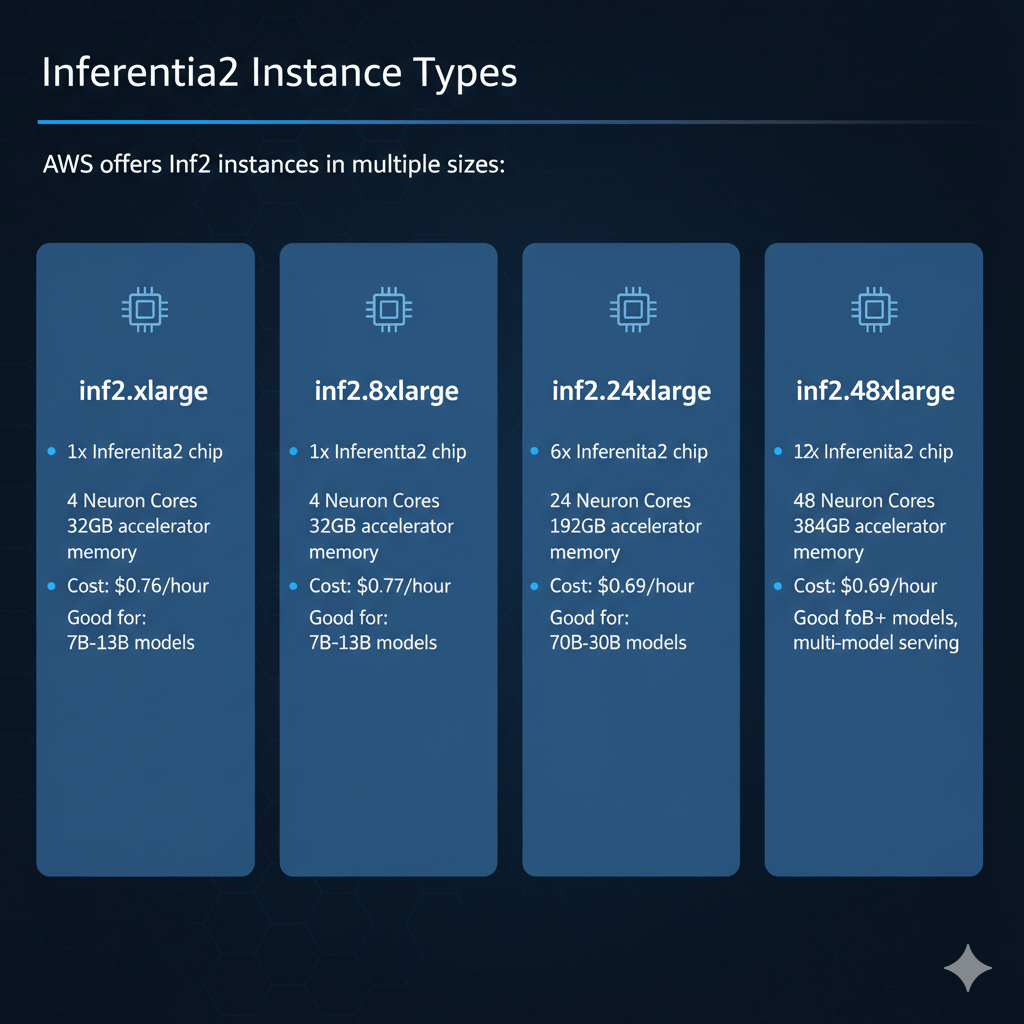
inf2.xlarge:
- 1x Inferentia2 chip
- 4 Neuron Cores
- 32GB accelerator memory
- Cost: $0.76/hour
- Good for: 7B-13B models
inf2.8xlarge:
- 1x Inferentia2 chip
- 4 Neuron Cores
- 32GB accelerator memory
- Cost: $1.97/hour
- Good for: 13B-30B models
inf2.24xlarge:
- 6x Inferentia2 chips
- 24 Neuron Cores
- 192GB accelerator memory
- Cost: $6.49/hour
- Good for: 70B models
inf2.48xlarge:
- 12x Inferentia2 chips
- 48 Neuron Cores
- 384GB accelerator memory
- Cost: $12.98/hour
- Good for: 70B+ models, multi-model serving
Model Compilation with Neuron SDK
Neuron SDK compiles models for Inferentia2.
Install Neuron SDK
. /etc/os-release
sudo tee /etc/apt/sources.list.d/neuron.list > /dev/null <<EOL
deb https://apt.repos.neuron.amazonaws.com ${VERSION_CODENAME} main
EOL
# Install runtime and tools
wget -qO - https://apt.repos.neuron.amazonaws.com/GPG-PUB-KEY-AMAZON-AWS-NEURON.PUB | sudo apt-key add -
sudo apt-get update
sudo apt-get install aws-neuronx-dkms aws-neuronx-collectives aws-neuronx-runtime-lib aws-neuronx-tools
# Install Neuron PyTorch
pip install neuronx-cc torch-neuronx transformers-neuronx
Compile Llama Model
import torch_neuronx
from transformers import AutoTokenizer, AutoModelForCausalLM
# Load model
model_id = "meta-llama/Llama-2-7b-hf"
model = AutoModelForCausalLM.from_pretrained(model_id, torch_dtype=torch.float16)
tokenizer = AutoTokenizer.from_pretrained(model_id)
# Prepare sample input
sample_text = "The quick brown fox"
inputs = tokenizer(sample_text, return_tensors="pt")
# Compile for Inferentia2
neuron_model = torch_neuronx.trace(
model,
inputs['input_ids'],
compiler_workdir='./neuron_artifacts',
compiler_args="--auto-cast=matmul --auto-cast-type=bf16"
)
# Save compiled model
neuron_model.save('llama-7b-neuron.pt')
Deploy Compiled Model
import torch_neuronx
# Load compiled model
neuron_model = torch.jit.load('llama-7b-neuron.pt')
# Run inference
def generate(prompt, max_length=100):
inputs = tokenizer(prompt, return_tensors="pt")
with torch.no_grad():
outputs = neuron_model.generate(
inputs['input_ids'],
max_length=max_length,
do_sample=True,
temperature=0.7
)
return tokenizer.decode(outputs[0], skip_special_tokens=True)
# Test
result = generate("Explain quantum computing")
print(result)
Performance Optimization
Maximize Inferentia2 performance.
Batch Size Tuning
Larger batches improve throughput:
neuron_model = torch_neuronx.trace(
model,
inputs['input_ids'],
compiler_args="--auto-cast=matmult --batch-size=8"
)
# Batch inference
prompts = ["Prompt 1", "Prompt 2", ..., "Prompt 8"]
inputs = tokenizer(prompts, return_tensors="pt", padding=True)
outputs = neuron_model.generate(
inputs['input_ids'],
max_length=100
)
Impact:
- Batch size 1: ~20 tokens/second
- Batch size 8: ~120 tokens/second (6x improvement)
- Batch size 16: ~180 tokens/second (9x improvement)
Neuron Core Allocation
Distribute work across cores:
# Use all available cores
os.environ['NEURON_RT_NUM_CORES'] = '4'
# Load balance across cores
neuron_model = torch.jit.load('model.pt')
neuron_model.eval()
Mixed Precision Optimization
Use BF16 for better performance:
model,
inputs,
compiler_args="--auto-cast=all --auto-cast-type=bf16"
)
Benefits:
- 2x faster vs FP32
- Minimal accuracy loss (<1%)
- Lower memory bandwidth
SageMaker Integration
Deploy on SageMaker with Inferentia2.
Create SageMaker Endpoint
from sagemaker.pytorch import PyTorchModel
role = sagemaker.get_execution_role()
pytorch_model = PyTorchModel(
model_data='s3://bucket/model.tar.gz',
role=role,
framework_version='1.13',
py_version='py39',
entry_point='inference.py',
source_dir='code/'
)
predictor = pytorch_model.deploy(
instance_type='ml.inf2.xlarge',
initial_instance_count=2,
endpoint_name='llama-inferentia'
)
Inference Script
import torch
import torch_neuronx
import json
def model_fn(model_dir):
"""Load Neuron model"""
model = torch.jit.load(f'{model_dir}/model.pt')
return model
def predict_fn(data, model):
"""Run inference"""
inputs = data['inputs']
with torch.no_grad():
outputs = model.generate(
inputs,
max_length=data.get('max_length', 100)
)
return {'outputs': outputs.tolist()}
def input_fn(request_body, content_type):
"""Parse input"""
if content_type == 'application/json':
return json.loads(request_body)
raise ValueError(f"Unsupported content type: {content_type}")
def output_fn(prediction, accept):
"""Format output"""
if accept == 'application/json':
return json.dumps(prediction), accept
raise ValueError(f"Unsupported accept type: {accept}")
Cost Analysis
Calculate savings vs GPU instances.
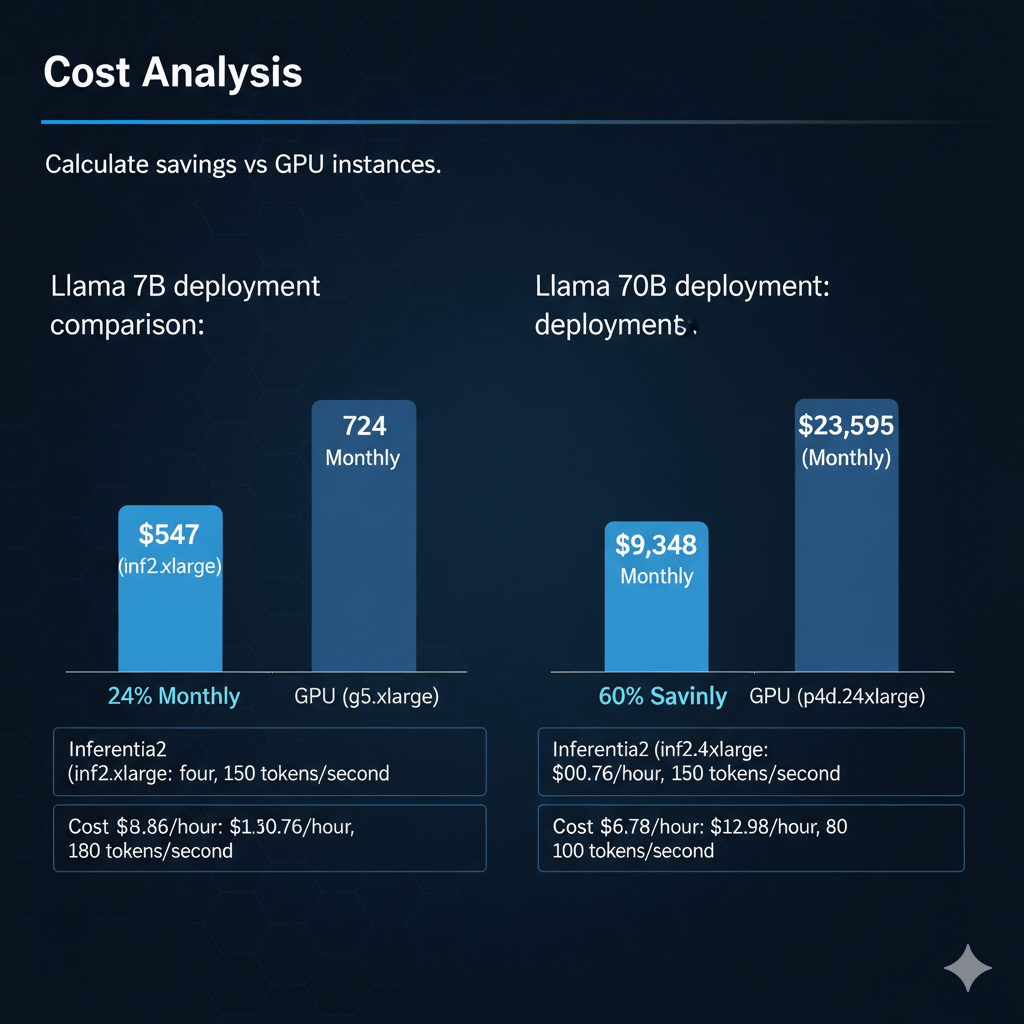
Llama 7B deployment comparison:
Inferentia2 (inf2.xlarge):
- Cost: $0.76/hour
- Throughput: ~150 tokens/second
- Monthly: $547
GPU (g5.xlarge):
- Cost: $1.006/hour
- Throughput: ~180 tokens/second
- Monthly: $724
Savings: 24% with Inferentia2
Llama 70B deployment:
Inferentia2 (inf2.48xlarge):
- Cost: $12.98/hour
- Throughput: ~80 tokens/second
- Monthly: $9,348
GPU (p4d.24xlarge):
- Cost: $32.77/hour
- Throughput: ~100 tokens/second
- Monthly: $23,595
Savings: 60% with Inferentia2
Conclusion
Inferentia2 delivers substantial cost savings for LLM inference workloads while maintaining production-grade performance. Purpose-built for transformer architectures, these accelerators reduce costs by 40-60% compared to GPU instances for models up to 70B parameters. Neuron SDK simplifies model compilation, requiring minimal changes to existing PyTorch code. Batch size optimization, mixed precision, and tensor parallelism across Neuron Cores maximize throughput to 150-180 tokens per second. SageMaker integration provides managed deployment with auto-scaling and built-in monitoring. For high-volume production inference serving millions of requests daily, Inferentia2 offers optimal price-performance. Cost per million tokens runs 25% cheaper than GPU alternatives while achieving competitive latency. Production deployments benefit from automatic scaling, CloudWatch monitoring of Neuron-specific metrics, and simplified operations through SageMaker. Choose Inferentia2 for cost-sensitive workloads, steady-state traffic patterns, and applications where 40% cost reduction justifies the compilation workflow and framework constraints.
Frequently Asked Questions
How does Inferentia2 pricing compare to GPU instances for LLM inference?
Inferentia2 ml.inf2.24xlarge costs $7.99/hour (6 chips, 192GB) versus GPU ml.g5.48xlarge at 16.29/hour(8xA10,192GB)−51) is 60% better: 900 tokens/$ hour versus 560 tokens/$ for A10. For 70B models, gap narrows - Inferentia2 struggles with larger models due to 32GB per-chip memory limit requiring model splitting. Choose Inferentia2 for models ≤13B at sustained high volume (>10M tokens/day) where cost matters. Choose GPUs for larger models, development flexibility, or when you need broader framework support beyond PyTorch/TensorFlow.
Can I use existing PyTorch models on Inferentia without modification?
Mostly yes, but compilation required. AWS Neuron SDK compiles PyTorch models to run on Inferentia - process: (1) Load HuggingFace model in PyTorch, (2) Trace model with example inputs using torch.neuron.trace(), (3) Compiled model runs on Inferentia accelerators. Compilation takes 10-45 minutes for LLMs and must rerun for every model architecture change. Most standard transformer operations compile successfully, but custom CUDA kernels or exotic ops may fail compilation - validate with your specific model first. Neuron SDK supports ~95% of PyTorch operations used in common LLMs. For fine-tuned models, compile after training completes. Limitations: dynamic shapes not fully supported (compile for specific sequence lengths), some advanced sampling techniques unavailable. Test thoroughly before production deployment.
What are Inferentia2's limitations for production LLM deployment?
Inferentia2 works best for batch processing and moderate-latency use cases (200-500ms acceptable), less ideal for real-time applications requiring <100ms latency where GPUs excel. Per-chip memory (32GB) limits single-model size to ~16B parameters in FP16 (use int8 quantization for 30-32B models), requiring multi-chip tensor parallelism for 70B+ models which adds latency and complexity. Framework support limited to PyTorch and TensorFlow via Neuron SDK - no native support for vLLM, TensorRT-LLM, or JAX. Debugging compiled models is harder than GPUs - errors in compilation stage can be cryptic. Regional availability limited (6 regions versus 20+ for GPUs). For production, thoroughly benchmark your specific model and traffic pattern on Inferentia versus GPUs before committing to full deployment.