Achieve 99.99% Uptime with Multi-Region AWS
Deploy LLMs across multiple AWS regions for global reach and high availability. This guide shows you proven patterns for multi-region architectures that deliver <100ms latency worldwide.
TLDR;
- Route 53 latency routing reduces response times by 50-80% for international users
- Active-active deployment achieves 99.99% uptime with sub-1-minute RTO during failures
- S3 Cross-Region Replication synchronizes models across regions in 5-15 minutes
- DynamoDB Global Tables provide sub-second replication for consistent global state
Global applications demand global infrastructure. Users in Tokyo should not wait for responses from us-east-1 data centers. Multi-region LLM deployment solves this challenge by distributing inference endpoints across geographic regions, reducing latency by 50-80% for international users. This guide covers three proven architecture patterns for multi-region deployments including active-active configurations for maximum availability, active-passive for cost optimization, and geo-routing for compliance requirements. You'll learn how to configure Route 53 latency-based routing, synchronize models across regions using S3 Cross-Region Replication, and maintain global state with DynamoDB Global Tables. Implementation includes automatic failover through health checks, cost optimization through regional pricing strategies, and monitoring across regions with CloudWatch dashboards. Whether you need GDPR-compliant EU deployments, sub-100ms latency for global users, or 99.99% availability SLAs, this tutorial provides production-ready code and proven patterns for building resilient multi-region AWS LLM infrastructure.
Benefits and Use Cases
Key benefits:
- Reduced latency (50-80% improvement)
- High availability (99.99% uptime achievable)
- Disaster recovery (RTO <1 minute)
- Compliance (data residency requirements)
- Load distribution (better resource utilization)
Deploy multi-region when:
- Global user base across continents
- SLA requires <100ms latency
- Availability needs exceed 99.9%
- Regulatory requirements mandate data residency
- Traffic exceeds single-region capacity
Architecture Patterns
Choose based on requirements and budget.
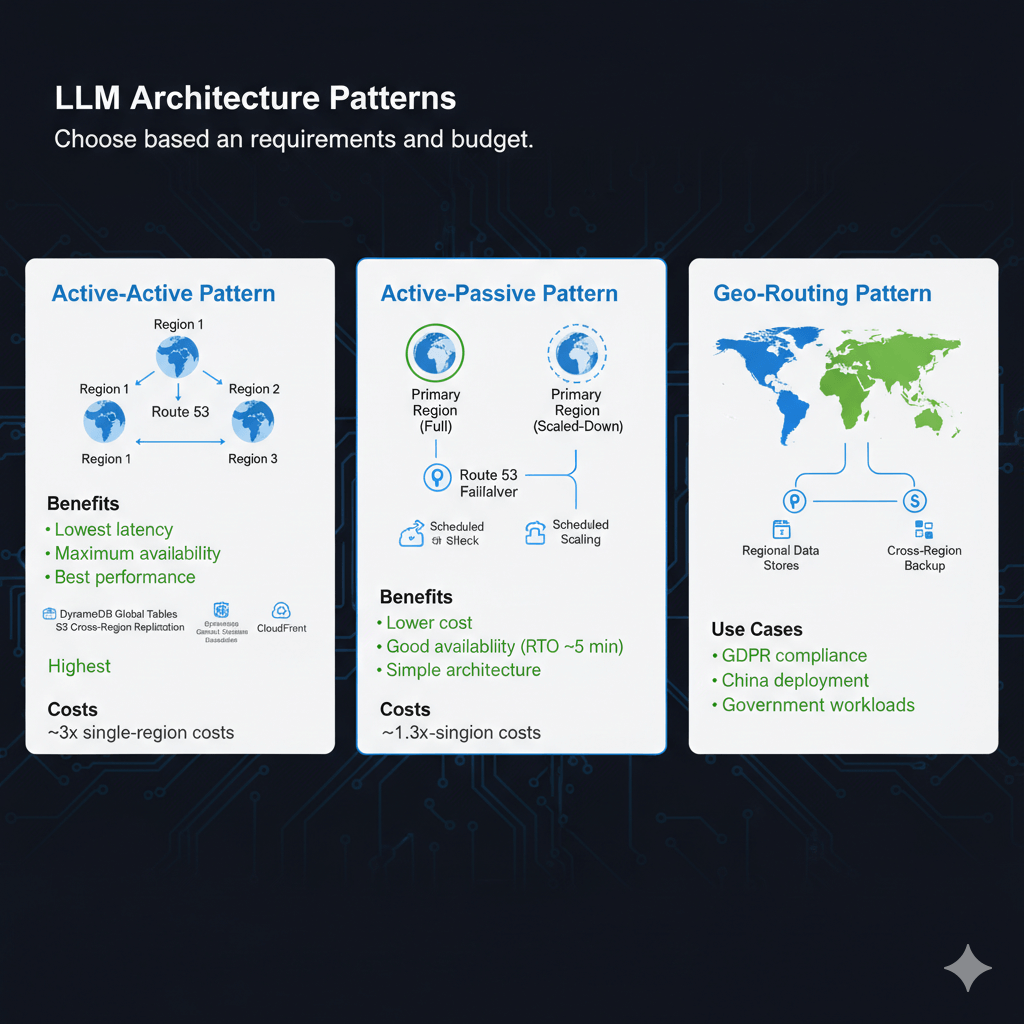
Active-Active Pattern
All regions serve production traffic simultaneously.
Architecture:
- Deploy LLM endpoints in 3+ regions
- Route 53 latency-based routing
- DynamoDB Global Tables for state
- S3 Cross-Region Replication for models
- CloudFront for API caching
Benefits:
- Lowest latency (route to nearest region)
- Maximum availability (any region can fail)
- Best performance (distribute load)
Costs:
- Highest (run full stack in each region)
- ~3x single-region costs for 3 regions
Active-Passive Pattern
Primary region serves traffic. Secondary region on standby.
Architecture:
- Primary region: Full deployment
- Secondary region: Scaled-down deployment
- Route 53 health checks for failover
- Scheduled scaling for disaster recovery
Benefits:
- Lower cost than active-active
- Good availability (RTO ~5 minutes)
- Simple architecture
Costs:
- ~1.3x single-region costs
Geo-Routing Pattern
Region selection based on user location.
Architecture:
- Deploy in regions matching user geography
- Route 53 geolocation routing
- Regional data stores
- Cross-region backup
Use cases:
- GDPR compliance (EU data in EU)
- China deployment (cn-north-1)
- Government workloads (GovCloud)
Implementation Guide
Deploy active-active multi-region architecture.
Step 1: Deploy Endpoints in Each Region
Deploy SageMaker endpoints in target regions:
regions = ['us-east-1', 'eu-west-1', 'ap-southeast-1']
for region in regions:
session = boto3.Session(region_name=region)
sagemaker = session.client('sagemaker')
# Deploy endpoint
response = sagemaker.create_endpoint(
EndpointName=f'llama-endpoint-{region}',
EndpointConfigName=f'llama-config-{region}'
)
print(f"Deployed to {region}: {response['EndpointArn']}")
Step 2: Configure Route 53 Latency Routing
route53 = boto3.client('route53')
# Create hosted zone
zone_response = route53.create_hosted_zone(
Name='llm-api.example.com',
CallerReference=str(hash(datetime.now()))
)
zone_id = zone_response['HostedZone']['Id']
# Create latency-based records
regions_config = [
{'region': 'us-east-1', 'value': 'llm-us.example.com'},
{'region': 'eu-west-1', 'value': 'llm-eu.example.com'},
{'region': 'ap-southeast-1', 'value': 'llm-ap.example.com'}
]
for config in regions_config:
route53.change_resource_record_sets(
HostedZoneId=zone_id,
ChangeBatch={
'Changes': [{
'Action': 'CREATE',
'ResourceRecordSet': {
'Name': 'api.llm-api.example.com',
'Type': 'CNAME',
'SetIdentifier': config['region'],
'Region': config['region'],
'TTL': 60,
'ResourceRecords': [{'Value': config['value']}]
}
}]
}
)
Step 3: Setup Global State with DynamoDB
# Create global table
dynamodb = boto3.client('dynamodb')
response = dynamodb.create_global_table(
GlobalTableName='llm-sessions',
ReplicationGroup=[
{'RegionName': 'us-east-1'},
{'RegionName': 'eu-west-1'},
{'RegionName': 'ap-southeast-1'}
]
)
# Table replicates automatically across regions
# Sub-second replication lag typical
Step 4: Model Synchronization
Replicate models across regions:
s3 = boto3.client('s3')
# Enable cross-region replication
replication_config = {
'Role': 'arn:aws:iam::account:role/s3-replication',
'Rules': [
{
'ID': 'model-replication',
'Status': 'Enabled',
'Priority': 1,
'Destination': {
'Bucket': 'arn:aws:s3:::models-eu-west-1',
'ReplicationTime': {
'Status': 'Enabled',
'Time': {'Minutes': 15}
}
},
'Filter': {'Prefix': 'models/'}
}
]
}
s3.put_bucket_replication(
Bucket='models-us-east-1',
ReplicationConfiguration=replication_config
)
Health Checks and Failover
Automatic failover on region failure.
Route 53 Health Checks
# Create health check for each endpoint
health_check = route53.create_health_check(
HealthCheckConfig={
'Type': 'HTTPS',
'ResourcePath': '/health',
'FullyQualifiedDomainName': 'llm-us.example.com',
'Port': 443,
'RequestInterval': 30,
'FailureThreshold': 3
}
)
# Associate with Route 53 record
route53.change_resource_record_sets(
HostedZoneId=zone_id,
ChangeBatch={
'Changes': [{
'Action': 'UPSERT',
'ResourceRecordSet': {
'Name': 'api.llm-api.example.com',
'Type': 'CNAME',
'SetIdentifier': 'us-east-1',
'Region': 'us-east-1',
'TTL': 60,
'ResourceRecords': [{'Value': 'llm-us.example.com'}],
'HealthCheckId': health_check['HealthCheck']['Id']
}
}]
}
)
CloudWatch Alarms
Monitor regional health:
cloudwatch.put_metric_alarm(
AlarmName='llm-us-east-1-errors',
ComparisonOperator='GreaterThanThreshold',
EvaluationPeriods=2,
MetricName='ModelInvocationErrors',
Namespace='AWS/SageMaker',
Period=300,
Statistic='Sum',
Threshold=10,
ActionsEnabled=True,
AlarmActions=['arn:aws:sns:us-east-1:account:llm-alerts'],
Dimensions=[
{'Name': 'EndpointName', 'Value': 'llama-endpoint-us-east-1'}
]
)
Cost Optimization
Reduce multi-region costs.
Regional Pricing Differences
Leverage price variations:
regional_pricing = {
'us-east-1': 1080, # $1.50/hour
'us-west-2': 1080, # $1.50/hour
'eu-west-1': 1166, # $1.62/hour (8% more)
'ap-southeast-1': 1296, # $1.80/hour (20% more)
'ap-northeast-1': 1382 # $1.92/hour (28% more)
}
# Deploy primary in us-east-1
# Use cheaper regions when possible
Traffic-Based Scaling
Scale each region based on actual traffic:
# eu-west-1: Medium traffic (3 instances)
# ap-southeast-1: Low traffic (1 instance)
import boto3
regions_scaling = {
'us-east-1': {'min': 3, 'max': 10, 'desired': 5},
'eu-west-1': {'min': 2, 'max': 6, 'desired': 3},
'ap-southeast-1': {'min': 1, 'max': 4, 'desired': 1}
}
for region, config in regions_scaling.items():
session = boto3.Session(region_name=region)
autoscaling = session.client('application-autoscaling')
autoscaling.register_scalable_target(
ServiceNamespace='sagemaker',
ResourceId=f'endpoint/llama-endpoint-{region}/variant/AllTraffic',
ScalableDimension='sagemaker:variant:DesiredInstanceCount',
MinCapacity=config['min'],
MaxCapacity=config['max']
)
Scheduled Scaling
Align with traffic patterns:
autoscaling.put_scheduled_action(
ServiceNamespace='sagemaker',
ScheduledActionName='scale-down-apac-night',
ResourceId='endpoint/llama-endpoint-ap-southeast-1/variant/AllTraffic',
ScalableDimension='sagemaker:variant:DesiredInstanceCount',
Schedule='cron(0 0 * * ? *)', # Midnight UTC
ScalableTargetAction={'MinCapacity': 0, 'MaxCapacity': 2}
)
Monitoring Global Deployment
Track performance across regions.
CloudWatch Cross-Region Dashboard
import json
cloudwatch = boto3.client('cloudwatch')
dashboard_body = {
"widgets": [
{
"type": "metric",
"properties": {
"metrics": [
["AWS/SageMaker", "ModelLatency", {"region": "us-east-1"}],
["...", {"region": "eu-west-1"}],
["...", {"region": "ap-southeast-1"}]
],
"period": 300,
"stat": "Average",
"region": "us-east-1",
"title": "Global Latency"
}
}
]
}
cloudwatch.put_dashboard(
DashboardName='LLMGlobalDeployment',
DashboardBody=json.dumps(dashboard_body)
)
Conclusion
Multi-region LLM deployment delivers global scale with reduced latency and high availability. Active-active patterns provide zero-downtime failover, while active-passive configurations balance cost and resilience. Route 53 latency-based routing automatically directs users to their nearest endpoint, improving response times by 50-80%. S3 Cross-Region Replication synchronizes model artifacts across regions, and DynamoDB Global Tables maintain consistent state worldwide. Cost optimization through regional pricing differences and traffic-based scaling reduces infrastructure costs while maintaining performance. Health checks and CloudWatch monitoring ensure automatic failover during outages. For applications serving global audiences, requiring sub-100ms latency, or needing 99.99% availability SLAs, multi-region architecture provides the foundation for production-scale LLM deployments. Start with three regions for true high availability, implement automated failover testing, and monitor performance across all regions to ensure consistent user experience worldwide.
Frequently Asked Questions
How do I handle model synchronization across regions?
Maintain single source of truth in S3 with cross-region replication (CRR) enabled - model weights replicate to secondary regions in 5-15 minutes. For faster synchronization, use Lambda functions triggered on S3 PUT events to immediately copy to all regions (replication completes in 1-3 minutes but costs more). Each region's SageMaker endpoints pull from their local S3 bucket, eliminating cross-region data transfer charges ($0.02/GB). For model updates, use deployment pipelines that: (1) upload to primary S3 bucket, (2) wait for CRR completion, (3) trigger endpoint updates in all regions simultaneously via Step Functions. This ensures version consistency. Store model registry metadata in DynamoDB Global Tables for real-time version tracking across regions, preventing split-brain scenarios where regions serve different model versions.
What's the latency impact of global load balancing?
Route 53 latency-based routing adds 1-5ms overhead - negligible for LLM inference where model execution takes 200-2000ms. Geographic routing to nearest region reduces baseline latency by 40-120ms versus single-region deployment - for US East users, routing to us-east-1 versus eu-west-1 saves 80ms average. CloudFront can't cache LLM inference (dynamic responses) but reduces API Gateway latency by 15-30ms. For lowest latency, use AWS Global Accelerator ($0.025/hour per accelerator) which provides anycast IPs routing traffic through AWS backbone network, improving latency by 20-50ms versus public internet. The latency benefits of multi-region deployment (routing to nearest region) far outweigh routing overhead, especially for global user bases spanning continents.
How do I test failover without impacting production?
Implement chaos engineering with scheduled drills quarterly: (1) Route small percentage (5%) of traffic to secondary region continuously to keep it warm and validated; (2) Use Route 53 weighted routing to gradually shift traffic (10% → 25% → 50% → 100%) to secondary region during off-peak hours, monitoring metrics; (3) After successful test, shift back to primary; (4) Automate failover testing with AWS Fault Injection Simulator, creating experiments that simulate region failures and validate automatic failover works. Test scenarios: primary region endpoint health checks failing, SageMaker endpoint throttling, S3 availability issues. Maintain runbooks documenting manual failover procedures as backup. Track metrics: failover completion time, data consistency, user impact (error rates during switch). Never test failover during peak traffic or major launches.