Slash Serverless Costs 60% with Smart Architecture
Reduce serverless application costs up to 60% using Lambda optimization, API Gateway caching, DynamoDB capacity planning, and architectural patterns for cost-effective serverless systems.
TL;DR
- Optimize Lambda memory with Power Tuning: Memory allocation directly impacts cost and speed. Use Lambda Power Tuning to find the sweet spot—often reducing costs 30-50% by balancing execution time against GB-second pricing.
- API Gateway: cache responses, compress payloads, validate requests. Caching cuts backend invocations for repeated requests. Gzip compression reduces data transfer 60-80%. Request validation blocks invalid calls before they reach Lambda, saving execution costs.
- DynamoDB: choose capacity mode wisely. Use on-demand for unpredictable/spiky traffic; use provisioned + auto-scaling for predictable workloads—costs 60-80% less per request. Audit Global Secondary Indexes (they multiply costs) and consider DAX caching for read-heavy workloads.
- Event-driven batching cuts invocations: Process messages in batches via SQS (e.g., 100 events per invocation instead of 1) to reduce Lambda count by 99%. Use EventBridge for async workflows to eliminate polling costs.
- Monitor relentlessly: Track cost per function, invocation trends, and DynamoDB consumption. Tag resources for granular visibility. Set alerts for unexpected spikes.
Serverless applications promise automatic scaling and pay-per-use pricing, but inefficient architectures can generate surprisingly high costs.
Organizations migrating to serverless often experience sticker shock when Lambda invocations reach millions monthly, API Gateway requests accumulate transfer fees, and DynamoDB throughput costs spiral.
Proper serverless cost optimization can reduce expenses by 60% or more while maintaining performance and scalability.
The key to cost-effective serverless lies in understanding pricing models and architecting accordingly. Lambda charges per invocation and execution duration in 1ms increments.
API Gateway bills per million requests plus data transfer. DynamoDB pricing depends on capacity mode, with on-demand versus provisioned offering different cost profiles. Step Functions charge per state transition.
This guide explores optimization strategies across Lambda function configuration, API Gateway optimization, DynamoDB on-demand vs provisioned, event-driven architecture patterns, and monitoring best practices.
Lambda Function Optimization
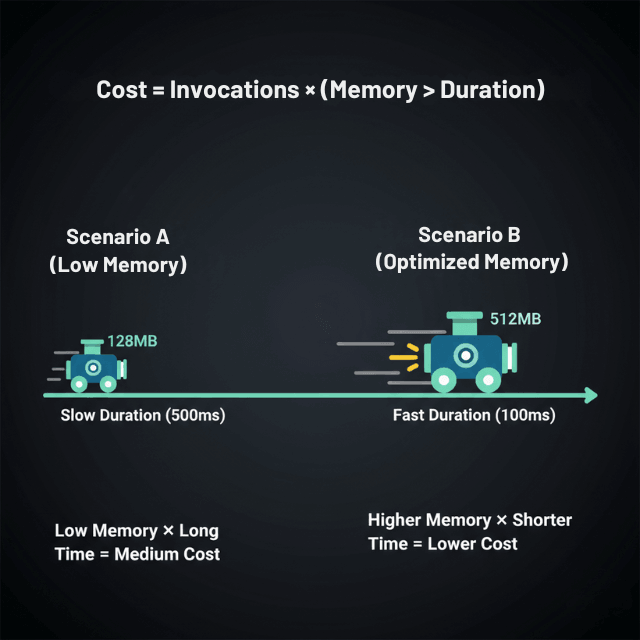
Lambda cost optimization starts with right-sizing memory allocation. Memory configuration determines both RAM available and CPU power allocated, with billing based on GB-seconds.
The optimal memory setting balances execution speed against memory cost. Functions with inadequate memory run slowly, accumulating duration charges. Over-provisioned memory wastes resources on unused capacity.
Use Lambda Power Tuning to test functions across memory configurations from 128MB to 10,240MB. The tool runs your function multiple times at each memory level, measuring execution time and cost. Results reveal the sweet spot where cost per invocation is minimized. Many functions achieve 30-50% cost reduction through optimal memory selection.
Minimize cold starts through provisioned concurrency for latency-sensitive functions. While provisioned concurrency adds baseline cost, it eliminates cold start delays and can reduce total cost for high-traffic functions by keeping instances warm. Reserve provisioned concurrency only for production traffic patterns that justify the expense.
Code optimization reduces execution duration directly impacting costs. Move initialization code outside the handler function to run once per container rather than per invocation. Minimize dependencies and package size to reduce deployment time and cold start duration. Use connection pooling for database connections rather than creating new connections per invocation.
API Gateway Cost Reduction
API Gateway pricing includes $3.50 per million requests plus data transfer charges. For high-traffic APIs, these costs accumulate rapidly. Caching responses at API Gateway level eliminates backend invocations for repeated requests. Configure cache TTL based on data freshness requirements, typically 60-300 seconds for semi-static content.
Response compression reduces data transfer costs. Enable gzip compression in API Gateway to compress responses before transmission. For large JSON payloads, compression reduces transfer by 60-80%, directly cutting data egress fees. Minimize response payload size by returning only necessary fields rather than complete objects.
Request validation at API Gateway prevents unnecessary Lambda invocations for malformed requests. Define request schemas that validate parameters before invoking backend functions. Invalid requests return errors immediately without consuming Lambda execution time.
For very high traffic APIs, consider CloudFront as a caching layer in front of API Gateway. CloudFront caching reduces requests reaching API Gateway, cutting both request fees and backend invocations. This approach proves cost-effective for APIs exceeding 100 million requests monthly.
DynamoDB Capacity Planning
DynamoDB offers two capacity modes with different cost implications. On-demand capacity charges per request without capacity planning, ideal for unpredictable or spiky traffic. Provisioned capacity requires forecasting read and write requirements but costs 60-80% less per request for consistent workloads.
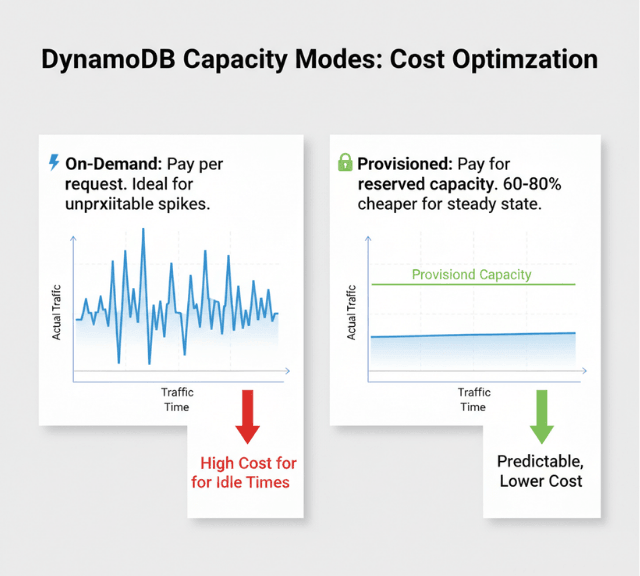
For predictable traffic, provisioned capacity with auto-scaling delivers optimal costs. Configure auto-scaling policies that adjust capacity based on utilization, typically targeting 70% utilization. This approach prevents over-provisioning while avoiding throttling.
Global Secondary Indexes multiply costs as each index requires its own provisioned capacity. Audit GSI usage and remove unused indexes. Project only required attributes into indexes rather than ALL to reduce storage costs. For infrequently accessed indexes, consider on-demand capacity while maintaining provisioned for the base table.
DynamoDB accelerator (DAX) caches frequently accessed items, reducing read capacity consumption. For read-heavy workloads with hot data patterns, DAX can reduce read capacity costs by 80% while improving latency. DAX cluster costs must be weighed against read capacity savings, typically breaking even at high read volumes.
Event-Driven Architecture Patterns
Event-driven patterns reduce costs by eliminating polling and minimizing active wait time. Use EventBridge or SNS/SQS for asynchronous processing rather than synchronous invocations. Async processing allows batching multiple events, reducing total Lambda invocations.
Batch processing through SQS queues accumulates messages before invoking Lambda, reducing invocation count. Configure batch size and timeout settings to balance processing latency against cost efficiency. Processing 100 messages per invocation rather than 1 message reduces costs by 99%.
Step Functions orchestrate complex workflows but charge per state transition. Optimize state machines by consolidating sequential Lambda invocations where appropriate, using parallel execution to reduce total transitions, and implementing wait states that pause workflows without continuous execution.
Monitoring and Cost Visibility
CloudWatch metrics track Lambda invocations, duration, errors, and throttles. Create dashboards monitoring cost per function, invocations by function, average duration trends, and error rates impacting costs. Set CloudWatch alarms for unexpected cost spikes based on invocation rates or duration increases.
Cost Explorer with resource-level granularity identifies specific Lambda functions, API Gateway endpoints, or DynamoDB tables driving costs. Tag resources consistently to enable cost allocation by project, environment, or team. Monthly reviews of cost trends reveal optimization opportunities and validate that implemented changes delivered expected savings.
Conclusion
Serverless cost optimization requires systematic attention to function configuration, API design, database capacity planning, and architectural patterns. Lambda memory optimization through power tuning reduces costs by 30-50%.
API Gateway caching eliminates unnecessary backend invocations while response compression cuts data transfer fees. DynamoDB capacity mode selection between on-demand and provisioned can cut costs by 60-80% for appropriate workloads. Event-driven architectures with batching reduce invocation counts by 90%+.
Implement comprehensive monitoring to track cost per transaction, identify optimization opportunities, and maintain balance between cost efficiency and performance. Regular reviews of configurations and usage patterns catch inefficiencies before they accumulate into significant expenses.
Frequently Asked Questions
Should I use on-demand or provisioned capacity for DynamoDB?
Use on-demand for unpredictable traffic patterns, new applications without usage history, or tables with sporadic access. Use provisioned capacity for consistent, predictable workloads where you can accurately forecast capacity needs.
Provisioned costs 60-80% less per request, making it economical for steady traffic. Monitor actual usage for 2-4 weeks before converting on-demand to provisioned.
How much memory should I allocate to Lambda functions?
Use Lambda Power Tuning to test your specific function across memory configurations. Optimal memory varies by workload characteristics.
CPU-intensive functions benefit from higher memory allocations that provide proportionally more CPU, often completing faster at lower total cost. I/O-bound functions may perform similarly across memory levels, favoring minimal allocation.
When does API Gateway caching provide ROI?
API Gateway caching costs $0.02 per hour per GB cache size. For APIs with repeated requests to semi-static data, caching provides ROI when backend invocation savings exceed cache costs.
APIs serving over 1 million daily requests to cacheable endpoints typically benefit. Test cache hit rates to validate ROI before enabling in production.
Summarize this post with:
Ready to put this into production?
Our engineers have deployed these architectures across 100+ client engagements — from AWS migrations to Kubernetes clusters to AI infrastructure. We turn complex cloud challenges into measurable outcomes.