Slash Your AWS Serverless Costs by 60%
Optimize AWS serverless costs with proven strategies for Lambda, API Gateway, Fargate, and Step Functions. Reduce expenses by 30-60% while maintaining performance.

Introduction
AWS serverless costs can spiral quickly without proper optimization. Organizations waste 30-40% of their serverless spending on overprovisioned Lambda functions, idle API Gateway resources, and inefficient Step Functions workflows. The promise of pay-per-use pricing only delivers value when you understand how AWS charges for serverless services and implement strategic optimization practices.
This guide reveals how to reduce AWS serverless costs by 30-60% through right-sizing Lambda functions, choosing optimal API Gateway types, leveraging Spot pricing for Fargate, and implementing intelligent monitoring. Whether you're running production APIs or processing millions of events, these strategies will transform your serverless economics.
Understanding AWS Serverless Pricing Models
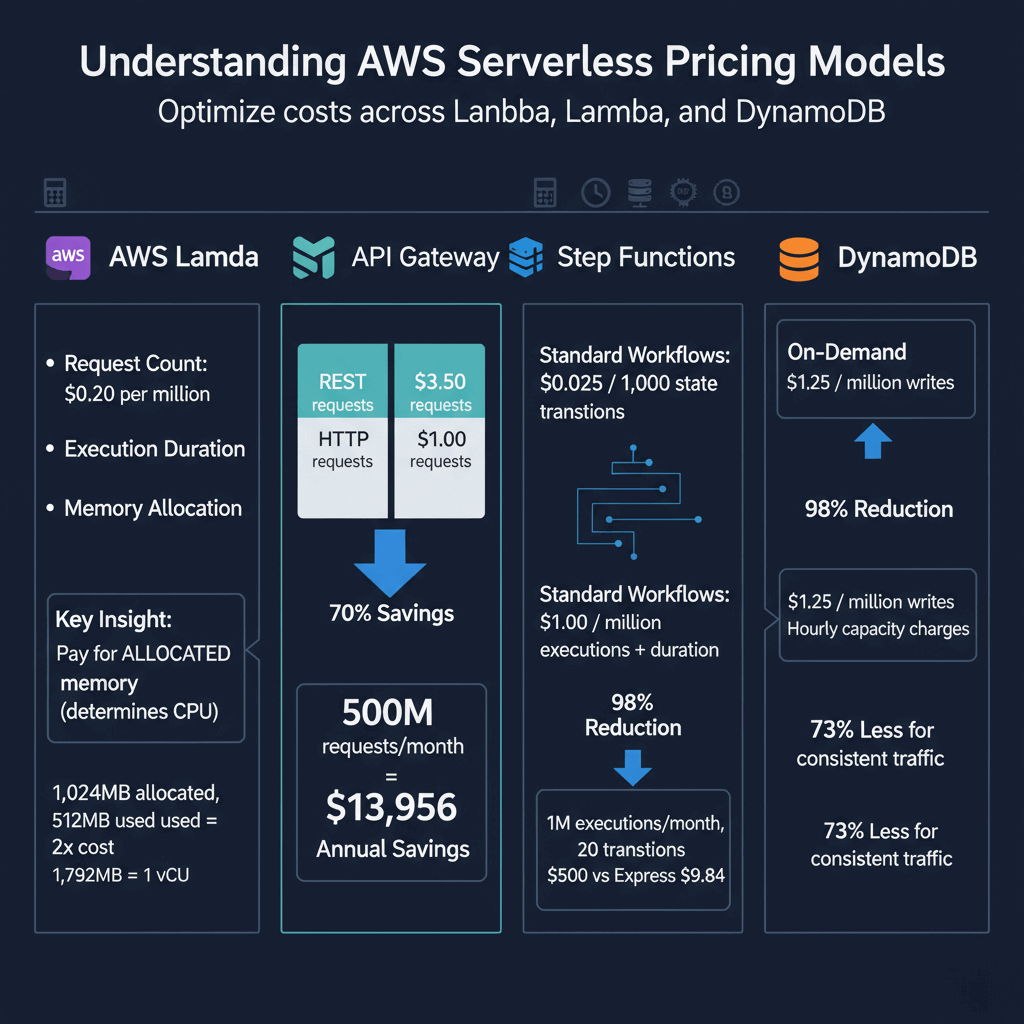
AWS Lambda charges based on three factors: request count ($0.20 per million), execution duration, and memory allocation. The critical insight is that Lambda charges for allocated memory, not used memory. Configuring a function with 1,024MB when it uses only 512MB doubles your costs. Memory allocation also determines CPU power—1,792MB equals one full vCPU.
API Gateway offers two types with dramatically different pricing. REST APIs cost $3.50 per million requests, while HTTP APIs cost $1.00 per million requests—a 70% savings. For applications serving 500 million requests monthly, this difference represents $1,163 in monthly savings or $13,956 annually.
Step Functions pricing varies between workflow types. Standard Workflows charge $0.025 per 1,000 state transitions, while Express Workflows charge $1.00 per million executions plus duration costs. For high-frequency workflows with 20 state transitions running 1 million times monthly, Standard costs $500 versus Express at $9.84—a 98% reduction.
DynamoDB offers On-Demand mode at $1.25 per million writes and $0.25 per million reads, or Provisioned mode with hourly capacity charges. For consistent traffic, Provisioned mode with autoscaling costs 73% less than On-Demand.
Right-Sizing AWS Lambda Functions
Lambda optimization delivers the highest ROI in serverless cost reduction. AWS Lambda Power Tuning automates finding optimal memory configurations by testing functions across different memory settings and analyzing execution time versus cost trade-offs, a technique we explore in our AWS consulting and optimization guide.
The 80% rule provides a simple guideline: configure memory at 80% above peak usage. If peak memory usage is 400MB, allocate 512MB. This provides headroom without massive overprovisioning.
Higher memory allocations cost more per GB-second but provide more CPU power. Sometimes doubling memory cuts execution time by 60%, resulting in net cost savings. A fintech company analyzed 200+ Lambda functions with Power Tuning and found 68% were overprovisioned, achieving $148,800 in annual savings with a 42% average memory reduction.
Minimize deployment package size to reduce cold starts. Remove unused dependencies, use Lambda layers for shared libraries, and compress packages. Moving expensive operations outside the handler function allows Lambda to reuse them across invocations.
Use Provisioned Concurrency selectively for customer-facing APIs where sub-100ms response times justify the 10x cost increase. For occasional traffic, strategic warming with scheduled CloudWatch Events maintains warm containers at pennies per hour.
API Gateway Cost Optimization
Migrate from REST APIs to HTTP APIs for immediate 70% cost reduction. HTTP APIs support JWT authorizers, CORS configuration, custom domains, and AWS service integrations—sufficient for most applications. Only use REST APIs when you specifically need API keys, request validation, AWS WAF integration, or resource policies.
API Gateway caching stores responses for configurable TTLs, serving cached responses without invoking Lambda. For an API serving 100M requests monthly with 60% cacheable content, caching reduces Lambda invocations from 100M to 40M, saving $100 monthly in Lambda costs minus $27 for a 1.6GB cache—a net savings of $73 monthly.
Minimize request volume through client-side caching with Cache-Control headers, WebSockets for real-time communication instead of polling (90% cost reduction), and batching operations. One request with 100 items costs the same as one individual request, achieving 90% reduction per operation.
Optimizing Fargate and Container Costs
Fargate charges for vCPU ($0.04048 per vCPU hour) and memory ($0.004445 per GB hour) regardless of utilization. A task with 0.5 vCPU and 1GB memory running continuously costs $17.77 monthly. Lambda is cheaper for sporadic traffic under 15 minutes, while Fargate becomes cost-effective above 1M requests monthly with steady traffic.
Right-size task definitions by monitoring CloudWatch Container Insights for actual resource usage. A task allocated 2 vCPU and 4GB but using 0.5 vCPU and 1GB wastes $53 monthly per task. Container monitoring and orchestration strategies are detailed in our ML & AI optimization on Kubernetes article.
Fargate Spot offers 70% discounts for fault-tolerant workloads like batch processing, CI/CD pipelines, and data processing. Implement autoscaling that adjusts task count based on metrics—averaging 3.5 tasks versus fixed 20 tasks saves 65% or $2,310 monthly.
DynamoDB Cost Optimization Techniques
Choose Provisioned mode for predictable traffic. An application with 50 writes/second and 200 reads/second costs $292 monthly with On-Demand versus $43 monthly with Provisioned—an 85% savings.
Enable DynamoDB autoscaling to handle traffic variability. Set minimum capacity for baseline traffic, maximum capacity 20-30% above peak, and target utilization of 60-70% to prevent throttling.
Use batch operations to reduce request count, projections in queries to fetch only needed attributes (reducing consumption by 90% for large items), and implement time-series table rotation. Rotate monthly tables and archive old data to S3, cutting storage costs by 83%.
Step Functions Workflow Optimization
Use Express Workflows for high-volume event processing. For workflows with 15 state transitions processing 10M events monthly, Standard costs $3,750 versus Express at $19.26—a 99.5% savings.
Reduce state transitions by consolidating sequential operations. Instead of five separate Lambda invocations (5 transitions), combine processing in a single Lambda (2 transitions) for 60% savings per workflow execution.
Use parallel states efficiently, as each branch counts as a separate transition. Ensure parallelization provides value justifying additional transitions. For batch processing, use inline mode for small batches under 100 items.
Monitoring and Cost Visibility
AWS Cost Explorer provides granular analysis filtered by service and grouped by tags. Implement cost allocation tagging for every resource with Environment, Application, Team, and Owner tags to enable accurate attribution.
AWS Budgets enables proactive control through alerts at 50%, 80%, and 100% thresholds. Configure budget actions to automatically stop non-critical resources when thresholds are exceeded.
CloudWatch metrics reveal optimization opportunities. High duration with low memory usage indicates overprovisioned functions. High memory usage with long duration suggests increasing memory for more CPU. Monitor invocations, errors, throttles, and concurrent executions to identify inefficiencies.
Third-party tools like Datadog, Lumigo, and CloudZero provide real-time cost tracking, anomaly detection, and optimization recommendations. These platforms aggregate costs across services and correlate spending with performance metrics.
Building a FinOps Culture
Assign cost accountability to engineering teams with monthly budgets, real-time dashboards, and cost metrics in sprint reviews. When teams own their costs, behavior changes—development environments no longer run 24/7 unnecessarily.
Include cost analysis in architecture reviews. Estimate costs of proposed changes before implementation, compare alternatives by cost, and model expenses at 10x and 100x scale.
Track cost efficiency metrics like cost per API request, cost per transaction, cost per active user, and Lambda cost per invocation by function. Display these alongside performance metrics in engineering dashboards.
AWS Savings Plans provide up to 17% discounts for Lambda and Fargate with 1-year or 3-year commitments. Analyze 90 days of usage and purchase Savings Plans covering 70% of minimum consistent hourly spend.
Conclusion
AWS serverless cost optimization requires systematic attention to Lambda right-sizing, API Gateway migration, intelligent workflow design, and continuous monitoring. Organizations typically achieve 30-60% cost reductions through the strategies outlined in this guide. Start with high-impact changes like migrating REST APIs to HTTP APIs, right-sizing Lambda functions with Power Tuning, and enabling DynamoDB autoscaling. These deliver immediate results while building momentum for advanced optimizations like multi-model endpoints and FinOps practices. The key is treating cost optimization as an ongoing discipline rather than a one-time project, with monthly reviews to capture new opportunities as your serverless architecture evolves.
Frequently Asked Questions
How much can I save by optimizing AWS serverless costs?
Organizations typically achieve 30-60% cost reductions through systematic serverless optimization. Quick wins like migrating REST APIs to HTTP APIs and right-sizing Lambda memory deliver 20-30% savings within weeks. Comprehensive optimization including capacity mode selection, workflow redesign, and FinOps practices achieves 50-80% total reduction. Real-world case studies show companies reducing Lambda costs by 67%, Step Functions by 98%, and overall serverless spend by 40-70%.
Should I use Lambda or Fargate for containerized workloads?
Choose Lambda for sporadic traffic, workloads under 15 minutes, and applications tolerating cold starts. Lambda's pay-per-invocation model excels with significant idle time between requests. Choose Fargate for consistent 24/7 traffic, long-running processes, persistent connections, or custom runtimes. The cost crossover point is typically 1M requests monthly—below that Lambda is cheaper, above that with steady traffic Fargate becomes cost-effective.
What are the biggest mistakes teams make with AWS serverless cost optimization?
The five most expensive mistakes are: using default memory allocations instead of right-sizing based on data (most functions are overprovisioned 40-60%), not migrating from REST APIs to HTTP APIs (leaving 70% savings unclaimed), using DynamoDB On-Demand for predictable workloads (Provisioned with autoscaling costs 70-85% less), implementing Standard Step Functions for high-frequency workflows (Express reduces costs 95-99%), and lacking cost allocation tagging and monitoring. Avoiding these mistakes through systematic optimization delivers immediate 30-50% cost reduction.
How do I monitor AWS serverless costs in real-time?
Use AWS Cost Explorer with daily granularity and service-level filtering for near-real-time visibility updated within 24 hours. Implement cost allocation tags on all Lambda functions, API Gateways, and DynamoDB tables for per-application and per-team tracking. Set up AWS Budgets with alerts at 50%, 80%, and 100% thresholds to catch anomalies before month-end. For true real-time monitoring, integrate CloudWatch metrics with custom dashboards showing invocation counts, duration, and estimated costs.
What's the difference between AWS Savings Plans and Reserved Instances for serverless?
AWS Savings Plans for Compute apply to Lambda and Fargate, offering up to 17% discounts for 1-year or 3-year commitments. Unlike Reserved Instances, Savings Plans are flexible—they apply to any Lambda or Fargate usage regardless of region or configuration. You commit to spending a specific amount per hour on compute, and AWS applies discounts automatically. Reserved Instances don't apply to serverless services. For serverless optimization, purchase Compute Savings Plans covering 60-70% of minimum consistent hourly usage to capture discounts while maintaining flexibility.