Right-Size EC2 and EKS for 40% Savings
Cut AWS compute costs 40% through EC2 right-sizing and EKS cluster optimization. Learn to use Compute Optimizer, Graviton migration, spot instances, and continuous review processes.
TL;DR
- Over-provisioning is the enemy: Most EC2 instances run at 20-30% average utilization, wasting 60-70% of spend. Systematic right-sizing identifies downsizing opportunities without sacrificing performance.
- Use AWS Compute Optimizer: Analyzes 14+ days of CPU, memory, network, and disk metrics. Provides specific recommendations with projected savings (25-40%) and performance risk assessments (low/medium/high). Start with low-risk recommendations.
- EKS optimization is two-fold:
- Consolidate clusters where possible—use namespaces and resource quotas instead of separate clusters per team/environment.
- Right-size worker nodes based on actual pod resource requests. Implement Cluster Autoscaler with aggressive scale-down (target 50% utilization) to eliminate idle nodes.
- Graviton instances boost savings: ARM-based Graviton processors (M6g, C6g) deliver 20-40% better price-performance than x86 equivalents. Combined with right-sizing, 50-60% total savings are achievable.
- Mix in Spot instances: For fault-tolerant workloads, use Spot + On-Demand in Auto Scaling groups or EKS node groups. Spot provides 60-90% discounts; configure multiple instance types to increase availability.
- Continuous optimization required: Workloads evolve. Conduct quarterly right-sizing reviews using Compute Optimizer. Track utilization trends and validate that implemented changes delivered expected savings.
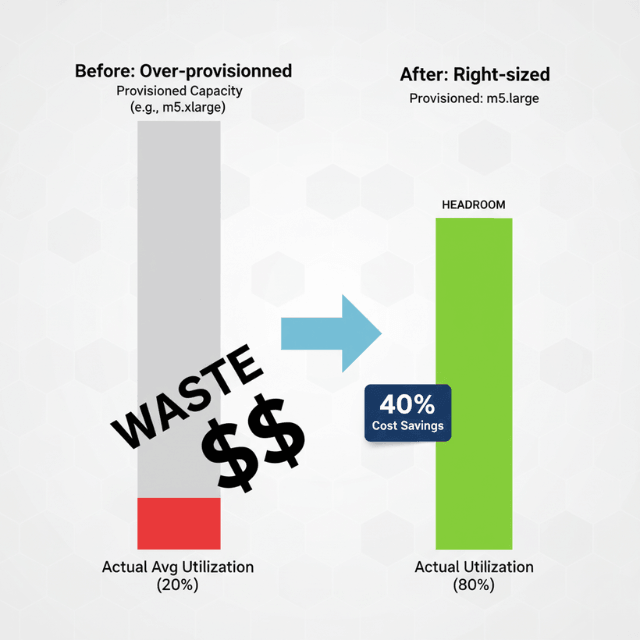
Right-sizing EC2 instances and EKS clusters addresses one of the most common cloud cost inefficiencies: over-provisioned resources. Organizations routinely allocate instances sized for peak capacity that runs at 20-30% average utilization, wasting 60-70% of compute spending. Systematic right-sizing reduces costs by 40% or more while maintaining performance and reliability.
The challenge lies in identifying optimization opportunities across hundreds or thousands of instances, validating that changes won't degrade performance, and implementing adjustments without service disruption. AWS Compute Optimizer, CloudWatch metrics, and third-party tools provide the data and recommendations needed for confident right-sizing decisions.
This guide explores right-sizing methodologies for EC2 instances, EKS worker nodes, and cluster autoscaling configurations.
Understanding Right-Sizing Opportunities
Over-provisioning stems from conservative capacity planning where teams select instance types "to be safe" without validation. Development and testing environments often mirror production sizing despite lower actual requirements. Legacy applications migrated from on-premises maintain their original sizing without cloud optimization.
Right-sizing identifies instances where actual resource utilization significantly differs from provisioned capacity. An instance consistently running at 20% CPU utilization and 40% memory usage represents a downsizing opportunity. Conversely, instances frequently exceeding 80% utilization may require upsizing to prevent performance degradation.
AWS Compute Optimizer analyzes CloudWatch metrics over 14 days including CPU utilization, memory consumption, network throughput, and disk I/O. The service provides specific recommendations with projected savings estimates, performance risk assessments, and migration complexity indicators. Organizations implementing Compute Optimizer recommendations typically achieve 25-40% cost reduction on optimized instances.
EC2 Instance Right-Sizing Process
Start with data collection through CloudWatch detailed monitoring. Enable detailed monitoring for accurate 1-minute metric granularity. Collect metrics for at least 14 days covering representative workload patterns including peak periods. Longer collection periods improve recommendation accuracy for variable workloads.
Analyze CPU utilization patterns identifying instances consistently below 40% average utilization. These represent downsizing candidates where smaller instance types maintain adequate performance. Review memory utilization through CloudWatch agent metrics. Memory over-provisioning wastes resources but requires agent installation for visibility.
Compute Optimizer provides actionable recommendations across instance families. Recommendations may suggest moving from compute-optimized (C5) to general-purpose (M5) instances when CPU usage is low, downsizing within the same family from xlarge to large, or switching to newer generation instances with better price-performance ratios like M6i or M6g (Graviton).
Implement changes incrementally with validation. Test recommendations in development environments before production deployment. Use Auto Scaling groups to implement changes with automatic rollback if metrics degrade. Schedule changes during maintenance windows minimizing user impact.
EKS Cluster Optimization
EKS cluster costs include control plane fees ($0.10 per hour per cluster) and worker node compute costs. Control plane consolidation reduces costs by minimizing cluster count. Use namespaces, resource quotas, and network policies to isolate workloads within shared clusters rather than creating separate clusters per environment or team.
Worker node right-sizing focuses on matching node capacity to actual pod resource requests. Nodes sized for large pods but running many small pods waste capacity. Use node groups with instance types matching workload profiles: CPU-intensive workloads on compute-optimized instances, memory-intensive on memory-optimized types.
Kubernetes pod resource requests and limits inform node sizing decisions. Pods without resource requests prevent accurate bin-packing and capacity planning. Implement LimitRanges requiring resource specifications for all pods. Use Kubernetes VerticalPodAutoscaler to recommend optimal resource allocations based on actual usage.
Cluster autoscaler adjusts node count based on pending pods and node utilization. Configure aggressive scale-down thresholds like 50% utilization to eliminate underutilized nodes. Set scale-down delays allowing temporary traffic spikes without continuous scaling churn. This approach maintains performance while minimizing idle capacity costs.
Graviton Instance Migration
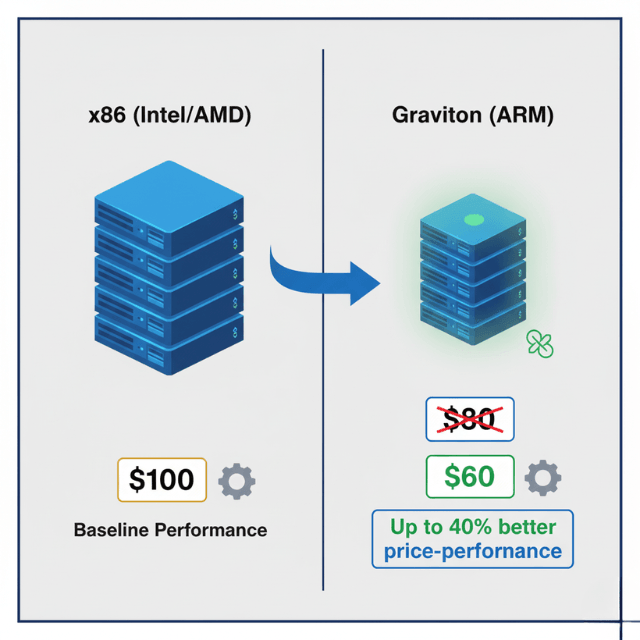
AWS Graviton processors deliver up to 40% better price-performance than comparable x86 instances. Migrating workloads from M5 to M6g or C5 to C6g reduces costs 20% with equivalent or better performance. Modern languages and frameworks support ARM64 architecture with minimal code changes.
Assess application compatibility testing in non-production environments. Most containerized applications run on Graviton without modification when using multi-architecture container images. Compiled applications may require recompilation for ARM64 architecture.
Performance testing validates that Graviton instances meet application requirements. Many workloads see performance improvements from Graviton's efficient architecture, allowing further downsizing. Combined with right-sizing, Graviton migrations can achieve 50-60% cost reduction.
Spot Instance Integration
Spot instances provide 60-90% discounts for workloads tolerating interruptions. Combine spot with on-demand instances in Auto Scaling groups or EKS node groups. Configure mixed instance policies allocating majority capacity to spot with on-demand baseline ensuring availability.
EKS managed node groups support spot instances with automatic interruption handling. Configure multiple instance types increasing spot availability. AWS automatically replaces interrupted instances maintaining desired capacity. Workloads with proper disruption budgets and stateless architectures handle interruptions gracefully.
Monitoring and Continuous Optimization
Right-sizing requires ongoing reviews as workload patterns evolve. Schedule quarterly right-sizing reviews analyzing Compute Optimizer recommendations, validating previous changes delivered expected savings, and identifying new optimization opportunities. Automated dashboards track average utilization across instances highlighting persistent over- or under-provisioning.
Cost Explorer with resource-level granularity shows spending by instance type. Compare costs before and after right-sizing validating projected savings materialized. Track utilization trends ensuring optimized instances maintain healthy headroom for traffic growth.
Conclusion
Right-sizing EC2 instances and EKS clusters delivers 40% cost reduction through systematic optimization. AWS Compute Optimizer provides data-driven recommendations analyzing 14+ days of utilization metrics across CPU, memory, network, and disk I/O.
Incremental implementation with validation prevents performance degradation while capturing savings. EKS optimization consolidates clusters, right-sizes worker nodes, and implements cluster autoscaling eliminating idle capacity.
Graviton instance migration provides additional 20-40% price-performance improvements for compatible workloads. Spot instance integration achieves 60-90% discounts for fault-tolerant applications. Establish quarterly review cycles ensuring ongoing optimization as workload patterns evolve.
Monitor utilization trends and cost metrics validating that right-sizing changes deliver projected savings without compromising application performance or reliability.
Frequently Asked Questions
How do I know if an instance is safe to downsize?
Review 14+ days of CloudWatch metrics covering peak periods. Instances consistently under 40% CPU and 60% memory utilization are safe downsizing candidates.
Compute Optimizer's performance risk assessment indicates low, medium, or high risk for each recommendation. Start with low-risk recommendations and test in development before production changes.
Should I right-size production and development environments differently?
Yes. Development and test environments typically require less capacity than production as they handle lower traffic and fewer concurrent users. Many organizations run development on instance types 50-75% smaller than production equivalents.
Implement automated shutdown schedules for development environments reducing costs by additional 60-70% during off-hours.
How often should I review and update instance sizing?
Conduct detailed right-sizing reviews quarterly, analyzing Compute Optimizer recommendations and utilization trends. Monthly spot-checks of highest-cost instances catch obvious optimization opportunities.
Implement automated alerts for instances consistently over-provisioned or under-provisioned based on utilization thresholds.
Summarize this post with:
Ready to put this into production?
Our engineers have deployed these architectures across 100+ client engagements — from AWS migrations to Kubernetes clusters to AI infrastructure. We turn complex cloud challenges into measurable outcomes.