Database Cost Hacks for 40-70% Monthly Savings
Master database cost optimization with proven strategies for AWS RDS, Aurora, and DynamoDB. Learn rightsizing, reserved instances, auto-scaling, and monitoring tools to reduce costs by up to 70%.
TL;DR
- Database costs dominate cloud bills (40-60%). Strategic optimization delivers 40-70% savings through rightsizing, reserved capacity, intelligent auto-scaling, and storage optimization.
- RDS: rightsize, go Graviton, reserve capacity. Analyze CPU/memory over 14 days—instances below 40% utilization are downsizing candidates. Graviton instances (db.r6g) deliver 20% cost reduction with better performance. Reserved instances provide 40-70% discounts for predictable workloads.
- Aurora: Serverless v2 for variable traffic. Scales in 0.5 ACU increments, dropping to minimal capacity during idle periods—50-60% savings for development or spiky production workloads. Aurora I/O-Optimized bundles I/O costs, saving 50-60% when storage I/O exceeds 25% of compute costs.
- DynamoDB: choose capacity mode wisely. On-demand for unpredictable/spiky traffic. Provisioned + auto-scaling for consistent workloads—60-80% cheaper per request. Audit Global Secondary Indexes (each multiplies costs) and remove unused ones.
- Storage and backup savings: Use gp3 volumes (20-30% cheaper than gp2 with better baseline performance). Implement compression at database level (60-80% storage reduction). Right-size backup retention—dev databases rarely need >7 days.
- Monitor continuously: Use AWS Compute Optimizer for rightsizing recommendations. Set CloudWatch alerts for sustained over-provisioning (>30 days below 20% CPU). Quarterly reviews catch drift before it becomes waste.
Database costs represent 40-60% of typical SaaS company cloud infrastructure budgets, making database optimization critical for sustainable operations. Organizations often discover significant waste through over-provisioned instances, inefficient storage configurations, and suboptimal capacity planning.
Strategic database cost optimization reduces expenses by 40-70% while maintaining or improving performance. The key optimization levers include rightsizing database instances to match actual workload requirements, leveraging reserved instances and savings plans for 40-70% discounts on predictable workloads.
Implementing intelligent auto-scaling for variable traffic patterns, optimizing storage through compression and lifecycle policies, and monitoring usage patterns to catch inefficiencies early. This guide explores proven strategies for optimizing costs across Amazon RDS, Aurora, and DynamoDB.
RDS Cost Optimization
Amazon RDS cost optimization begins with instance rightsizing. Analyze CPU utilization, memory consumption, and IOPS patterns over representative periods identifying over-provisioned instances. Database instances consistently running below 40% CPU utilization represent downsizing opportunities where smaller instance types maintain adequate performance.
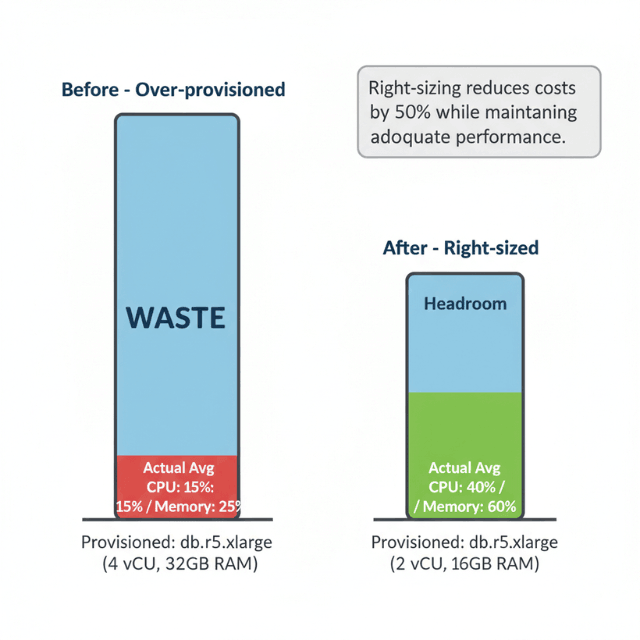
Modern Graviton-based instances (db.r6g, db.m6g) deliver 40% better price-performance than previous generation instances. Migrating from db.r5 to db.r6g reduces costs 20% with equivalent or better performance. For compatible database engines including MySQL, PostgreSQL, and MariaDB, Graviton migration requires minimal effort with significant savings.
Reserved instances provide the most substantial RDS savings, offering up to 70% discounts for three-year commitments with partial upfront payment. One-year no-upfront reservations deliver 40% savings balancing commitment risk against cost reduction. Analyze historical usage patterns identifying stable baseline capacity suitable for reserved instance coverage.
Storage optimization reduces ongoing costs through gp3 volume migration. General Purpose SSD (gp3) offers better price-performance than gp2, providing baseline performance at lower cost. For databases not requiring maximum IOPS, gp3 delivers 20-30% storage cost reduction with equivalent or better performance.
Aurora Optimization
Aurora Serverless v2 provides fine-grained auto-scaling in 0.5 Aurora Capacity Unit (ACU) increments, matching capacity precisely to workload requirements. Unlike traditional instances running continuously, Serverless scales to minimal capacity during idle periods, potentially reducing costs 50-60% for variable traffic patterns.
For production workloads with predictable patterns, Aurora Serverless automatically adjusts capacity based on actual demand. Applications with business-hours traffic scale up during peak periods and down to minimal capacity overnight. This approach eliminates paying for peak capacity 24/7 while maintaining performance during high-traffic periods.
Aurora I/O-Optimized delivers predictable pricing for I/O-intensive workloads. Traditional Aurora pricing includes separate charges for storage I/O operations, which accumulate rapidly for read-heavy applications. Aurora I/O-Optimized bundles I/O with storage costs, reducing total expenses 50-60% when storage I/O exceeds 25% of compute costs.
Read replica management impacts Aurora costs substantially. While Aurora supports up to 15 read replicas, each incurs compute charges. Analyze read traffic patterns implementing auto-scaling for read replicas that adds capacity during peak hours and removes it during low-traffic periods. Dynamic replica management prevents paying for unused read capacity continuously.
DynamoDB Capacity Planning
DynamoDB offers two capacity modes with different cost implications. On-demand capacity charges per request without capacity planning, ideal for unpredictable or sporadic traffic. Provisioned capacity requires forecasting but costs 60-80% less per request for consistent workloads exceeding baseline thresholds.
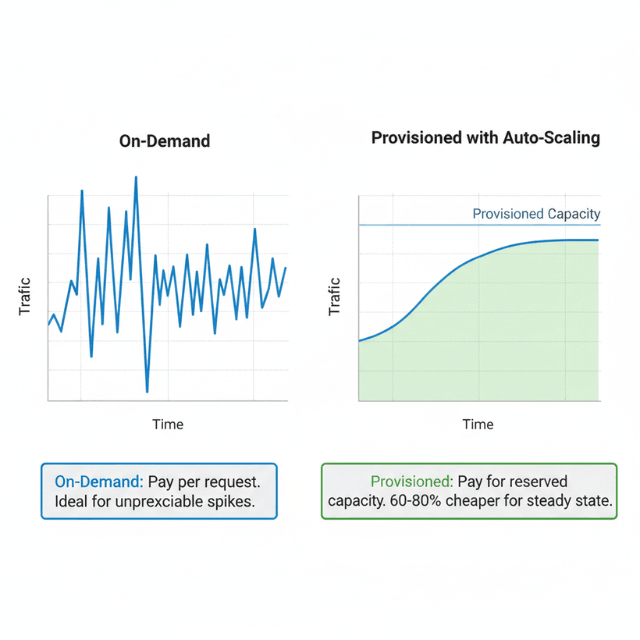
Auto-scaling bridges these models, allowing provisioned capacity to adjust automatically based on actual traffic. Configure conservative minimum capacity units reducing baseline costs while setting maximum limits preventing runaway expenses during unexpected spikes. Monitor CloudWatch metrics comparing provisioned versus consumed capacity ensuring alignment.
Global Secondary Indexes multiply costs as each index requires its own provisioned capacity. Audit GSI usage removing unused indexes consuming capacity without delivering value. Project only necessary attributes into indexes rather than ALL to reduce storage costs and write capacity consumption.
DynamoDB reserved capacity provides up to 70% discounts on provisioned capacity for one or three-year terms. Unlike RDS reserved instances applying to specific databases, DynamoDB reserved capacity applies to total provisioned capacity across all tables in a region, providing flexibility as table architecture evolves.
Monitoring and Optimization
AWS Compute Optimizer analyzes RDS and Aurora database workloads, recommending optimal instance types based on actual utilization over 14 days. Recommendations consider CPU, memory, network, and storage I/O patterns, typically identifying 15-25% potential savings through rightsizing or instance family changes.
CloudWatch metrics track database performance and resource consumption. Create dashboards monitoring CPU utilization, memory usage, IOPS, network throughput, and connection counts. Databases consistently running below 40% CPU represent downsizing opportunities, while those frequently exceeding 80% may require scaling to prevent degradation.
Third-party tools like Datadog, New Relic, and Foglight provide multi-platform monitoring across diverse database environments. These tools excel at anomaly detection, trend analysis, and unified visibility across hybrid and multi-cloud deployments. For organizations managing multiple database platforms, consolidated monitoring simplifies operations and improves optimization insight.
Storage and Backup Optimization
Database storage costs accumulate from data volume, provisioned IOPS, and backup retention. Implement compression at the database level reducing physical storage requirements by 60-80% for appropriate data types. Modern database engines support transparent compression with minimal CPU overhead.
Backup retention policies significantly impact storage costs. Many organizations retain backups far longer than necessary, following outdated on-premises patterns. Define retention based on actual recovery requirements and compliance mandates. Development databases rarely need more than 7-day retention, while production may require 30 days.
Automated backup lifecycle policies in RDS and Aurora enable granular control, retaining recent backups while transitioning older backups to lower-cost storage or deletion. Snapshot lifecycle management prevents accumulation of obsolete snapshots consuming storage indefinitely.
Conclusion
Database cost optimization delivers 40-70% savings through systematic attention to instance sizing, capacity planning, and storage management. RDS rightsizing and Graviton migration reduce compute costs 20-40%.
Reserved instances provide 40-70% discounts for predictable workloads. Aurora Serverless and I/O-Optimized configurations match pricing to actual usage patterns.
DynamoDB capacity mode selection between on-demand and provisioned can cut costs 60-80%. Implement comprehensive monitoring tracking utilization trends, cost per query, and optimization opportunities.
Regular quarterly reviews validate that database configurations remain appropriately sized as workloads evolve, catching inefficiencies before they accumulate into significant expenses.
Frequently Asked Questions
Should I use Aurora Serverless or provisioned Aurora instances?
Use Aurora Serverless for development, testing, and variable production workloads with unpredictable traffic patterns. Serverless scales to minimal capacity during idle periods delivering 50-60% savings for appropriate workloads.
Use provisioned instances with reserved capacity for production workloads with consistent, predictable traffic where reserved instance pricing provides better economics.
When should I use DynamoDB on-demand versus provisioned capacity?
Use on-demand for unpredictable traffic patterns, new applications without usage history, or tables with sporadic access.
Use provisioned capacity for consistent workloads where you can accurately forecast capacity needs, as provisioned costs 60-80% less per request. Monitor actual usage for 2-4 weeks before converting on-demand to provisioned.
How often should I review database rightsizing recommendations?
Conduct detailed quarterly reviews analyzing AWS Compute Optimizer recommendations and utilization trends. Monthly spot-checks of highest-cost databases catch obvious optimization opportunities.
Implement automated alerts for databases consistently over-provisioned or under-provisioned based on utilization thresholds exceeding 14 days.
Summarize this post with:
Ready to put this into production?
Our engineers have deployed these architectures across 100+ client engagements — from AWS migrations to Kubernetes clusters to AI infrastructure. We turn complex cloud challenges into measurable outcomes.