Cut SageMaker Costs 90% with Spot Instances
Reduce SageMaker training costs up to 90% using spot instances. Master interruption handling, checkpointing, and managed spot training for cost-effective machine learning at scale.
TL;DR
- Save 50-90% on SageMaker training by using spot instances—AWS spare capacity offered at steep discounts. A p3.2xlarge drops from $3.06/hour on-demand to as low as $0.30/hour as spot.
- Handle interruptions with checkpointing: Spot instances can be terminated with just a two-minute warning. Implement frequent checkpointing (every 5-30 minutes) to S3 so training can resume seamlessly from the last saved state.
- Use SageMaker managed spot training to automate the complexity. Enable it with
use_spot_instances=True, setmax_wait(total job time including interruptions), and SageMaker automatically retries and resumes from checkpoints. - Best for fault-tolerant workloads: Spot is ideal for training jobs, hyperparameter tuning, and experimentation—not for time-sensitive production training or real-time inference that requires guaranteed uptime.
Amazon SageMaker training costs can quickly consume your ML budget, especially when training large models or running frequent experiments. Spot instances offer a powerful solution, delivering the same computational performance as on-demand instances at discounts of up to 90%. For ML teams under budget pressure, mastering spot instances has become essential for sustainable AI development.
AWS Spot instances leverage unused EC2 capacity, providing massive cost savings with one important trade-off: instances can be interrupted with two-minute warning when AWS needs capacity back.
While this creates challenges for long-running training jobs, modern techniques like checkpointing, managed spot training, and automatic resume capabilities make spot instances practical for most ML workloads.
This guide provides the strategies ML engineers need to harness spot instances effectively while managing interruption risks.
Understanding SageMaker Spot Instances
SageMaker spot instances run on the same hardware as on-demand instances but utilize spare AWS capacity at heavily discounted rates. Pricing varies based on supply and demand, typically ranging from 50-90% below on-demand prices. When AWS needs capacity for on-demand customers, spot instances receive a two-minute interruption notice before termination.
The economic advantage is compelling. A p3.2xlarge instance costs $3.06 per hour on-demand but often runs at $0.30-1.50 per hour as a spot instance, representing 50-90% savings. For training jobs requiring hundreds or thousands of GPU hours, these savings translate into tens of thousands of dollars per model.
SageMaker provides managed spot training that automatically handles interruptions, resuming training from the last checkpoint when capacity becomes available again. This automation removes the complexity of manual retry logic and checkpoint management, making spot instances practical even for teams with limited DevOps resources.
When to Use Spot Instances
Spot instances work best for fault-tolerant, flexible workloads that can handle interruptions gracefully. Training jobs are ideal candidates since they inherently support checkpointing and resume capabilities.
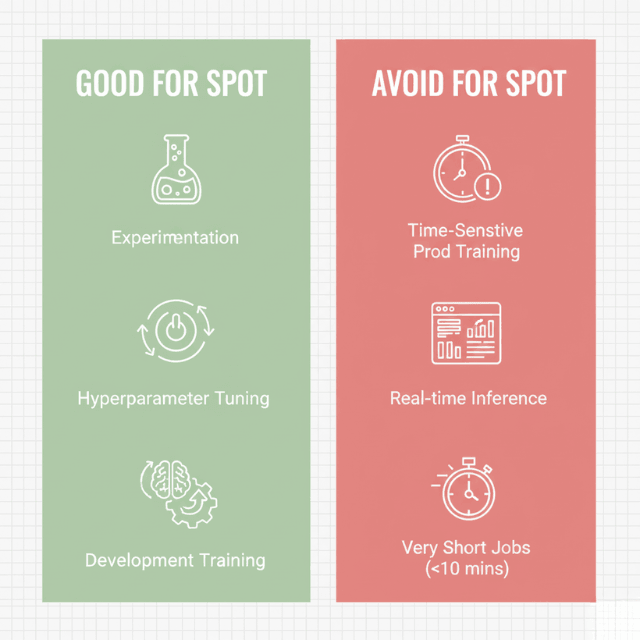
Hyperparameter tuning jobs particularly benefit from spot instances because multiple training jobs run in parallel, and SageMaker automatically retries interrupted jobs without manual intervention.
Model development and experimentation represent perfect use cases. During the development phase, teams run dozens or hundreds of training experiments with different architectures, parameters, and data configurations.
Using on-demand instances for these exploratory workloads wastes budget, while spot instances dramatically reduce costs without impacting iteration speed.
Avoid spot instances for time-sensitive production model training with hard deadlines, real-time inference endpoints requiring guaranteed availability, and extremely short training jobs under 10 minutes where checkpoint overhead exceeds interruption risk. For these scenarios, on-demand or reserved instances provide better reliability.
Implementing Checkpointing Strategies
Effective checkpointing is the foundation of successful spot instance usage. Checkpoints save model state, optimizer state, and training progress at regular intervals, enabling training to resume from the last checkpoint rather than restarting from scratch after interruptions.
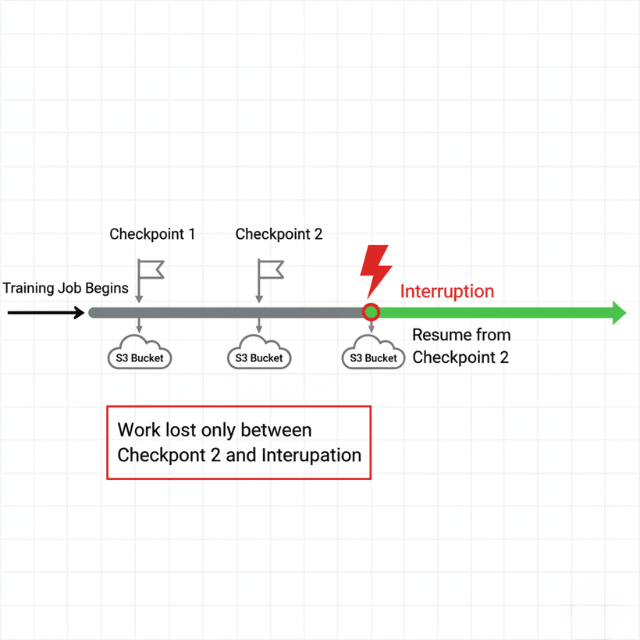
SageMaker automatically stores checkpoints in Amazon S3, providing durable storage that persists across instance interruptions. Configure checkpoint frequency based on training job duration and interruption risk.
For jobs running several hours, checkpoint every 5-15 minutes. For multi-day training, checkpoint every 30-60 minutes to balance checkpoint overhead against potential lost progress.
Implementation varies by framework. PyTorch training scripts should save checkpoints containing model state dictionary, optimizer state, epoch number, and training loss using torch.save().
TensorFlow users can leverage tf.train.Checkpoint for automatic state management. SageMaker automatically detects and loads the most recent checkpoint when resuming interrupted jobs.
Managed Spot Training Configuration
SageMaker managed spot training handles the complexity of spot instance lifecycle management automatically. Enable managed spot training by setting the use_spot_instances parameter to True in your training job configuration and specifying max_wait time that limits total job duration including interruption wait time.
The max_run parameter defines maximum continuous runtime for a single training attempt, while max_wait sets the total time SageMaker will wait for spot capacity, including interruptions. Set max_wait to 2-3x max_run for jobs where interruptions are likely, providing adequate time for automatic retries.
Configure checkpoint directory to persist model state, enabling seamless resume after interruptions. SageMaker automatically retries interrupted training jobs up to the max_wait timeout, loading the most recent checkpoint and continuing from that point.
Training time on spot instances is billed only for actual compute time, not waiting time during interruptions, maximizing cost savings even with multiple interruptions.
Optimizing for Cost and Performance
Maximize spot instance savings through strategic instance selection and job configuration. Use diverse instance types through instance pools, specifying multiple acceptable instance types for training jobs. SageMaker automatically selects the lowest-cost available option, improving capacity availability while minimizing costs.
Flexible instance selection works well when training jobs are not tightly coupled to specific GPU types. For example, specify both p3.2xlarge and p3.8xlarge as acceptable instance types, allowing SageMaker to choose based on current spot pricing and availability. This flexibility reduces interruption risk.
Training job optimization reduces total runtime, decreasing interruption exposure. Use mixed precision training to accelerate GPU utilization, implement efficient data loading pipelines to prevent GPU starvation, leverage distributed training for large datasets, and optimize batch sizes for maximum GPU memory utilization. Faster training means less time at risk of interruption and lower total costs.
Conclusion
SageMaker spot instances deliver transformative cost savings for machine learning teams, with discounts of 50-90% compared to on-demand instances.
Success depends on implementing robust checkpointing to handle interruptions gracefully, leveraging managed spot training for automated retry and resume capabilities, and selecting appropriate workloads where flexibility outweighs guaranteed availability.
For training jobs, hyperparameter tuning, and model development, spot instances represent one of the highest-ROI optimizations available to ML teams. With proper implementation, teams can dramatically reduce ML infrastructure costs while maintaining development velocity and model quality.
Frequently Asked Questions
How often do spot instance interruptions actually occur?
Interruption frequency varies by instance type, region, and time. Historical data shows interruption rates typically range from 5-20% for popular ML instance types like p3 and g4 families.
AWS Spot Instance Advisor provides real-time interruption frequency data. Some instance types in high-demand regions may see interruptions every few hours, while others run for days without interruption.
Can I use spot instances for distributed training?
Yes, but distributed training requires additional considerations. Implement checkpointing across all training nodes and provide your distributed training framework supports fault tolerance.
SageMaker distributed training with spot instances works well when using checkpointing and automatic retry. Some teams use hybrid approaches with on-demand instances for parameter servers and spot instances for workers.
What happens to my training data during interruptions?
Training data loaded from S3 is not affected by spot interruptions. When training resumes, SageMaker reloads data from S3 or uses cached data if still available.
Your data loading pipeline should be idempotent and able to restart from any checkpoint position. Using SageMaker File Mode or Fast File Mode handles data loading automatically across interruptions.
Summarize this post with:
Ready to put this into production?
Our engineers have deployed these architectures across 100+ client engagements — from AWS migrations to Kubernetes clusters to AI infrastructure. We turn complex cloud challenges into measurable outcomes.