Top 10 Essential Practices for Container Security
EaseCloud enhances container security with tools for vulnerability scans, compliance checks, and real-time monitoring. Safeguard your systems today.
Container technology has transformed how teams build and deploy software, but as adoption scales, so does the attack surface. In 2025, following container security best practices is not optional. It is the baseline for protecting cloud infrastructure. Misconfigurations, exposed secrets, and unpatched images account for the majority of container breaches.
This guide covers the practices security teams, DevOps engineers, and cloud architects use to lock down containerized environments without slowing delivery.
Related Reading: The Importance of DevSecOps in Modern Cloud Environments.
TL;DR
Container security best practices every team should apply in 2025:
- Use verified base images and scan them continuously for known CVEs
- Apply least privilege by running containers as non-root with minimal capabilities
- Harden containers with read-only filesystems, seccomp profiles, and dropped Linux capabilities
- Enforce runtime security to detect and stop threats the moment they occur
- Implement network policies to control traffic and prevent data exposure between containers
- Meet compliance standards with CIS Docker Benchmark and NIST SP 800-190 controls
Secure Container Images from the Start
Container image security best practices start before a single container runs. Every image pulled from an untrusted source or skipped through scanning is a potential vulnerability waiting to surface in production.
Start with official, minimal base images from Docker Hub, Amazon ECR Public Gallery, or your cloud provider's registry. Alpine Linux-based images reduce the attack surface through a small footprint. Avoid 'latest' tags in production. Pin to specific image digests so builds are reproducible and auditable.
Integrate vulnerability scanning into CI/CD pipelines so every image build triggers an automated scan. Tools like Trivy, Clair, and Anchore evaluate container images against public CVE databases. Configure pipelines to block images with critical or high-severity vulnerabilities before they reach staging or production.
Scheduled scans on images already running in production catch vulnerabilities published after deployment. New CVEs surface continuously, and an image that passed scanning at build time may be exposed by a new disclosure weeks later.
Amazon ECR Enhanced Scanning uses Amazon Inspector to scan images automatically on push and on a schedule. Azure Container Registry integrates Microsoft Defender for Containers for continuous image assessment. These platform-native tools reduce the overhead of maintaining a separate scanning pipeline.
Maintain a curated internal registry of approved base images. This gives security teams control over what enters the build pipeline and prevents developers from pulling arbitrary images from public sources.
Access Control and Least Privilege in Container Deployments
The least privilege principle limits the damage a compromised container can cause. Run every container as a non-root user. In Docker, add a USER directive to the Dockerfile. In Kubernetes, set runAsNonRoot: true and runAsUser in the pod security context.
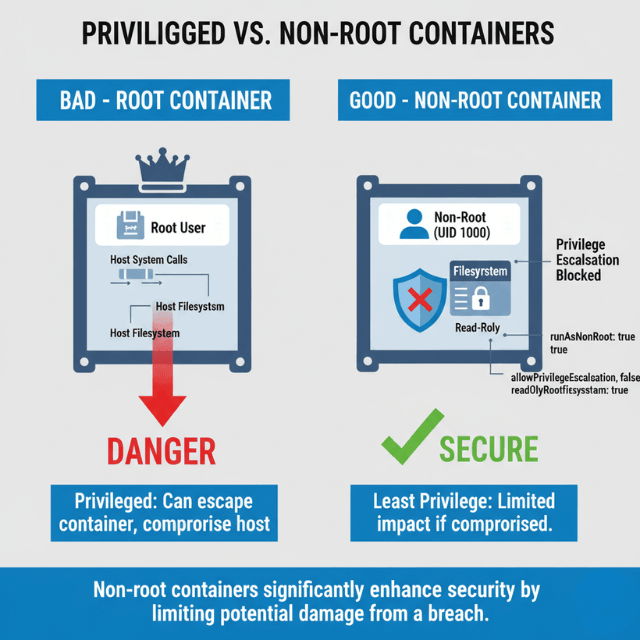
Drop all Linux capabilities by default, then restore only those the application requires. Most applications run with NET_ADMIN and SYS_ADMIN removed. Use --cap-drop=ALL in Docker or set capabilities.drop: ["ALL"] in Kubernetes pod specs.
Hard-coding API keys, database passwords, or TLS certificates into container images is one of the most common causes of credential exposure. Use dedicated secrets tools instead. Kubernetes Secrets, AWS Secrets Manager, Azure Key Vault, and HashiCorp Vault all provide secure retrieval at runtime without embedding credentials in images or environment variables that persist in container metadata.
Mount volumes as read-only where the application does not need to write. Apply Kubernetes readOnlyRootFilesystem: true to prevent runtime modifications to the container filesystem.
Apply role-based access control (RBAC) in Kubernetes to limit which service accounts can interact with the API server. Audit RBAC policies regularly using tools like kubectl-who-can or Polaris.
Container Hardening Best Practices
Hardening restricts operating-system-level resources available to containers so that even if an attacker gains a foothold, lateral movement is difficult.
Use seccomp (secure computing mode) profiles to filter the system calls a container can make. Docker applies a default seccomp profile that blocks approximately 40 dangerous syscalls. For higher-security workloads, create custom profiles that restrict the container to only the syscalls your application actually uses.
Apply AppArmor or SELinux policies to restrict file system access, network operations, and process interactions. Kubernetes supports AppArmor annotations on pods, and SELinux labels can be set via securityContext.seLinuxOptions. Both enforce mandatory access controls at the host OS level, outside the container's control.
Set container filesystems to read-only. Applications that write data should use explicitly defined volume mounts. A container that cannot write to its own filesystem is much harder to compromise with a web shell or malware dropper.
Disable privilege escalation. Set allowPrivilegeEscalation: false in Kubernetes security contexts. This blocks processes inside a container from gaining more privileges than their parent process, preventing a wide class of container escape techniques.
Avoid running privileged containers. The --privileged flag gives a container near-complete host access. Reserve it for specific infrastructure tools that genuinely require it, such as container runtime components, and never use it in application workloads.
Container Runtime Security Best Practices
Runtime security detects threats that pre-deployment scanning cannot catch. Attackers exploiting application vulnerabilities or supply chain weaknesses may behave normally at image scan time but execute malicious activity once running.
Falco is the most widely adopted open-source runtime security tool for containers and Kubernetes. It uses kernel-level system call interception via eBPF or kernel modules to detect anomalous behavior in real time, including unexpected network connections, shell spawning inside containers, sensitive file access, and privilege escalation attempts.
Define Falco rules that match your application's expected behavior. Flag deviations as alerts, not just logs. Integrate Falco alerts with your SIEM or incident response platform so security teams can respond immediately when a rule fires.
Aqua Security and Sysdig Secure provide commercial runtime security with additional capabilities: drift prevention (blocking new binaries at runtime), behavioral ML baselines, and automated response playbooks. For teams on AWS, Amazon GuardDuty includes EKS Runtime Monitoring, which uses eBPF sensors to detect suspicious container activity without requiring application modifications.
Combine runtime security with immutable infrastructure practices. Containers that cannot write new binaries or modify their own process trees are harder to compromise. Runtime tools catch the cases where immutability is not fully enforced.
Forward container logs to a centralized system such as the ELK Stack, OpenSearch, or your cloud provider's logging service. Set retention policies that meet your audit and compliance requirements.
Network Policies to Prevent Data Exposure Between Containers
By default, containers in the same Kubernetes cluster can communicate freely. This flat network model increases the risk of data exposure between containers. If one container is compromised, an attacker can probe all others on the same network without restriction.
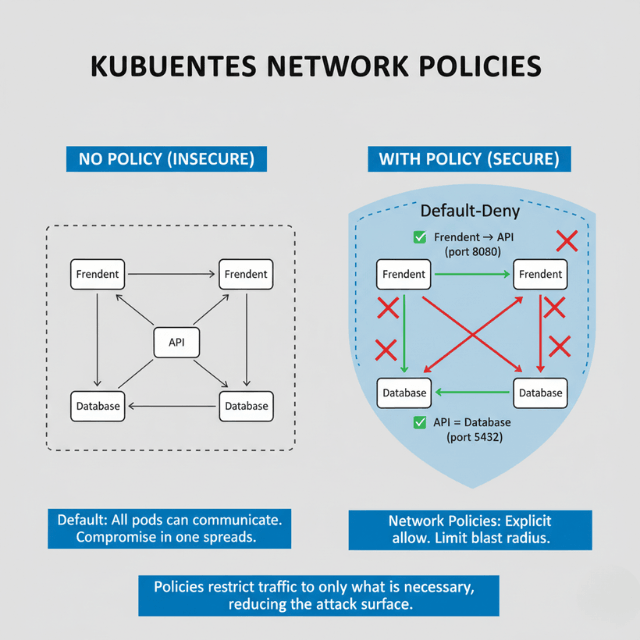
Kubernetes Network Policies define which pods can communicate with which other pods and on which ports. Apply a default-deny policy across all namespaces, then explicitly allow only required traffic paths. Tools like Calico, Cilium, and Weave Net implement these policies at the kernel level using eBPF, adding minimal latency.
Segment workloads by namespace. Place frontend services, backend APIs, and databases in separate namespaces with explicit ingress and egress rules. This limits blast radius if any single workload is compromised.
Encrypt traffic between containers using mutual TLS (mTLS). Service mesh tools like Istio and Linkerd automate mTLS across all pod-to-pod communication without application code changes. mTLS verifies the identity of both communicating services and encrypts data in transit, eliminating eavesdropping risks within the cluster.
Monitor and Audit Container Activity
Effective container security requires both real-time monitoring of anomalous behavior and structured audit trails of all administrative actions.
Deploy Prometheus for metrics collection and Grafana for dashboards. Alert on unusual resource usage patterns that may signal cryptomining, data exfiltration, or a runaway process. Sysdig provides container-native monitoring that correlates system calls with Kubernetes metadata, giving deeper visibility than generic infrastructure monitoring tools.
Enable Kubernetes audit logging to capture every API server request. Audit logs record which users or service accounts performed which actions on which resources, with timestamps. Route audit logs to an immutable storage destination and set a retention period that satisfies your compliance requirements.
Set up alerts for high-risk events: pod creation with elevated privileges, changes to RBAC policies, new service accounts with cluster-admin roles, or image pulls from unregistered registries. These events often signal a misconfiguration or an active attack.
Review container logs centrally using the ELK Stack, OpenSearch, or a managed service like AWS CloudWatch Logs or Azure Monitor. Structured logging in JSON format makes queries and anomaly detection faster.
AWS and Azure Container Security Best Practices
Cloud providers offer native security controls that integrate directly with container services. Using these controls reduces the operational overhead of managing third-party security tools and aligns your security posture with your cloud provider's compliance programs.
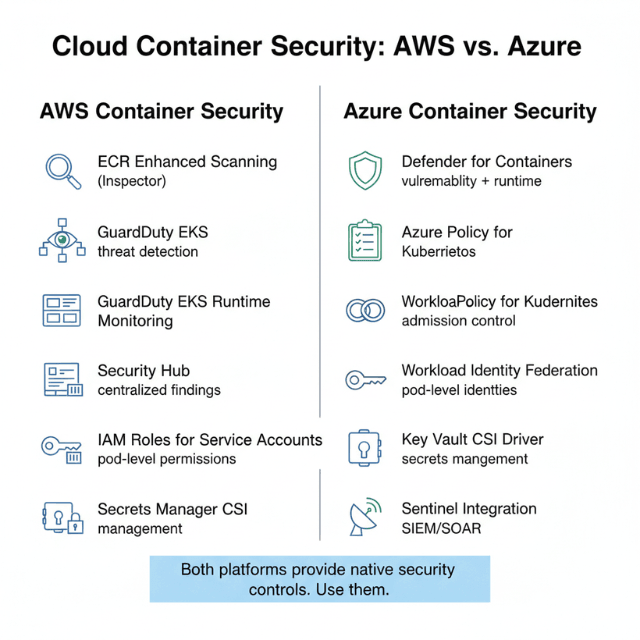
On AWS: Amazon Elastic Container Service (ECS) and Amazon Elastic Kubernetes Service (EKS) both support IAM roles for service accounts, giving individual pods granular AWS permissions without sharing credentials. Enable Amazon ECR Enhanced Scanning with Amazon Inspector for continuous image vulnerability assessment. Use AWS Security Hub to aggregate findings from GuardDuty EKS Runtime Monitoring, ECR scanning, and Inspector into a single view. Replace environment variable secrets with AWS Secrets Manager references using the Secrets Manager CSI driver.
On Azure: Azure Kubernetes Service (AKS) supports workload identity federation, which assigns Azure AD identities to pods without static credentials. Enable Microsoft Defender for Containers on all AKS clusters for vulnerability scanning, runtime threat detection, and Kubernetes security posture management. Use Azure Policy for Kubernetes to enforce admission control policies such as preventing privileged containers or requiring image signing with Notary. Store secrets in Azure Key Vault and mount them as volumes using the Secrets Store CSI driver.
Both platforms support node auto-upgrade, which keeps container node OS patches current automatically. Unpatched nodes are one of the most common paths for container escapes to host.
Container Security Compliance and Standards
Meeting container security compliance requirements calls for a structured approach built around established standards, not ad hoc checklists.
The CIS Docker Benchmark and CIS Kubernetes Benchmark provide scored recommendations for hardening container infrastructure. Run kube-bench to automatically evaluate your Kubernetes cluster against CIS benchmark controls and produce a pass/fail report. Integrate kube-bench scans into CI/CD pipelines so configuration drift is caught before reaching production.
NIST SP 800-190 (Application Container Security Guide) defines security controls for container components including images, registries, orchestrators, and host OS. Organizations pursuing FedRAMP authorization must demonstrate alignment with NIST SP 800-190 controls.
For SOC 2 Type II and PCI DSS compliance, container security controls map to specific requirements around access control, audit logging, vulnerability management, and encryption in transit. Automated compliance tools like Prisma Cloud, Aqua Security, and Lacework continuously map your container security posture to these frameworks and flag gaps.
Software bill of materials (SBOM) generation is becoming a regulatory requirement in multiple jurisdictions. Tools like Syft and Grype generate SBOMs from container images and scan them for known vulnerabilities, satisfying emerging software supply chain security mandates.
Conduct Security Audits and Penetration Testing for Containers
Periodic audits and penetration testing validate that container security controls hold under real attack conditions.
Use kube-bench to audit Kubernetes configurations against CIS benchmarks regularly. Run Trivy in misconfiguration mode to scan Kubernetes manifests and Helm charts for security issues before deployment. Tools like Checkov and Terrascan extend this to IaC files, catching container misconfigurations in Terraform or CloudFormation templates before they reach production.
For penetration testing, tools like kube-hunter simulate attacker behavior against exposed Kubernetes API servers and in-cluster attack paths. Container penetration testing should cover image analysis for embedded secrets, RBAC privilege escalation paths, and network policy bypass attempts.
Schedule thorough security audits at least quarterly. Pair them with continuous automated scanning using a CSPM (Cloud Security Posture Management) tool that monitors your container environment around the clock.
Keep Development Teams Updated on Container Security
Security tools only work if the teams using them understand the threat model. Run quarterly container security training sessions covering the most current attack techniques: supply chain attacks, container escape exploits, and Kubernetes RBAC misconfigurations.
Integrate security into the development workflow rather than treating it as a gate at deployment time. Developer-focused training on Dockerfile security, secrets management, and dependency hygiene prevents a large class of vulnerabilities before they reach code review.
Use platforms like Kubernetes Goat, an intentionally vulnerable Kubernetes cluster, for hands-on attack and defense exercises. Practical labs build more durable skills than slideware.
Document your organization's container security standards in a runbook. Update it when new CVEs or attack techniques emerge.
How EaseCloud Enhances Container Security
EaseCloud empowers teams to strengthen container security with advanced tools built for proactive threat detection and mitigation. Our platform integrates with container orchestration systems to provide robust vulnerability scanning, automated compliance checks, and real-time monitoring. By leveraging EaseCloud, organizations can keep their containers secure without compromising speed or efficiency, reducing risks while maintaining peak operational performance.
Conclusion
Container security is not a one-time checklist. It requires layered controls spanning image build, runtime, network, and compliance. The container security best practices covered here address the full attack surface: from image security at build time to runtime protection, container hardening, cloud-specific controls for AWS and Azure, and compliance with CIS and NIST standards.
The threat environment shifts continuously. Teams that automate security checks, monitor runtime behavior, and keep infrastructure patched maintain the strongest posture. EaseCloud supports this with integrated tools that make container security continuous and measurable, rather than a periodic manual effort.
Start with the highest-impact controls: trusted images, least privilege, and runtime monitoring. Layer in hardening and compliance as your security program matures.
Frequently Asked Questions
Why is container security important?
Container security prevents unauthorized access, data breaches, and lateral movement across infrastructure. Containerized workloads share host OS kernels, which means a breach in one container can affect others on the same host. Strong security controls protect applications, data, and business continuity.
What are the best practices for securing containers in the cloud?
Use verified base images, scan images in CI/CD pipelines, run containers as non-root, apply network policies, store secrets in AWS Secrets Manager or Azure Key Vault, enable cloud-native runtime threat detection (AWS GuardDuty EKS Monitoring or Azure Defender for Containers), and audit configurations against CIS benchmarks regularly.
What are common vulnerabilities in container environments?
Misconfigurations top the list: containers running as root, overly permissive RBAC roles, and missing network policies. Outdated base images with unpatched CVEs and hard-coded secrets in Dockerfile ENV instructions are also frequent sources of breaches.
How can I ensure compliance in cloud container security?
Run kube-bench against CIS Kubernetes Benchmarks regularly. Map controls to NIST SP 800-190 for FedRAMP workloads or relevant PCI DSS requirements. Use automated CSPM tools like Prisma Cloud or Aqua Security to continuously assess your posture and flag gaps against compliance frameworks.
What tools are best for container security?
For image scanning: Trivy, Clair, and Anchore. For runtime security: Falco and Sysdig Secure. For cloud-native detection: AWS GuardDuty EKS Runtime Monitoring or Azure Defender for Containers. For CIS compliance auditing: kube-bench. For secrets management: HashiCorp Vault, Kubernetes Secrets, AWS Secrets Manager, or Azure Key Vault.
What do I need to know about container security as a beginner?
Start with three fundamentals: never run containers as root, never hard-code secrets in images, and always use images from verified sources. Add vulnerability scanning to your build pipeline and apply Kubernetes network policies to restrict container-to-container communication. These steps eliminate the most common breach vectors.
How often should I update container images?
Update base images at least monthly, or immediately when a critical CVE is published affecting your image layers. Automate updates through CI/CD pipelines and scheduled image rebuilds. Use a tool like Renovate or Dependabot to track upstream image tag changes and rebuild affected images promptly.
Summarize this post with:
Ready to put this into production?
Our engineers have deployed these architectures across 100+ client engagements — from AWS migrations to Kubernetes clusters to AI infrastructure. We turn complex cloud challenges into measurable outcomes.