Data Backup and Disaster Recovery
Master data backup and disaster recovery for cloud-native SaaS. Learn RPO/RTO, point-in-time recovery, cross-region replication, and automated verification for data protection.
TL;DR
- RPO & RTO: RPO = max data loss (e.g., 1 hr). RTO = max downtime (e.g., 15 min). Critical systems need minutes/seconds; internal tools can tolerate hours.
- Backup Strategy: Full + incremental + continuous archiving (WAL/oplog) = point-in-time recovery (PITR).
- Tools: Velero (K8s), CloudNativePG (PostgreSQL), MongoDB Operator.
- Cross-Region Replication: Protects against regional outages. Replicate backups or maintain standby clusters elsewhere.
- Verification: Mandatory. Unverified backups don't exist. Automate restore tests + run quarterly drills.
- Cost Optimization: Tiered storage + compression. Lifecycle policies: STANDARD_IA (7 days) → GLACIER (30 days) → DEEP_ARCHIVE (90 days) → expire (365 days).
Disaster recovery planning protects against catastrophic failures that threaten data availability. Hardware failures, software bugs, human errors, security breaches, and natural disasters all pose risks to production systems. Cloud-native backup strategies leverage distributed infrastructure and object storage to build resilient recovery mechanisms.
Backup Strategy Fundamentals
Effective backup strategies balance recovery objectives against infrastructure costs and operational complexity. Two key metrics define backup requirements.
Recovery Point Objective (RPO) measures maximum acceptable data loss. An RPO of 1 hour means tolerating loss of up to one hour of data during disaster scenarios. An RPO of zero requires synchronous replication with no data loss tolerance.
Recovery Time Objective (RTO) measures maximum acceptable downtime. An RTO of 15 minutes requires hot standby systems ready to take over immediately. An RTO of 24 hours allows time for manual intervention and restoration from backups.
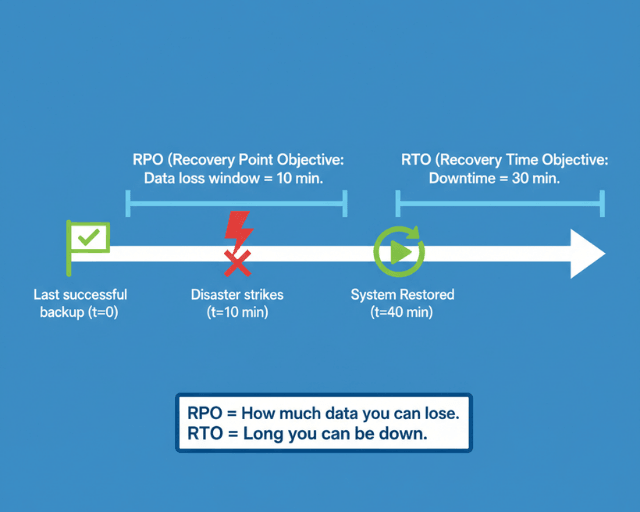
Business requirements drive these metrics. E-commerce platforms during peak shopping seasons might require RPO of minutes and RTO of seconds. Internal tools with lower criticality might tolerate hours of data loss and downtime.
Backup Types and Approaches
Different backup types serve different recovery scenarios and have distinct storage and performance characteristics.
Full backups capture complete database state at a point in time. They enable straightforward recovery but consume significant storage and bandwidth. A 500GB PostgreSQL database requires 500GB for each full backup.
apiVersion: postgresql.cnpg.io/v1
kind: Cluster
metadata:
  name: production-postgres
spec:
  instances: 3
  storage:
    size: 200Gi
  backup:
    barmanObjectStore:
      destinationPath: s3://backups/postgres-prod
      s3Credentials:
        accessKeyId:
          name: aws-creds
          key: ACCESS_KEY_ID
        secretAccessKey:
          name: aws-creds
          key: SECRET_ACCESS_KEY
      data:
        compression: gzip
        immediateCheckpoint: true
        jobs: 4
      wal:
        compression: gzip
        maxParallel: 2
    retentionPolicy: "30d"
---
apiVersion: postgresql.cnpg.io/v1
kind: ScheduledBackup
metadata:
  name: daily-backup
spec:
  schedule: "0 2 * * *"
  backupOwnerReference: self
  cluster:
    name: production-postgres
Incremental backups capture only changes since the last backup. They reduce storage costs and backup duration but complicate restore procedures requiring the full backup plus all subsequent incrementals.
Continuous archiving streams transaction logs to object storage in real-time. PostgreSQL's Write-Ahead Log (WAL) archiving enables point-in-time recovery to any moment between backups.
-- PostgreSQL WAL archiving configuration
ALTER SYSTEM SET wal_level = 'replica';
ALTER SYSTEM SET archive_mode = 'on';
ALTER SYSTEM SET archive_command = 'aws s3 cp %p s3://wal-archive/postgres/%f';
ALTER SYSTEM SET archive_timeout = '300';  -- Force WAL switch every 5 minutes
SELECT pg_reload_conf();

-- Verify archiving is working
SELECT * FROM pg_stat_archiver;
MongoDB supports point-in-time recovery through oplog archiving. Continuous backup solutions capture oplog entries alongside periodic snapshots.
// MongoDB oplog tailing for continuous backup
const client = new MongoClient(uri);
const db = client.db('local');
const oplog = db.collection('oplog.rs');

// Get latest timestamp
const latest = await oplog.find().sort({$natural: -1}).limit(1).next();
const timestamp = latest.ts;

// Tail oplog for changes
const cursor = oplog.find({
  ts: {$gt: timestamp}
}, {
  tailable: true,
  awaitData: true
});

cursor.forEach(async (op) => {
  // Archive operation to S3
  await archiveOperation(op);
});
Cloud-Native Backup Tools
Modern backup solutions integrate with Kubernetes and cloud storage providers.
Velero backs up Kubernetes resources and persistent volumes. It captures entire application state including configurations, secrets, and data volumes.
# Install Velero with AWS plugin
velero install \
  --provider aws \
  --plugins velero/velero-plugin-for-aws:v1.8.0 \
  --bucket backup-bucket \
  --backup-location-config region=us-east-1 \
  --snapshot-location-config region=us-east-1 \
  --secret-file ./credentials-velero

# Create backup schedule
velero schedule create daily-backup \
  --schedule="0 2 * * *" \
  --include-namespaces production \
  --ttl 720h0m0s

# Backup specific application
velero backup create postgres-backup \
  --selector app=postgresql \
  --snapshot-volumes=true

# Restore from backup
velero restore create --from-backup postgres-backup
CloudNativePG provides integrated backup and recovery for PostgreSQL clusters running on Kubernetes.
apiVersion: postgresql.cnpg.io/v1
kind: Cluster
metadata:
  name: production-db
spec:
  instances: 3
  backup:
    barmanObjectStore:
      destinationPath: s3://postgres-backups/prod-cluster
      s3Credentials:
        accessKeyId:
          name: backup-creds
          key: ACCESS_KEY_ID
        secretAccessKey:
          name: backup-creds
          key: SECRET_ACCESS_KEY
      wal:
        compression: gzip
        encryption: AES256
        maxParallel: 4
      data:
        compression: gzip
        encryption: AES256
        jobs: 2
        immediateCheckpoint: true
    retentionPolicy: "30d"
    volumeSnapshot:
      className: csi-snapshot-class
      snapshotOwnerReference: cluster
MongoDB Enterprise Operator automates backup and restore operations for MongoDB deployments.
apiVersion: mongodb.com/v1
kind: MongoDB
metadata:
  name: production-mongo
spec:
  members: 3
  type: ReplicaSet
  version: "6.0.5"
  backup:
    mode: enabled
  cloudManager:
    configMapRef:
      name: cloud-manager-config
  credentials: cloud-manager-credentials
---
apiVersion: mongodb.com/v1
kind: MongoDBOpsManager
metadata:
  name: ops-manager
spec:
  replicas: 1
  version: "6.0.12"
  backup:
    enabled: true
    headDB:
      storage: 50Gi
    opLogStores:
    - name: oplog1
      mongodbResourceRef:
        name: oplog-store
      mongodbUserRef:
        name: oplog-user
    s3Stores:
    - name: s3-backup
      s3BucketEndpoint: s3.amazonaws.com
      s3BucketName: mongo-backups
      s3SecretRef:
        name: s3-credentials
      pathStyleAccessEnabled: false
Point-in-Time Recovery
PITR enables restoring data to any specific moment, crucial for recovering from data corruption or accidental deletions discovered hours after occurrence.
apiVersion: postgresql.cnpg.io/v1
kind: Cluster
metadata:
  name: restored-postgres
spec:
  instances: 3
  bootstrap:
    recovery:
      source: production-postgres
      recoveryTarget:
        targetTime: "2025-11-25 14:30:00.00000+00"
  externalClusters:
  - name: production-postgres
    barmanObjectStore:
      destinationPath: s3://backups/postgres-prod
      s3Credentials:
        accessKeyId:
          name: aws-creds
          key: ACCESS_KEY_ID
        secretAccessKey:
          name: aws-creds
          key: SECRET_ACCESS_KEY
      wal:
        maxParallel: 8
This manifest creates a new cluster restored to November 25, 2025 at 14:30 UTC. The operator fetches the most recent full backup before that timestamp, then replays WAL files to reach the exact recovery point.
Testing PITR regularly ensures the process works when needed. Schedule quarterly recovery drills where teams restore production data to test environments at specific points in time.
Cross-Region Replication
Geographic distribution protects against regional failures. Cloud provider outages affecting entire regions occur periodically, making cross-region strategies essential for critical systems.
apiVersion: postgresql.cnpg.io/v1
kind: Cluster
metadata:
  name: postgres-primary
  namespace: production
spec:
  instances: 3
  storage:
    size: 200Gi
  backup:
    barmanObjectStore:
      destinationPath: s3://postgres-backups-us-east-1/primary
      s3Credentials:
        accessKeyId:
          name: s3-creds
          key: ACCESS_KEY_ID
        secretAccessKey:
          name: s3-creds
          key: SECRET_ACCESS_KEY
      wal:
        compression: gzip
        maxParallel: 4
    retentionPolicy: "30d"
---
apiVersion: postgresql.cnpg.io/v1
kind: Cluster
metadata:
  name: postgres-replica
  namespace: production
spec:
  instances: 3
  replica:
    enabled: true
    source: postgres-primary
  externalClusters:
  - name: postgres-primary
    connectionParameters:
      host: postgres-primary-rw.production.svc.cluster.local
      user: streaming_replica
      dbname: postgres
    password:
      name: replica-creds
      key: password
Multi-region backup replication stores backups in multiple geographic locations. Configure S3 cross-region replication or backup to multiple regional buckets.
# AWS S3 cross-region replication configuration
aws s3api put-bucket-replication --bucket postgres-backups-us-east-1 \
  --replication-configuration file://replication-config.json

# replication-config.json
{
  "Role": "arn:aws:iam::123456789012:role/s3-replication-role",
  "Rules": [{
    "Status": "Enabled",
    "Priority": 1,
    "Filter": {},
    "Destination": {
      "Bucket": "arn:aws:s3:::postgres-backups-eu-west-1",
      "ReplicationTime": {
        "Status": "Enabled",
        "Time": {
          "Minutes": 15
        }
      }
    }
  }]
}
Backup Verification
Backups are worthless if they cannot be restored. Automated verification catches backup corruption before disasters occur.
apiVersion: batch/v1
kind: CronJob
metadata:
  name: backup-verification
spec:
  schedule: "0 3 * * 0"  # Weekly on Sunday at 3 AM
  jobTemplate:
    spec:
      template:
        spec:
          containers:
          - name: verify-backup
            image: postgres:15
            command:
            - /bin/bash
            - -c
            - |
              # Download latest backup
              aws s3 cp s3://backups/latest.tar.gz /tmp/backup.tar.gz

              # Extract and verify
              tar -xzf /tmp/backup.tar.gz -C /tmp/restore

              # Start temporary postgres instance
              pg_ctl -D /tmp/restore start

              # Run verification queries
              psql -d postgres -c "SELECT COUNT(*) FROM pg_database;"
              psql -d postgres -c "SELECT pg_database_size('production');"

              # Verify critical tables exist
              psql -d production -c "\dt"

              # Cleanup
              pg_ctl -D /tmp/restore stop
              rm -rf /tmp/restore /tmp/backup.tar.gz
          restartPolicy: OnFailure
Disaster Recovery Procedures
Document and practice recovery procedures. During actual disasters, clear runbooks reduce recovery time and prevent errors under pressure.
Automated failover for database clusters enables rapid recovery from primary instance failures.
apiVersion: postgresql.cnpg.io/v1
kind: Cluster
metadata:
  name: production-postgres
spec:
  instances: 3
  primaryUpdateStrategy: unsupervised
  failoverDelay: 30
  switchoverDelay: 60
  postgresql:
    parameters:
      max_connections: "200"
      shared_buffers: "256MB"
  monitoring:
    enabled: true
Manual failover procedures document steps for promoting standby instances when automatic failover fails or isn't configured.
# Promote standby to primary in CloudNativePG
kubectl cnpg promote production-postgres 1

# Check cluster status
kubectl cnpg status production-postgres

# Update application connection strings
kubectl patch service postgres-rw -p '{"spec":{"selector":{"postgresql":"production-postgres-1"}}}'
Redis Backup Strategies
Redis requires different backup approaches due to its in-memory nature. RDB snapshots and AOF logs provide recovery options.
apiVersion: redis.redis.opstreelabs.in/v1beta1
kind: Redis
metadata:
  name: production-redis
spec:
  kubernetesConfig:
    image: redis:7.0
    imagePullPolicy: IfNotPresent
  storage:
    volumeClaimTemplate:
      spec:
        accessModes: ["ReadWriteOnce"]
        resources:
          requests:
            storage: 50Gi
  redisConfig:
    save: "900 1 300 10 60 10000"  # RDB snapshot policy
    appendonly: "yes"  # Enable AOF
    appendfsync: "everysec"
    auto-aof-rewrite-percentage: "100"
    auto-aof-rewrite-min-size: "64mb"
---
apiVersion: batch/v1
kind: CronJob
metadata:
  name: redis-backup
spec:
  schedule: "0 */6 * * *"  # Every 6 hours
  jobTemplate:
    spec:
      template:
        spec:
          containers:
          - name: backup-redis
            image: redis:7.0
            command:
            - /bin/sh
            - -c
            - |
              redis-cli -h production-redis BGSAVE
              sleep 10
              aws s3 cp /data/dump.rdb s3://redis-backups/dump-$(date +%Y%m%d-%H%M%S).rdb
              aws s3 cp /data/appendonly.aof s3://redis-backups/aof-$(date +%Y%m%d-%H%M%S).aof
          restartPolicy: OnFailure
Cost Optimization
Backup storage costs accumulate quickly. Lifecycle policies reduce expenses while maintaining adequate recovery capabilities.
apiVersion: postgresql.cnpg.io/v1
kind: Cluster
metadata:
  name: production-postgres
spec:
  backup:
    barmanObjectStore:
      destinationPath: s3://backups/postgres
      s3Credentials:
        accessKeyId:
          name: aws-creds
          key: ACCESS_KEY_ID
        secretAccessKey:
          name: aws-creds
          key: SECRET_ACCESS_KEY
      data:
        compression: gzip
      wal:
        compression: gzip
    retentionPolicy: "30d"  # Keep backups for 30 days
S3 lifecycle policies automatically transition older backups to cheaper storage tiers.
{
  "Rules": [{
    "Id": "BackupLifecycle",
    "Status": "Enabled",
    "Transitions": [
      {
        "Days": 7,
        "StorageClass": "STANDARD_IA"
      },
      {
        "Days": 30,
        "StorageClass": "GLACIER"
      },
      {
        "Days": 90,
        "StorageClass": "DEEP_ARCHIVE"
      }
    ],
    "Expiration": {
      "Days": 365
    }
  }]
}
Effective disaster recovery requires planning, automation, regular testing, and documented procedures. Investment in robust backup infrastructure and recovery processes protects against catastrophic data loss and enables rapid recovery from failures.
Conclusion
Data backup and disaster recovery are not technical details to address after launch they are fundamental business protections. The cloud-native era makes robust backup strategies more accessible than ever: object storage for durable, infinite retention; managed operators that automate backup scheduling and WAL archiving; cross-region replication for geographic redundancy; and PITR for granular recovery. But access to tools does not guarantee protection.
Real protection comes from disciplined implementation: setting RPO/RTO based on business requirements, not technical convenience; automating backups and verification; testing recovery procedures quarterly; and documenting runbooks for incident response.
The most expensive backup is the one that fails when you need it. Invest in automation, test regularly, and treat disaster recovery as a continuous practice not a one-time project. Your data's availability depends on it.
Frequently Asked Questions
What's the difference between RPO and RTO, and how do I choose the right values?
RPO (Recovery Point Objective) = how much data you can lose. RTO (Recovery Time Objective) = how long you can be down. Choose values based on business impact:
- E-commerce checkout: RPO = minutes, RTO = seconds (lost sales per minute)
- Internal analytics dashboard: RPO = 24 hours, RTO = 4 hours (lower criticality)
- Financial transactions: RPO = 0 (no data loss), RTO = minutes (regulatory requirements)
Lower RPO/RTO requires more investment (synchronous replication, hot standbys). Match protection to business value.
How do I perform point-in-time recovery (PITR) with PostgreSQL on Kubernetes?
PITR requires continuous WAL archiving. Using CloudNativePG:
- Enable WAL archiving to S3 in the cluster spec
- To restore, create a new cluster with
bootstrap.recoverypointing to the source - Specify
targetTime(e.g., "2025-11-25 14:30:00") - The operator fetches the latest full backup before that time, then replays WAL files to reach the exact moment
Test this process quarterly recovering to specific times catches data corruption or accidental deletions discovered hours later.
How do I verify backups actually work?
Two levels of verification:
- Automated: Run a CronJob that restores the latest backup to a temporary instance, runs verification queries (table counts, critical data presence), then cleans up. Fail the job if verification fails.
- Manual drills: Quarterly, randomly select a PITR target from the last 30 days. Have an on-call engineer restore production data to a test environment at that exact time. Time the recovery and document any issues.
If you haven't successfully restored from a backup within the last 30 days, assume it's broken. Verification is not optional it's the only way to know your backups are valid.
Summarize this post with:
Ready to put this into production?
Our engineers have deployed these architectures across 100+ client engagements — from AWS migrations to Kubernetes clusters to AI infrastructure. We turn complex cloud challenges into measurable outcomes.