Artifact Management: Registry Organization, Security Scanning & Promotion
Master artifact management for containers and packages. Learn registry organization, lifecycle policies, security scanning, SBOMs, and promotion strategies for reliable deployments.
TL;DR
- Artifacts are the foundation of deployments: The average enterprise manages 47,000 artifacts. Poor artifact management causes deployment confusion, security gaps, and operational chaos. Good management = knowing exactly what version is running where, with clear security posture.
- Registry organization drives access control and workflows: Two patterns dominate:
- Namespace-based (
registry/platform/api:v1.2.3)—simpler but requires granular permissions. - Repository-based (
registry/prod/api:v1.2.3)—clear separation by environment but requires copying images.
Choose based on team size and security requirements. Tag immutability in production is non-negotiable—73% of incidents with wrong image versions could have been prevented with immutable tags.
- Namespace-based (
- Tagging strategies prevent confusion:
- Production: Semantic version tags (
v1.2.3) + immutable timestamped tags. Never reuse tags. - Development: Git-based tags (
main-a1b2c3d,feature-x-e4f5g6h). - Always include metadata labels (OCI standards): source repo, commit SHA, build date, team owner.
- Production: Semantic version tags (
- Lifecycle policies save storage costs: Automatically delete old images. Example rules: keep last 30 production images, remove untagged images after 7 days, expire dev images after 14 days. One team saved $18,000/year with proper retention.
- Security scanning + SBOMs are mandatory: Scan every image for vulnerabilities (Trivy, Snyk). Block builds with critical/high vulnerabilities. Generate and store SBOMs (Software Bill of Materials) alongside artifacts for compliance and incident response. BuildKit now generates SBOMs natively with
--sbom=true. - Promote artifacts, don't rebuild: Build once, deploy many times. Promotion strategies: tag-based (add
-prodtag after validation), repository-based (copy to prod repo), or GitOps manifest updates. Automate with validation gates that check scans and SBOMs before promotion.
Every build produces artifacts-container images, packages, binaries, libraries. Managing these artifacts properly separates professional teams from those fighting constant deployment issues. The average enterprise manages 47,000 artifacts across registries, according to JFrog's 2024 DevOps Platform Survey.
This guide covers practical artifact management patterns: registry organization, lifecycle policies, security scanning, and promotion strategies that work in production.
Container Registry Organization
Registry structure determines access control, promotion workflows, and operational complexity. Two common patterns dominate: namespace-based and repository-based.
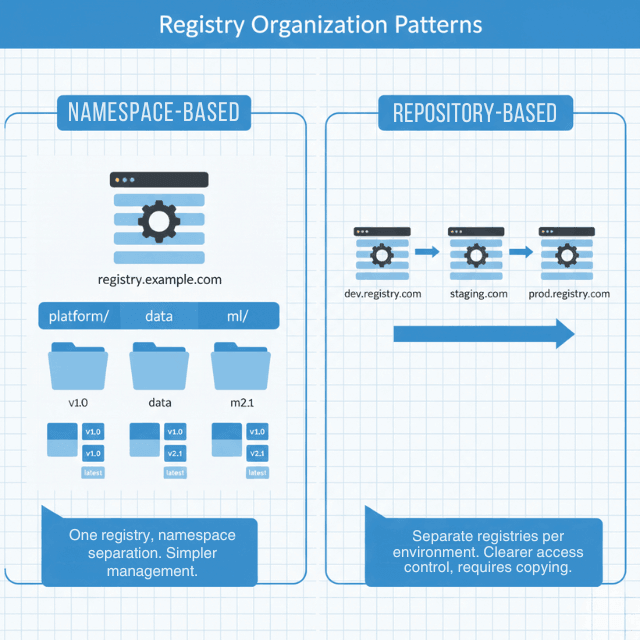
Namespace organization uses a single registry with namespaces for separation:
# Example registry structure
registry.example.com/platform/api-gateway:v1.2.3
registry.example.com/platform/auth-service:v2.0.1
registry.example.com/data/pipeline-processor:v1.5.0
registry.example.com/ml/model-serving:v3.0.0
This approach simplifies registry management but requires granular namespace-level access control.
Repository-based organization separates by environment:
# Development images with commit hash tags
registry.example.com/dev/api-gateway:git-a1b2c3d
registry.example.com/dev/auth-service:git-e4f5g6h

# Staging images with semantic versions after testing
registry.example.com/staging/api-gateway:v1.2.3
registry.example.com/staging/auth-service:v2.0.1

# Production images - promoted from staging
registry.example.com/prod/api-gateway:v1.2.3
registry.example.com/prod/auth-service:v2.0.1
This makes access control simpler-production engineers only need access to the prod namespace-but requires copying images between repositories rather than just promoting tags.
Registry configuration example:
# Harbor registry project configuration
apiVersion: v1
kind: ConfigMap
metadata:
  name: harbor-config
data:
  config.yaml: |
    projects:
      - name: platform
        public: false
        quota:
          storage: 500GB
        vulnerability_scanning:
          enabled: true
          scan_on_push: true
          prevent_vulnerable: true
          severity: high
        retention_policy:
          enabled: true
          rules:
            - tag_pattern: "v*"
              retention_count: 30
            - tag_pattern: "latest"
              always_retain: true
            - tag_pattern: "*"
              retention_days: 7

      - name: production
        public: false
        quota:
          storage: 1TB
        immutability:
          enabled: true
          tag_pattern: "v*"
        vulnerability_scanning:
          enabled: true
          prevent_vulnerable: true
          severity: critical
        retention_policy:
          enabled: true
          rules:
            - tag_pattern: "v*"
              retention_count: 100
Harbor's 2024 annual survey found that 73% of production incidents involving wrong image versions could have been prevented with tag immutability.
Artifact Tagging Strategies
Tags identify artifact versions. Poor tagging causes deployment confusion and rollback difficulties.
Semantic versioning for releases:
# Production releases use semantic versions
docker build -t registry.example.com/api:v1.2.3 .
docker tag registry.example.com/api:v1.2.3 registry.example.com/api:v1.2
docker tag registry.example.com/api:v1.2.3 registry.example.com/api:v1
docker tag registry.example.com/api:v1.2.3 registry.example.com/api:latest
docker push registry.example.com/api --all-tags
Git-based tags for development:
# Development builds tagged with git information
GIT_SHA=$(git rev-parse --short HEAD)
GIT_BRANCH=$(git rev-parse --abbrev-ref HEAD)
BUILD_DATE=$(date -u +%Y%m%d)

docker build \
  --label "git.commit=${GIT_SHA}" \
  --label "git.branch=${GIT_BRANCH}" \
  --label "build.date=${BUILD_DATE}" \
  -t registry.example.com/api:${GIT_BRANCH}-${GIT_SHA} \
  -t registry.example.com/api:${GIT_BRANCH}-latest \
  .
Immutable production tags:
# Production images get immutable tags - never overwrite
docker tag registry.example.com/api:staging-v1.2.3 \
  registry.example.com/prod/api:v1.2.3-$(date +%s)

# Tag with release name for easy identification
docker tag registry.example.com/prod/api:v1.2.3-1704067200 \
  registry.example.com/prod/api:release-2024-q1
Never reuse tags in production. Tag latest means nothing during incident response at 3 AM.
Artifact Metadata and Labels
Metadata makes artifacts traceable. Labels connect artifacts to source code, build systems, and deployment environments.
# Dockerfile with OCI-compliant labels
FROM node:20-alpine AS builder

LABEL org.opencontainers.image.source="https://github.com/example/api-service"
LABEL org.opencontainers.image.revision="${GIT_SHA}"
LABEL org.opencontainers.image.created="${BUILD_DATE}"
LABEL org.opencontainers.image.version="${VERSION}"
LABEL org.opencontainers.image.title="API Service"
LABEL org.opencontainers.image.description="Core API service for platform"

# Custom labels for internal tracking
LABEL com.example.build.number="${BUILD_NUMBER}"
LABEL com.example.build.pipeline="${CI_PIPELINE_ID}"
LABEL com.example.team="platform"
LABEL com.example.oncall="platform-oncall@example.com"

WORKDIR /app
COPY package*.json ./
RUN npm ci --production
COPY . .
RUN npm run build

FROM node:20-alpine
WORKDIR /app
COPY --from=builder /app/dist ./dist
COPY --from=builder /app/node_modules ./node_modules

EXPOSE 8080
CMD ["node", "dist/main.js"]
Query artifacts by metadata:
# Find all images built from specific commit
docker images --filter "label=org.opencontainers.image.revision=a1b2c3d"

# Find images by build pipeline
skopeo list-tags docker://registry.example.com/api | \
  jq -r '.Tags[]' | \
  xargs -I {} skopeo inspect docker://registry.example.com/api:{} | \
  jq 'select(.Labels."com.example.build.pipeline" == "12345")'
Lifecycle Management and Retention
Without lifecycle policies, registries fill up with old images nobody uses, driving storage costs up and making it hard to find current versions.
Retention policies automatically delete artifacts based on age or count:
# AWS ECR lifecycle policy
{
  "rules": [
    {
      "rulePriority": 1,
      "description": "Keep last 30 production images",
      "selection": {
        "tagStatus": "tagged",
        "tagPrefixList": ["v"],
        "countType": "imageCountMoreThan",
        "countNumber": 30
      },
      "action": {
        "type": "expire"
      }
    },
    {
      "rulePriority": 2,
      "description": "Remove untagged images after 7 days",
      "selection": {
        "tagStatus": "untagged",
        "countType": "sinceImagePushed",
        "countUnit": "days",
        "countNumber": 7
      },
      "action": {
        "type": "expire"
      }
    },
    {
      "rulePriority": 3,
      "description": "Keep development images for 14 days",
      "selection": {
        "tagStatus": "tagged",
        "tagPrefixList": ["dev-", "feature-"],
        "countType": "sinceImagePushed",
        "countUnit": "days",
        "countNumber": 14
      },
      "action": {
        "type": "expire"
      }
    }
  ]
}
Google Artifact Registry retention:
# Create repository with retention policy
gcloud artifacts repositories create api-images \
  --repository-format=docker \
  --location=us-central1 \
  --description="API service container images" \
  --cleanup-policy-dry-run=false

# Add cleanup policy
cat <<EOF > cleanup-policy.json
[
  {
    "name": "delete-old-dev-images",
    "action": {"type": "Delete"},
    "condition": {
      "tagState": "tagged",
      "tagPrefixes": ["dev-"],
      "olderThan": "1209600s"
    }
  },
  {
    "name": "keep-recent-releases",
    "action": {"type": "Keep"},
    "mostRecentVersions": {
      "keepCount": 50
    },
    "condition": {
      "tagState": "tagged",
      "tagPrefixes": ["v"]
    }
  }
]
EOF

gcloud artifacts repositories set-cleanup-policies api-images \
  --location=us-central1 \
  --policy=cleanup-policy.json
Proper retention saved one 2024 case study team $18,000 annually in registry storage costs while improving artifact discoverability.
Security Scanning and SBOMs
Security scanning identifies vulnerabilities before deployment. Software Bill of Materials (SBOM) documents dependencies for compliance and incident response.
Automated vulnerability scanning:
# GitHub Actions with Trivy scanning
name: Build and Scan

on: [push]

jobs:
  build-and-scan:
    runs-on: ubuntu-latest
    steps:
      - uses: actions/checkout@v4

      - name: Build image
        run: |
          docker build -t registry.example.com/api:${{ github.sha }} .

      - name: Scan image with Trivy
        uses: aquasecurity/trivy-action@master
        with:
          image-ref: registry.example.com/api:${{ github.sha }}
          format: 'json'
          output: 'trivy-results.json'
          severity: 'CRITICAL,HIGH'

      - name: Check vulnerability threshold
        run: |
          CRITICAL=$(cat trivy-results.json | jq '[.Results[].Vulnerabilities[]? | select(.Severity=="CRITICAL")] | length')
          HIGH=$(cat trivy-results.json | jq '[.Results[].Vulnerabilities[]? | select(.Severity=="HIGH")] | length')

          echo "Found $CRITICAL critical and $HIGH high vulnerabilities"

          if [ $CRITICAL -gt 0 ]; then
            echo "Critical vulnerabilities found - blocking deployment"
            exit 1
          fi

          if [ $HIGH -gt 10 ]; then
            echo "Too many high-severity vulnerabilities"
            exit 1
          fi

      - name: Push only if scan passes
        run: |
          docker push registry.example.com/api:${{ github.sha }}
Generate and store SBOMs:
# Generate SBOM with Syft
syft packages registry.example.com/api:v1.2.3 -o spdx-json > sbom.json

# Upload SBOM to registry as artifact attestation
cosign attach sbom --sbom sbom.json registry.example.com/api:v1.2.3

# Sign the SBOM
cosign sign --key cosign.key registry.example.com/api:sha256-xxx.sbom

# Verify SBOM authenticity later
cosign verify --key cosign.pub registry.example.com/api:sha256-xxx.sbom
Docker BuildKit can generate SBOMs during image builds with a simple flag, making it zero-friction:
# Build with SBOM generation
docker buildx build \
  --sbom=true \
  --provenance=true \
  -t registry.example.com/api:v1.2.3 \
  --push \
  .

# Retrieve SBOM from built image
docker buildx imagetools inspect registry.example.com/api:v1.2.3 \
  --format '{{ json .SBOM }}'
Language-specific tools like npm sbom, go mod graph, or dependency checkers provide detailed information for specific ecosystems.
Store SBOMs alongside artifacts in your registry (some registries support SBOM attachments) or in a dedicated SBOM database. Tools like Dependency-Track provide a database and API for SBOM storage, querying, and vulnerability correlation.
Artifact Promotion Patterns
Promotion moves artifacts through environments without rebuilding. Build once, deploy many times.
Tag-based promotion updates tags as artifacts pass validation:
# Initial build tagged for staging
docker build -t registry.example.com/api:v1.2.3-staging .
docker push registry.example.com/api:v1.2.3-staging

# After validation in staging, promote to production
docker tag registry.example.com/api:v1.2.3-staging \
  registry.example.com/api:v1.2.3-prod
docker push registry.example.com/api:v1.2.3-prod

# Also tag as current release
docker tag registry.example.com/api:v1.2.3-prod \
  registry.example.com/api:v1.2.3
docker push registry.example.com/api:v1.2.3
Repository promotion moves artifacts between repositories as they progress:
# Copy from staging repository to production repository
docker tag registry.example.com/staging/api:v1.2.3 \
  registry.example.com/prod/api:v1.2.3
docker push registry.example.com/prod/api:v1.2.3

# Or use registry API for direct copy without pulling
crane copy \
  registry.example.com/staging/api:v1.2.3 \
  registry.example.com/prod/api:v1.2.3
This provides clearer separation and easier access control but requires copying artifacts.
Manifest promotion updates a manifest file (Kubernetes, Helm values) to point to a validated artifact version:
# GitOps-style promotion via manifest update
# production/api-deployment.yaml
apiVersion: apps/v1
kind: Deployment
metadata:
  name: api
  namespace: production
spec:
  replicas: 10
  template:
    spec:
      containers:
      - name: api
        image: registry.example.com/api:v1.2.3  # Promoted version
        imagePullPolicy: Always
Automate promotion with validation gates that check vulnerability scan results and SBOM presence before allowing artifacts to progress to production. GitOps-style promotion updates manifests in version control, creating an audit trail of what version deployed when.
Multi-Registry Strategies
Large organizations often use multiple registries for geographic distribution, disaster recovery, or vendor diversity. Configure registry replication to automatically copy production images to secondary registries. Harbor, AWS ECR, and Google Artifact Registry all support cross-region or cross-registry replication for high availability.
Artifact management isn't glamorous, but it's the foundation of reliable deployments. Proper registry organization, lifecycle policies, security scanning, and promotion workflows prevent the chaos of "which version is in production?" at 2 AM. Treat it with the attention it deserves.
Conclusion
Artifact management is the unglamorous but essential backbone of reliable software delivery. When done well, you know exactly what container image is running in production, its security posture, and how to roll back.
When done poorly, you're guessing at 2 AM during an incident, pulling images by latest tag, and hoping for the best. The patterns are clear: organize registries for your team's scale, tag immutably, enforce lifecycle policies to control storage costs, and embed security scanning with SBOM generation into every build.
Promotion should move artifacts—not rebuild them. The upfront investment in artifact management pays back in every deployment, every incident response, and every audit. Treat your artifacts as the critical assets they are.
Frequently Asked Questions
What's the biggest mistake teams make with artifact management?
Reusing tags, especially latest in production. When you overwrite a tag, you lose the ability to know what version was deployed at any point in time. During incident response, if multiple images share the same tag, you can't be certain what's actually running.
Use immutable tags—semantic versions plus build timestamps or commit SHAs. Never overwrite a tag that points to a deployed artifact.
How do I decide between namespace-based and repository-based registry organization?
Use namespace-based if you have fewer than 10 teams and need simplicity. A single registry with namespaces (/platform/, /data/) works well with modern access control. Use repository-based if you have strict separation of environments (prod vs. staging vs. dev) or different teams managing each environment.
Repository-based gives clearer boundaries but requires copying artifacts between repositories rather than just promoting tags. Both patterns work; choose based on your team structure and security requirements.
What should I scan for, and how strict should my gates be?
Scan for known vulnerabilities (CVEs) using tools like Trivy, Snyk, or AWS ECR scanning. Block builds that introduce critical or high-severity vulnerabilities with known exploits. For medium/low severity, allow with exceptions and track remediation.
Generate SBOMs (Software Bill of Materials) for every artifact—this documents all dependencies and is increasingly required for compliance (e.g., US Executive Order 14028). Store SBOMs alongside artifacts or in a dedicated database for querying during incidents and audits. The goal: know what's in your artifacts before they reach production.
Summarize this post with:
Ready to put this into production?
Our engineers have deployed these architectures across 100+ client engagements — from AWS migrations to Kubernetes clusters to AI infrastructure. We turn complex cloud challenges into measurable outcomes.