Kubernetes Autoscaling Strategies for AWS
Optimize Kubernetes costs on AWS with proven strategies for right-sizing, autoscaling, spot instances, and FinOps. Reduce EKS expenses by 30-50% while maintaining reliability
Introduction
Kubernetes on AWS provides flexibility and scalability, but managing costs remains a critical challenge. Studies show that up to 30% of cloud spending on Kubernetes environments goes to waste through idle resources and misconfigured workloads. Organizations running production workloads on Amazon EKS face overprovisioned nodes, inefficient scaling, and lack of visibility into resource consumption patterns.
This guide provides proven strategies for AWS Kubernetes cost optimization through intelligent resource allocation, autoscaling techniques, storage optimization, and FinOps practices. Whether you're running production workloads at scale or building cost-efficient development environments, these expert strategies will help you balance performance requirements with financial efficiency.
Understanding AWS Kubernetes Cost Drivers
Compute resources account for 53% of total AWS spend according to 2025 research. EC2 instances serving as worker nodes or AWS Fargate costs for serverless pods represent the largest cost component. Common inefficiencies include overprovisioned nodes running at 20-30% utilization, clusters that don't scale down during off-peak hours, and mismatched instance types for workload requirements.
The AWS EKS control plane costs $0.10 per hour per cluster ($73 monthly). Organizations running 20+ clusters face nearly $18,000 annually just for control plane access, making cluster consolidation an important optimization strategy.
Storage costs accumulate through Amazon EBS volumes attached to pods, and adopting cost‑effective Kubernetes management strategies helps prevent waste such as orphaned volumes and unused PersistentVolumes. EFS file systems for shared storage, and persistent volumes that outlive the pods they served. Unattached EBS volumes from deleted pods represent pure waste, yet they persist indefinitely unless actively managed. Many organizations discover hundreds of orphaned volumes during audits.
Network costs in Kubernetes environments involve data transfer between availability zones ($0.01 per GB each direction), egress to the internet, and load balancer provisioning. Cross-AZ traffic seems negligible until you're processing terabytes of internal traffic daily. Applications serving large files or high-volume APIs can generate substantial network bills.
Right-Sizing Kubernetes Nodes
Right-sizing nodes forms the foundation of AWS Kubernetes cost optimization. Running appropriately sized instances ensures you're not paying for capacity you don't use while maintaining sufficient resources for workload demands.
Start by analyzing current utilization patterns using Kubernetes Metrics Server, Prometheus, or AWS Container Insights. Most organizations discover significant overprovisioning—nodes running at 30-40% utilization when 70-80% would be safe with proper autoscaling.
Instance type selection dramatically impacts costs. AWS offers dozens of instance families optimized for different workload characteristics. Compute-optimized (C family) instances provide better value for CPU-intensive workloads, while memory-optimized (R family) instances suit databases and caching layers. General-purpose (M family and T family) instances work well for balanced workloads.
Graviton instances (ARM-based processors) offer compelling economics for compatible workloads. AWS claims up to 40% better price-performance with Graviton3 compared to x86 alternatives. While not all applications support ARM architecture, those that do can achieve substantial savings.
Implement a diversified node strategy with multiple node pools tailored to different workload classes. Run web services on cost-effective T3 instances with burstable performance, databases on memory-optimized R6g instances, and batch jobs on spot instances.
Implementing Intelligent Autoscaling
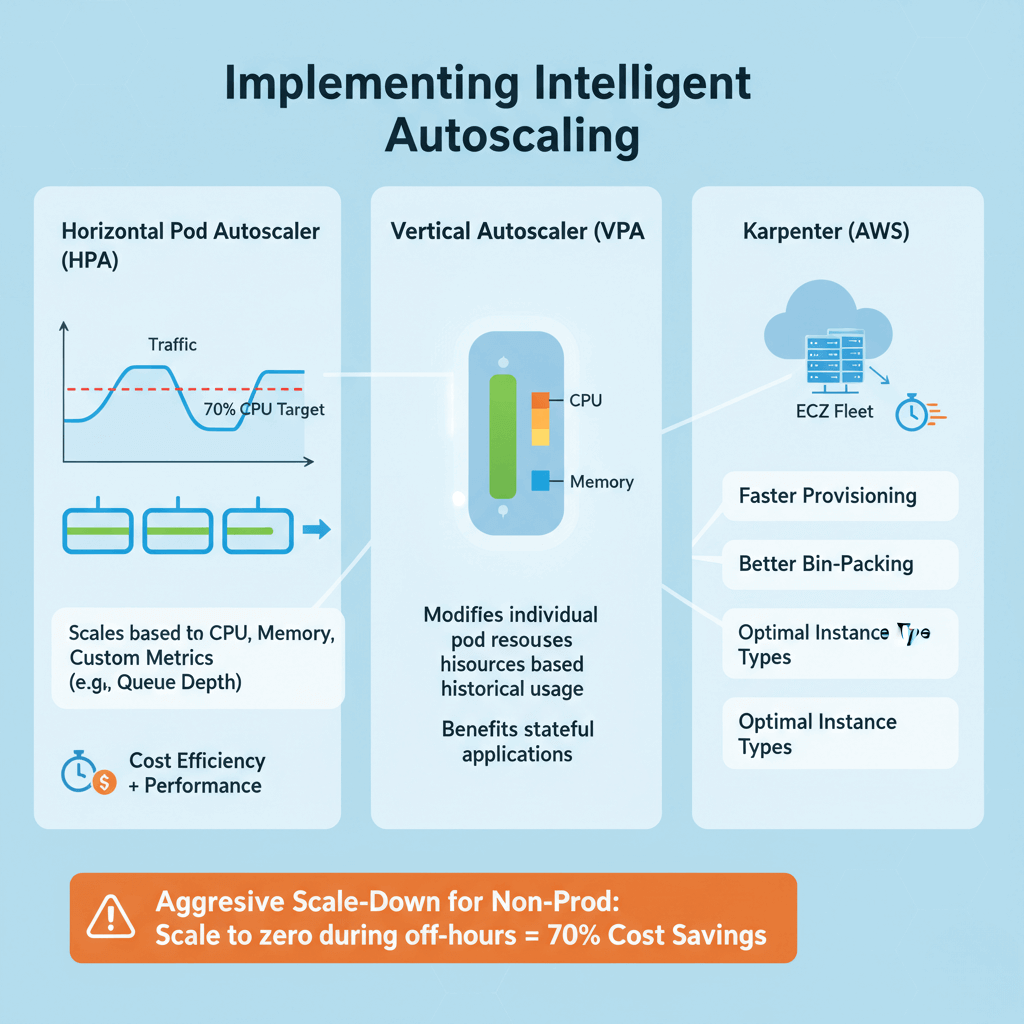
Horizontal Pod Autoscaler (HPA) increases or decreases pod replicas based on observed metrics like CPU utilization, memory usage, or custom metrics. HPA excels at handling variable traffic patterns, scaling web applications from a few pods during quiet periods to dozens during peak hours.
Configure HPA with appropriate target metrics. A CPU target of 70-80% balances cost efficiency with performance headroom. Implement custom metrics for better scaling decisions—applications serving requests should scale based on queue depth or request latency rather than just CPU. For advanced event‑driven scaling patterns, AWS provides prescriptive guidance on event‑driven autoscaling with KEDA.
Vertical Pod Autoscaler (VPA) modifies individual pod resource requests by analyzing historical usage patterns and recommending optimal CPU and memory requests. VPA particularly benefits workloads with variable resource needs that don't scale horizontally well, such as stateful applications.
Karpenter, AWS's newer autoscaling solution, improves on Cluster Autoscaler with faster provisioning, better bin-packing, and direct EC2 Fleet API integration. Karpenter can provision nodes in seconds and select optimal instance types automatically based on pod requirements and pricing.
Configure aggressive scale-down policies for non-production environments. Development and staging clusters can scale to zero during off-hours, eliminating 70% of costs with minimal effort.
Leveraging AWS Spot Instances
AWS Spot Instances offer the most dramatic cost reduction opportunity for Kubernetes workloads, providing up to 90% savings compared to on-demand pricing. Spot instances use AWS's spare EC2 capacity at deeply discounted prices, with the trade-off that AWS can reclaim them with a 2-minute warning.
Identify suitable workloads for spot instances. Batch processing jobs, data analytics, CI/CD pipelines, and containerized web services with multiple replicas are excellent candidates. Avoid using spot instances for singleton databases, stateful applications without replication, or workloads requiring guaranteed availability.
Implement diversification strategies to minimize interruption impact. Mix multiple instance types and availability zones in your spot instance pools. When one instance type faces high reclamation rates, your workloads shift to alternatives. Karpenter excels at this diversification.
Combine spot instances with on-demand instances for resilient architectures. Run 70-80% of replicas on spot instances for cost savings, with 20-30% on on-demand instances ensuring baseline availability. This hybrid approach balances economics with reliability.
Use the AWS Node Termination Handler to gracefully drain pods from terminating nodes, allowing Kubernetes to reschedule them elsewhere before interruption. This prevents abrupt service disruptions.
Optimizing Storage Costs
Storage optimization often receives less attention than compute optimization, yet it represents a significant cost reduction opportunity. Implement policies to automatically delete PersistentVolumeClaims (PVCs) when applications are removed. Many organizations discover hundreds of GB in orphaned volumes persisting months after their pods terminated.
Match storage classes to workload requirements. AWS offers multiple EBS volume types: gp3 (general purpose SSD) for cost-effective defaults, io2 (provisioned IOPS SSD) for high-performance databases, st1 (throughput optimized HDD) for large sequential workloads, and sc1 (cold HDD) for infrequently accessed data.
Default storage classes often use gp2 volumes, which cost more than gp3 while delivering lower performance. Updating your default StorageClass to gp3 typically saves 20% immediately.
Use Amazon EFS intelligently. EFS provides shared file systems ideal for ReadWriteMany volumes, but costs significantly more than EBS ($0.30 per GB-month versus $0.08 for gp3). Reserve EFS for workloads genuinely requiring shared access.
Manage snapshots proactively. Implement automated snapshot lifecycle policies that retain daily snapshots for 7 days, weekly for 4 weeks, and monthly for 12 months, then delete older snapshots.
Network Cost Optimization
Network costs stem from data transfer between availability zones, egress to the internet, and load balancer provisioning. Minimize cross-AZ traffic where possible. While distributing workloads across availability zones provides high availability, it introduces costs ($0.01 per GB each direction).
Kubernetes Topology Aware Hints enable the kube-proxy to route traffic preferentially to endpoints in the same zone. This reduces cross-AZ traffic for service-to-service communication without changing application code.
Consolidate internet egress through NAT Gateways. Each NAT Gateway costs $0.045 per hour plus $0.045 per GB processed. Running one NAT Gateway per AZ provides high availability while minimizing fixed costs. For non-production environments, a single NAT Gateway offers further savings.
Use AWS PrivateLink for service connections. When accessing AWS services like S3, RDS, or third-party SaaS applications, PrivateLink eliminates internet egress charges. Traffic stays within the AWS network, reducing costs and improving security.
Optimize load balancer usage. Application Load Balancers (ALB) cost $0.0225 per hour plus $0.008 per LCU consumed. Consolidate multiple services behind a single ALB using Kubernetes Ingress resources rather than provisioning separate load balancers per service.
Resource Requests and Limits
Properly configured resource requests and limits control pod scheduling and resource allocation, directly impacting cluster efficiency and costs. Resource requests tell the Kubernetes scheduler the minimum CPU and memory a pod needs. Resource limits define the maximum resources a pod can consume.
Overestimated requests lead to poor bin-packing and wasted capacity—nodes appear full while running at 30% utilization. Underestimated requests cause performance issues as pods compete for resources.
Start with profiling. Run applications in development with minimal requests to observe actual consumption. Tools like Vertical Pod Autoscaler in recommendation mode analyze historical usage and suggest appropriate values. Aim to set requests at the 90th percentile of normal usage.
Set limits thoughtfully. For CPU, limits create throttling—pods can use up to the limit, but no more. For memory, exceeding limits causes pod termination. Production applications generally benefit from CPU requests matching typical usage with limits 20-50% higher for burst handling, and memory requests and limits set equal to prevent terminations during normal operation.
Avoid pods without resource requests entirely. Kubernetes schedules these to any node, potentially overwhelming it. Implement admission controllers like ResourceQuota to enforce request specifications.
Implementing FinOps for Kubernetes
FinOps (Financial Operations) brings financial accountability to cloud spending through collaboration between engineering, finance, and operations teams. For AWS Kubernetes environments, FinOps transforms cost optimization from a periodic engineering task to a continuous business practice.
Building a cross-functional FinOps team starts with identifying stakeholders from engineering, finance, procurement, and business operations. Establish cost ownership by assigning monthly budgets to engineering teams. Teams view their cloud costs in real-time dashboards, with cost metrics included in sprint reviews.
Track key performance indicators aligned with business objectives. Essential metrics include cost per customer, cloud waste percentage, reserved instance coverage, average resource utilization, and month-over-month cost trends. These KPIs should measure spending relative to business metrics rather than focusing solely on minimizing costs.
Implement showback or chargeback models. Showback reports costs to teams for visibility and awareness. Chargeback allocates costs as actual budget items, creating stronger incentives for optimization. Start with showback to build awareness before transitioning to chargeback.
Regular FinOps reviews—typically monthly or quarterly—provide forums for discussing cost trends, reviewing optimization opportunities, and aligning cloud strategy with business objectives. These meetings should include presentations on major cost drivers, successful optimizations, and upcoming initiatives that may impact cloud spending.
Conclusion
AWS Kubernetes cost optimization requires systematic attention to right-sizing, intelligent autoscaling, spot instance utilization, storage management, and FinOps practices. Organizations typically reduce Kubernetes costs by 30-50% through the strategies outlined in this guide. Start with high-impact changes like right-sizing nodes, implementing aggressive autoscaling for non-production environments, and leveraging spot instances for fault-tolerant workloads. These quick wins demonstrate value and build momentum for more sophisticated optimizations like multi-cluster strategies and AI-driven resource management. Cost optimization is not about minimizing spending at all costs—it's about maximizing business value per dollar invested. By implementing monitoring, governance, and continuous improvement practices, you'll build Kubernetes systems that scale economically with your business.
Frequently Asked Questions
How do I reduce AWS EKS costs effectively?
Reducing AWS EKS costs requires a multi-faceted approach. Start with right-sizing worker nodes based on actual utilization data—most clusters run at 20-30% utilization when 70-80% is safe with proper autoscaling. Implement intelligent autoscaling using Horizontal Pod Autoscaler, Vertical Pod Autoscaler, and Karpenter to match resources to demand. Leverage spot instances for 60-80% of fault-tolerant workloads to achieve up to 90% savings. Use AWS Compute Savings Plans to commit to baseline usage for 30-70% discounts. Clean up orphaned resources like unused volumes and idle clusters. Most organizations achieve 30-50% cost reduction through these combined strategies.
What are the best Kubernetes cost optimization tools for AWS?
The best tools combine cost visibility, optimization recommendations, and automation. Kubecost provides detailed cost breakdowns by namespace, deployment, and label with actionable recommendations—its free tier offers essential features. AWS Container Insights integrates with CloudWatch for native AWS monitoring. Prometheus and Grafana deliver metrics and visualization for resource utilization. For advanced AI-driven optimization, StormForge and CloudBolt analyze performance data and automatically recommend or apply resource adjustments. AWS Cost Explorer with proper tagging provides financial visibility across all AWS services. Use multiple tools together for coverage.
Is AWS Fargate more cost-effective than EC2 for Kubernetes workloads?
AWS Fargate's cost-effectiveness depends on workload characteristics. Fargate eliminates node management overhead and charges only for vCPU and memory consumed by pods, making it ideal for bursty or unpredictable workloads that would require overprovisioned EC2 capacity. However, Fargate costs approximately 20-30% more than on-demand EC2 instances for continuously running workloads. EC2 with spot instances and Savings Plans typically provides the lowest cost for steady-state production workloads. The optimal approach often combines both: use EC2 with spot instances for predictable baseline capacity and Fargate for unpredictable spikes.
How do Spot Instances impact Kubernetes workload reliability?
Spot instances provide up to 90% cost savings but can be interrupted with 2-minute notice when AWS needs capacity. Impact on reliability depends on implementation. For stateless applications with multiple replicas, spot instances have minimal impact—Kubernetes automatically reschedules interrupted pods to other nodes. Use the AWS Node Termination Handler to gracefully drain pods before interruption. Implement diversification across multiple instance types and availability zones to reduce interruption correlation. Avoid spot instances for singleton databases or stateful applications without replication. A hybrid approach—70-80% spot instances, 20-30% on-demand instances—balances cost savings with reliability for most production workloads.
What are common Kubernetes cost optimization mistakes to avoid?
Common mistakes include: not setting resource requests and limits, causing poor bin-packing and wasted capacity; running development and staging clusters 24/7 instead of scaling down during off-hours; using a single instance type for all workloads instead of matching instance families to workload characteristics; neglecting to clean up orphaned resources like unused PersistentVolumes and idle load balancers; implementing autoscaling without proper monitoring, leading to over-aggressive or under-aggressive scaling; purchasing Reserved Instances or Savings Plans without analyzing usage patterns; ignoring network costs from cross-AZ traffic and egress; and running separate EKS clusters when namespaces would suffice, multiplying control plane costs.