Hybrid Architecture: AWS Outposts, Azure Arc & Anthos Guide
Master hybrid architecture combining on-premises and cloud. Learn AWS Outposts, Azure Arc, Google Anthos, data synchronization, and network patterns for unified infrastructure management.
TL;DR
- Unify on-premises + cloud: Hybrid architecture creates a single operational model across data centers and public cloud. Use it for cloud bursting, data residency compliance, and edge computing with sub-10ms latency.
- Three major platforms: AWS Outposts brings native AWS services to your data center. Azure Arc extends Azure management to any infrastructure. Google Anthos provides unified Kubernetes across environments.
- Data + network are critical: Connect with dedicated links (AWS Direct Connect, Azure ExpressRoute) for <10ms latency. Use active-active replication for data synchronization, but watch egress costs—AWS charges $0.09/GB out.
- Start stateless, add stateful later: Begin with workloads that move easily (web servers, APIs). Add databases and stateful services only after establishing reliable sync and failover patterns.
- Monitor everything unified: Use Prometheus federation for metrics, OpenTelemetry for distributed tracing across hybrid boundaries, and centralized logs for security correlation.
Modern enterprises face a common challenge: they need the flexibility of cloud infrastructure while maintaining critical workloads on-premises for compliance, latency, or cost reasons.
Hybrid architecture solves this by combining on-premises data centers with public cloud services, creating a unified environment that spans multiple locations. Organizations using hybrid architectures report 35% faster deployment times and 40% reduction in infrastructure costs according to 2024 Flexera State of the Cloud Report.
This guide shows you how to design, implement, and manage hybrid architectures using proven patterns and real-world implementations with AWS Outposts, Azure Arc, and Google Anthos.
Understanding Hybrid Architecture Patterns
Hybrid architecture extends your infrastructure across on-premises data centers and cloud environments, creating a single operational model. The three primary patterns include cloud bursting for dynamic workload expansion, data residency for compliance requirements, and edge computing for low-latency applications.
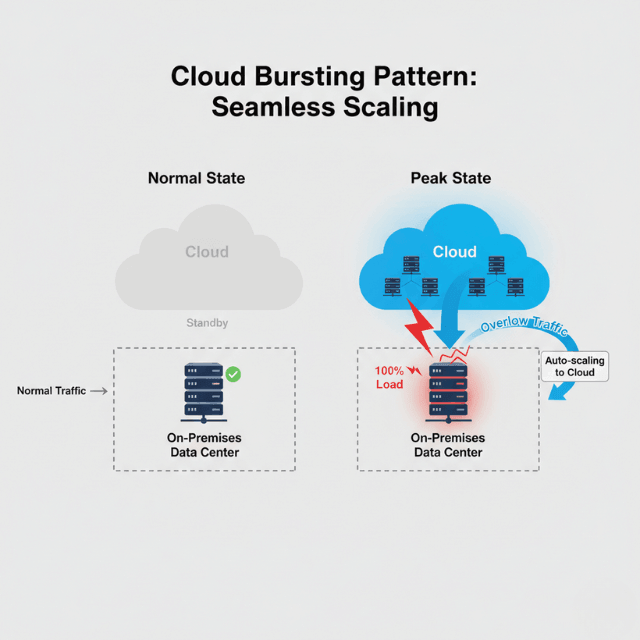
Cloud bursting allows applications to run on-premises during normal operations, then automatically expand to cloud resources during peak demand. Netflix uses this pattern to handle streaming spikes during new releases, maintaining base infrastructure on-premises while scaling to AWS during high traffic.
Data residency patterns keep sensitive data on-premises while using cloud services for processing. European banks implement this to comply with GDPR requirements, storing customer data locally while running analytics in regional cloud zones.
Edge computing patterns distribute workload processing close to data sources. Autonomous vehicle manufacturers process sensor data at edge locations, sending only aggregated results to central cloud systems. This reduces latency from 200ms to under 10ms for real-time decision making.
Network connectivity forms the foundation. AWS Direct Connect provides dedicated 1-10 Gbps connections with latency under 10ms. Azure ExpressRoute offers similar capabilities with 50 Gbps options. Google Cloud Interconnect supports up to 200 Gbps using multiple connections.
Implementation with Major Cloud Platforms
AWS Outposts brings native AWS services to your data center using the same hardware infrastructure that powers AWS regions. You deploy EC2 instances, EBS volumes, RDS databases, and ECS containers on Outposts racks that AWS delivers, installs, and maintains.
# AWS Outposts hybrid deployment configuration
AWSTemplateFormatVersion: '2010-09-09'
Description: 'Hybrid application deployment across Outposts and AWS regions'

Resources:
  OutpostSubnet:
    Type: AWS::EC2::Subnet
    Properties:
      VpcId: !Ref HybridVPC
      CidrBlock: 10.0.1.0/24
      OutpostArn: !Ref OutpostArn
      AvailabilityZone: us-east-1a
      Tags:
        - Key: Name
          Value: outpost-application-subnet

  OutpostInstance:
    Type: AWS::EC2::Instance
    Properties:
      InstanceType: m5.2xlarge
      ImageId: ami-0c55b159cbfafe1f0
      SubnetId: !Ref OutpostSubnet
      UserData:
        Fn::Base64: !Sub |
          #!/bin/bash
          aws s3 sync s3://config-bucket/outpost-config /opt/app/config
          systemctl enable app-service
          systemctl start app-service
      Tags:
        - Key: Environment
          Value: hybrid-production

  CloudBurstingAutoScaling:
    Type: AWS::AutoScaling::AutoScalingGroup
    Properties:
      MinSize: 0
      MaxSize: 20
      DesiredCapacity: 0
      VPCZoneIdentifier:
        - !Ref CloudSubnet1
        - !Ref CloudSubnet2
      TargetGroupARNs:
        - !Ref ApplicationLoadBalancerTargetGroup
Azure Arc extends Azure management to any infrastructure including on-premises servers, multi-cloud environments, and edge devices. You install the Azure Connected Machine agent on existing servers, registering them with Azure Resource Manager.
"""
Azure Arc hybrid Kubernetes cluster management
Prerequisites:
- Azure CLI configured
- kubectl configured for local cluster
- pip install azure-identity azure-mgmt-kubernetesconfiguration
"""

from azure.identity import DefaultAzureCredential
from azure.mgmt.kubernetesconfiguration import KubernetesConfigurationClient
import subprocess
import logging

logger = logging.getLogger(__name__)

class HybridClusterManager:
    def __init__(self, subscription_id: str, resource_group: str):
        self.credential = DefaultAzureCredential()
        self.subscription_id = subscription_id
        self.resource_group = resource_group
        self.k8s_client = KubernetesConfigurationClient(
            credential=self.credential,
            subscription_id=subscription_id
        )

    def connect_cluster_to_arc(self, cluster_name: str, location: str):
        """Connect on-premises Kubernetes cluster to Azure Arc"""
        connect_command = [
            'az', 'connectedk8s', 'connect',
            '--name', cluster_name,
            '--resource-group', self.resource_group,
            '--location', location,
            '--tags', 'environment=hybrid'
        ]

        logger.info(f"Connecting cluster {cluster_name} to Azure Arc")
        result = subprocess.run(connect_command, capture_output=True, check=True)

        return {
            'status': 'connected',
            'cluster_name': cluster_name,
            'location': location
        }

    def deploy_hybrid_workload(self, cluster_name: str, namespace: str):
        """Deploy application using GitOps"""
        configuration = {
            'source_kind': 'GitRepository',
            'repository_url': 'https://github.com/yourorg/hybrid-app',
            'operator_namespace': namespace,
            'operator_type': 'Flux',
            'enable_helm_operator': True
        }

        result = self.k8s_client.source_control_configurations.create_or_update(
            resource_group_name=self.resource_group,
            cluster_name=cluster_name,
            source_control_configuration_name=f'{cluster_name}-config',
            source_control_configuration=configuration
        )

        return result

# Example usage
manager = HybridClusterManager(
    subscription_id="your-subscription-id",
    resource_group="hybrid-rg"
)

connection = manager.connect_cluster_to_arc(
    cluster_name="datacenter-k8s",
    location="eastus"
)
Google Anthos provides unified management across on-premises, Google Cloud, AWS, and Azure. Anthos clusters run on VMware vSphere, bare metal servers, or cloud VMs with centralized control through Google Cloud Console.
Data Synchronization and Workload Placement
Data synchronization between environments requires careful planning. Active-active replication maintains synchronized copies in both locations for local reads and writes. Financial platforms use this to maintain sub-millisecond latency while replicating to cloud for analytics.
AWS DataSync handles bidirectional synchronization between on-premises NFS storage and S3 buckets. You configure sync tasks with bandwidth limits, schedules, and verification options. Manufacturing companies reduced monthly transfer costs from $15,000 to $3,000 by implementing compression and incremental sync.
Workload placement depends on latency requirements, data gravity, compliance needs, and costs. Latency-sensitive applications like trading systems run on-premises with sub-millisecond requirements.
Batch analytics run in cloud for elasticity. Healthcare providers maintain electronic health records on-premises for HIPAA compliance while using cloud for non-PHI workloads.
Data gravity influences placement based on where data resides. AWS charges $0.09 per GB for data transfer out, making it expensive to move large datasets. IoT data processing stays at edge locations, sending only aggregated metrics to cloud.
Network Architecture and Security
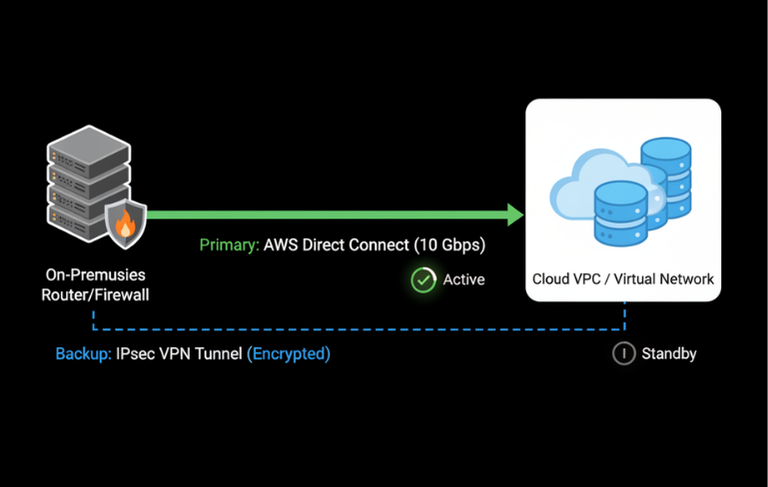
Hybrid network architecture requires secure, high-performance connectivity. AWS Direct Connect provides dedicated 1-100 Gbps bandwidth with consistent latency under 10ms. Backup VPN connections provide 1.25 Gbps throughput with encryption.
# Terraform hybrid network configuration
terraform {
  required_providers {
    aws = {
      source  = "hashicorp/aws"
      version = "~> 5.0"
    }
  }
}

resource "aws_dx_connection" "primary" {
  name      = "primary-dx-connection"
  bandwidth = "10Gbps"
  location  = "EqDC2"
}

resource "aws_dx_gateway" "hybrid" {
  name            = "hybrid-dx-gateway"
  amazon_side_asn = 64512
}

resource "aws_vpn_connection" "backup" {
  vpn_gateway_id      = aws_vpn_gateway.hybrid_vgw.id
  customer_gateway_id = aws_customer_gateway.onprem.id
  type                = "ipsec.1"
  static_routes_only  = false

  tunnel1_inside_cidr = "169.254.10.0/30"
  tunnel2_inside_cidr = "169.254.11.0/30"
}
Security controls span both environments with unified identity management. Single sign-on extends corporate Active Directory to cloud using Azure AD Connect or AWS Directory Service. Network segmentation uses consistent VLAN structures with firewall rules managed through infrastructure as code.
Monitoring and Troubleshooting
Unified monitoring provides visibility across hybrid infrastructure. Prometheus federation collects metrics from on-premises and cloud Kubernetes clusters, storing them in centralized Thanos. Grafana dashboards visualize metrics from both locations with consistent templates.
Distributed tracing tracks requests across hybrid boundaries using OpenTelemetry. Transactions starting on-premises and calling cloud APIs appear as single traces, showing latency breakdown by location. Retail companies optimize checkout flows that validate inventory on-premises and process payments in cloud.
Log aggregation centralizes logs using ELK stack or CloudWatch Logs Insights. On-premises agents forward to cloud storage for unified search. Security teams detect attacks spanning both environments by correlating firewall and access logs.
Common issues include network latency, synchronization conflicts, and authentication failures. Monitor Direct Connect link status and failover to VPN during outages.
Implement conflict resolution strategies for data synchronization using timestamp or checksum-based approaches. Test disaster recovery procedures monthly to verify failover capabilities.
Optimization and Best Practices
Start with stateless workloads to minimize complexity. Web servers, API gateways, and container applications move easily between locations. Add stateful workloads after establishing reliable synchronization patterns.
Implement cost monitoring across both environments. Compress data before transfer and use incremental sync to reduce bandwidth consumption. Automate deployment pipelines using GitOps and infrastructure as code. Flux CD or ArgoCD deploy applications to any Kubernetes cluster regardless of location.
Test disaster recovery regularly by simulating failures in each location. Practice failover from on-premises to cloud and verify applications continue operating. Financial services companies run monthly DR tests, achieving recovery time objectives under 15 minutes.
Monitor key metrics including network latency, synchronization lag, resource utilization, and application response times. Set alerts for Direct Connect failures, high data transfer costs, and authentication errors. Review costs monthly to identify optimization opportunities.
Conclusion
Hybrid architecture enables enterprises to leverage cloud benefits while maintaining on-premises infrastructure for specific requirements. AWS Outposts, Azure Arc, and Google Anthos provide managed platforms with consistent operational models.
Network connectivity through Direct Connect or ExpressRoute ensures high-performance links between locations. Data synchronization patterns balance consistency with performance and cost. Workload placement strategies optimize for latency, compliance, and economics.
Organizations implementing hybrid architectures report 40% cost reduction and 35% faster deployment times while maintaining control over sensitive workloads. Start with stateless applications and network connectivity, then add stateful workloads as patterns mature.
FAQs
When should I choose hybrid over pure cloud or pure on-premises?
Choose hybrid when you need both cloud elasticity and on-premises control.
Common drivers: data residency (keep sensitive data on-premises while using cloud for processing), latency (single-digit millisecond requirements for trading, manufacturing), existing investment (leverage data center assets while adding cloud capabilities), or gradual migration (move workloads incrementally over years).
How do I handle data consistency across hybrid environments?
Use active-active replication for low-latency local access with eventual consistency (suitable for user profiles, product catalogs). For strong consistency needs, use active-passive with primary writes in one location.
Implement conflict resolution strategies—last-write-wins or version vectors. Tools like AWS DataSync handle bidirectional sync with compression and incremental transfers to minimize costs.
What's the biggest cost trap in hybrid architectures?
Data transfer egress. Moving data between on-premises and cloud can quickly eat your budget. A single terabyte transferred out of AWS costs ~$90.
Mitigation strategies: compress before transfer, use incremental sync, cache frequently accessed data locally, and architect to keep data where it's processed whenever possible. Monitor transfer costs weekly, not monthly.
Summarize this post with:
Ready to put this into production?
Our engineers have deployed these architectures across 100+ client engagements — from AWS migrations to Kubernetes clusters to AI infrastructure. We turn complex cloud challenges into measurable outcomes.