Azure Performance Optimization with Scaling, Caching, and Database Tuning
Optimize Azure performance with scaling, Redis caching, SQL tuning, Cosmos DB partitioning, and CDN strategies to boost SaaS speed and cut costs.
Microsoft Azure provides robust infrastructure for SaaS applications, but achieving optimal performance requires understanding Azure-specific services and configurations. From compute scaling to managed caching and database optimization, Azure offers purpose-built tools that can dramatically improve application responsiveness and reduce operational costs when properly configured.
Azure Compute Optimization
Azure Virtual Machines offer multiple series optimized for different workloads. General-purpose D-series VMs balance compute and memory. Compute-optimized F-series VMs suit CPU-intensive workloads. Memory-optimized E-series VMs excel at database and caching workloads.
VM sizing directly impacts performance and cost. Oversized VMs waste money; right‑sizing is a key part of cloud infrastructure cost optimization. Undersized VMs create bottlenecks. Azure Advisor provides right-sizing recommendations based on actual utilization.
Azure Virtual Machine Scale Sets enable automatic horizontal scaling, a core component of auto-scaling architecture in SaaS environments. Define scaling rules based on CPU, memory, or custom metrics. Scale sets add or remove instances automatically as demand changes.
{
  "rules": [{
    "metricTrigger": {
      "metricName": "Percentage CPU",
      "threshold": 75,
      "timeAggregation": "Average"
    },
    "scaleAction": {
      "direction": "Increase",
      "type": "ChangeCount",
      "value": "2",
      "cooldown": "PT5M"
    }
  }]
}
Availability Zones distribute VMs across physically separated datacenters. This provides high availability while maintaining low latency within the same region.
Premium SSD or Ultra Disk storage dramatically improves I/O performance. Standard HDD storage should be reserved for non-critical workloads. Storage tier selection significantly impacts database and application performance.
Azure App Service Performance
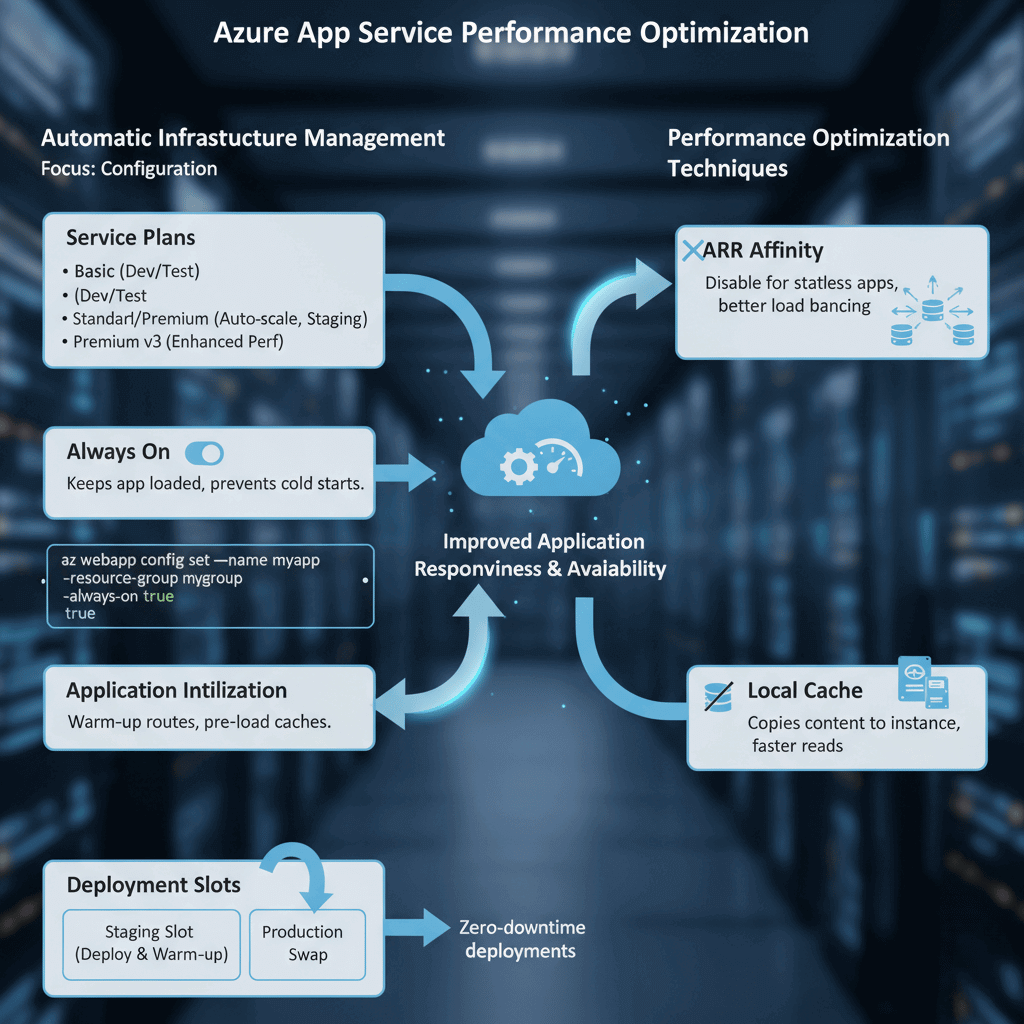
Azure App Service handles infrastructure management automatically. Performance optimization focuses on configuration rather than server management.
Service plan selection determines available resources. Basic plans suit development. Standard and Premium plans provide auto-scaling and staging slots. Premium v3 plans offer enhanced performance and larger instance sizes.
Always On keeps applications continuously loaded. Without Always On, applications unload after periods of inactivity, causing cold start delays for subsequent requests.
# Enable Always On via Azure CLI
az webapp config set --name myapp --resource-group mygroup --always-on true
Application Initialization warms up applications before they receive traffic. Configure initialization routes that pre-load caches and establish database connections.
Deployment slots enable zero-downtime deployments. Deploy to staging slots, warm up the application, then swap to production. This eliminates cold start impact during deployments.
ARR Affinity maintains session stickiness but can create uneven load distribution. For stateless applications, disabling ARR Affinity improves load balancing.
Local cache improves read performance for content-heavy applications. Content copies to the instance's local storage, reducing dependency on the central storage.
Azure Cache for Redis
Azure Cache for Redis provides managed Redis instances. Caching reduces database load and improves response times for frequently accessed data.
Cache tiers range from Basic (development) through Standard (production) to Premium (enterprise features). Premium tier provides clustering, geo-replication, and Virtual Network integration.
Connection pooling prevents connection exhaustion. Redis connections are expensive to establish. Reuse connections across requests.
// Use singleton ConnectionMultiplexer
private static Lazy<ConnectionMultiplexer> lazyConnection =
    new Lazy<ConnectionMultiplexer>(() => {
        return ConnectionMultiplexer.Connect(connectionString);
    });

public static ConnectionMultiplexer Connection => lazyConnection.Value;
Cache-aside pattern loads data into cache on demand. Check cache first, load from database if missing, then store in cache.
Appropriate TTLs balance freshness against cache hit ratio. Short TTLs ensure data currency but reduce cache effectiveness. Long TTLs maximize cache hits but risk stale data.
Redis clustering distributes data across multiple shards. Premium tier supports up to 10 shards, scaling both memory and throughput. Access patterns should consider key distribution across shards.
Data serialization affects performance. MessagePack or Protocol Buffers provide faster serialization than JSON. Choose formats based on client support and performance requirements.
Azure SQL Database Tuning
Azure SQL Database manages infrastructure automatically but still requires query and index optimization.
Service tier selection matches workload characteristics. DTU-based tiers bundle compute, memory, and I/O. vCore-based tiers provide independent resource scaling. Serverless tier scales automatically and pauses during inactivity.
Query Performance Insight identifies slow queries. The Azure portal displays query statistics, execution counts, and resource consumption.
-- Find resource-intensive queries
SELECT TOP 10
    query_stats.query_hash,
    SUM(query_stats.total_worker_time) / SUM(query_stats.execution_count) AS avg_cpu_time,
    SUM(query_stats.execution_count) AS execution_count
FROM sys.dm_exec_query_stats AS query_stats
GROUP BY query_stats.query_hash
ORDER BY avg_cpu_time DESC;
Automatic tuning implements index recommendations and fixes query regressions. Azure SQL can create missing indexes and drop unused ones automatically.
Read replicas offload read-heavy workloads. Configure applications to route read queries to replicas while writes go to the primary. This scales read capacity horizontally.
Elastic pools share resources across multiple databases. For multi-tenant SaaS applications, elastic pools provide cost-efficient resource sharing while maintaining database isolation.
Query Store captures query execution history. This enables performance regression analysis and plan forcing when necessary.
Cosmos DB Performance
Azure Cosmos DB provides globally distributed, multi-model database capabilities. Performance optimization focuses on partition design and throughput provisioning.
Partition key selection critically affects performance. Choose keys that evenly distribute data and align with common query patterns. Hot partitions create bottlenecks.
// Good: Distributes evenly, aligns with query pattern
{ "partitionKey": "/tenantId" }

// Bad: Creates hot partition
{ "partitionKey": "/country" }  // If most users are in one country
Request Units (RUs) measure throughput. Every operation consumes RUs based on complexity. Provision adequate RUs for peak workloads or use autoscale.
Autoscale throughput adjusts RUs automatically between 10% and 100% of maximum. This handles traffic spikes without manual intervention.
Indexing policy affects both read and write performance. By default, Cosmos DB indexes all properties. Exclude properties that aren't queried to reduce write RU consumption.
Direct connectivity mode provides lower latency than Gateway mode. Use Direct mode for production workloads.
Integrated cache reduces RU consumption for read-heavy workloads. Dedicated gateway caches frequently accessed items at the Cosmos DB layer.
Azure CDN and Front Door
Azure CDN caches static content at edge locations worldwide. Users receive content from nearby edge servers, dramatically reducing latency.
CDN profiles support multiple origins and endpoints. Configure caching rules based on file types and URL patterns.
{
  "cacheConfiguration": {
    "queryStringCachingBehavior": "IgnoreQueryString",
    "cacheDuration": "1.00:00:00"
  }
}
Azure Front Door provides global load balancing with CDN capabilities based on Microsoft's global edge network architecture. Intelligent routing directs users to the fastest available backend.
Health probes monitor backend availability. Front Door automatically routes around failed backends.
WAF (Web Application Firewall) integration protects applications without significant performance impact. Managed rule sets defend against common attacks.
Compression reduces transfer sizes. Enable compression for text-based content types including JSON API responses.
Monitoring with Azure Monitor
Azure Monitor provides unified monitoring across all Azure services. Application Insights, specifically, tracks application performance.
Application Insights instruments applications automatically. SDK integration provides detailed telemetry including request traces, dependencies, and exceptions.
// Custom metric tracking
var telemetry = new TelemetryClient();
telemetry.TrackMetric("OrderProcessingTime", processingTime);
Log Analytics enables complex queries across monitoring data. KQL (Kusto Query Language) provides powerful analysis capabilities.
requests
| where timestamp > ago(1h)
| summarize avg(duration), percentile(duration, 95) by name
| order by avg_duration desc
Alerts notify teams of performance degradation. Configure alert rules based on metrics, logs, or activity events. Action groups define notification channels.
Workbooks create custom dashboards. Combine metrics, logs, and visualizations into shareable reports.
Smart Detection automatically identifies performance anomalies. Machine learning analyzes patterns and alerts on unusual behavior.