AWS vs Azure vs GCP Autoscaling - Best Practices Guide (2026)
Learn auto-scaling in AWS, Azure, and GCP for 2026. Compare ASGs, VMSS, MIGs, and Kubernetes HPA to optimize performance, cost, and resilience.
Auto-scaling automatically adjusts compute capacity based on demand. Traffic spikes trigger scale-out; quiet periods trigger scale-in.
This elasticity optimizes both performance and costs. Each major cloud provider implements auto-scaling differently, with distinct features and configuration approaches.
Auto-Scaling Fundamentals
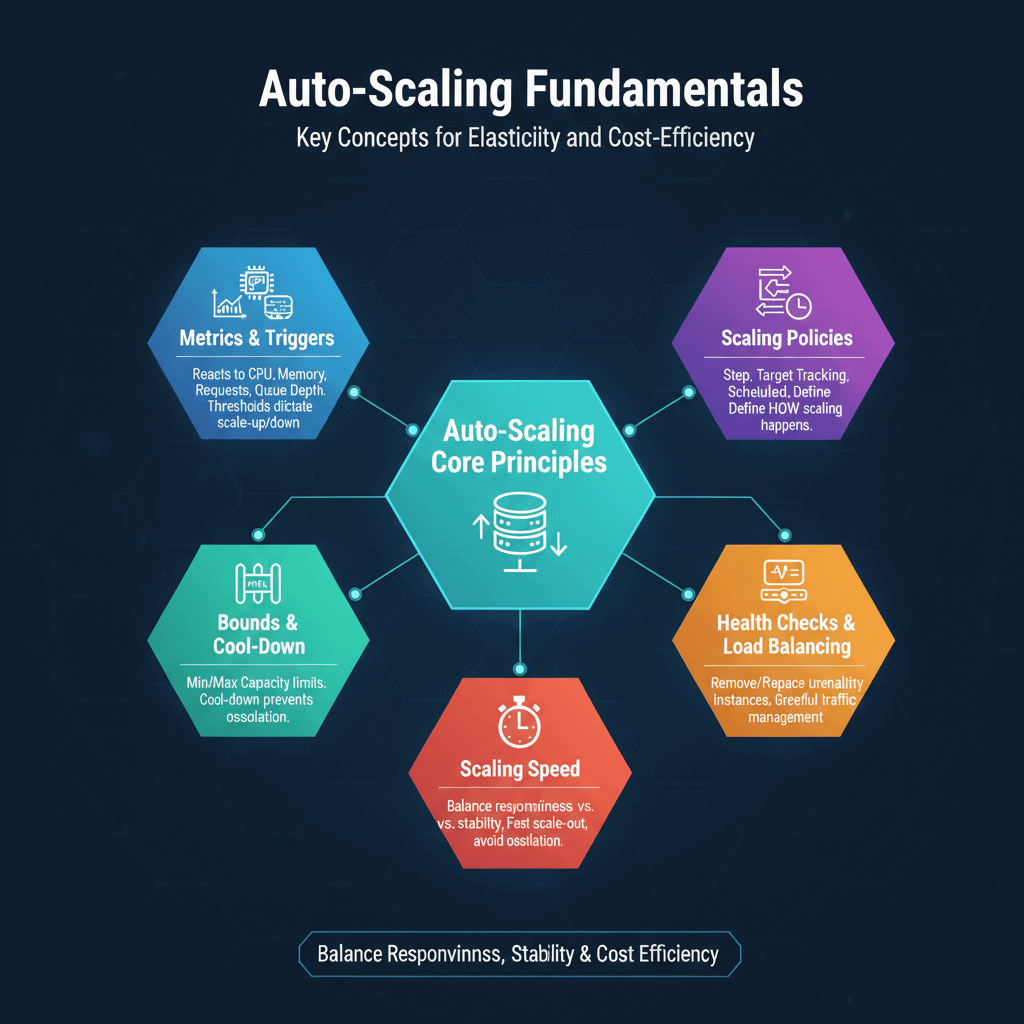
Auto-scaling reacts to metrics that indicate resource needs. Common triggers include CPU utilization, memory usage, request count, and queue depth. When metrics exceed thresholds, capacity increases. When metrics fall below thresholds, capacity decreases.
Scaling policies define how scaling happens. Step scaling increases or decreases by fixed amounts at threshold boundaries. Target tracking maintains metrics at specified targets. Scheduled scaling adjusts capacity based on predictable patterns.
Scaling speed affects user experience. Fast scale-out responds quickly to traffic spikes. But launching instances takes time. Aggressive scaling can cause oscillation. Balance responsiveness against stability.
Minimum and maximum bounds prevent runaway scaling. Minimum capacity ensures baseline availability. Maximum capacity limits costs and protects downstream systems.
Cool-down periods prevent rapid oscillation. After scaling events, systems pause before evaluating again. This prevents repeated scaling from metric noise.
Health checks ensure only healthy instances receive traffic. Auto-scaling removes unhealthy instances and replaces them. Integration with load balancers enables graceful traffic management.
AWS Auto Scaling
AWS Auto Scaling Groups manage EC2 instances. Define launch templates specifying instance configuration, then set scaling policies to adjust capacity.
# CloudFormation Auto Scaling Group
AutoScalingGroup:
  Type: AWS::AutoScaling::AutoScalingGroup
  Properties:
    LaunchTemplate:
      LaunchTemplateId: !Ref LaunchTemplate
      Version: !GetAtt LaunchTemplate.LatestVersionNumber
    MinSize: 2
    MaxSize: 20
    DesiredCapacity: 4
    TargetGroupARNs:
      - !Ref TargetGroup
    VPCZoneIdentifier:
      - !Ref SubnetA
      - !Ref SubnetB
Target tracking policies are simplest. Specify a target value for a metric (e.g., 70% CPU utilization), and AWS handles the rest.
ScalingPolicy:
  Type: AWS::AutoScaling::ScalingPolicy
  Properties:
    AutoScalingGroupName: !Ref AutoScalingGroup
    PolicyType: TargetTrackingScaling
    TargetTrackingConfiguration:
      PredefinedMetricSpecification:
        PredefinedMetricType: ASGAverageCPUUtilization
      TargetValue: 70.0
Predictive scaling uses machine learning to anticipate demand. AWS analyzes historical patterns and scales proactively before traffic increases.
Warm pools pre-initialize instances for faster scaling. Instances in warm pools are stopped or hibernated, ready to start quickly when needed.
Application Auto Scaling extends beyond EC2. DynamoDB tables, ECS services, Aurora replicas, and other services support auto-scaling through Application Auto Scaling.
Lifecycle hooks execute custom actions during scaling. Run scripts during instance launch or termination. Useful for configuration or graceful shutdown.
Azure Autoscale
Azure Virtual Machine Scale Sets (VMSS) provide auto-scaling for VMs. Define scale sets with autoscale rules to adjust instance count.
{
  "autoscaleSettings": {
    "profiles": [{
      "capacity": {
        "minimum": "2",
        "maximum": "20",
        "default": "4"
      },
      "rules": [{
        "metricTrigger": {
          "metricName": "Percentage CPU",
          "timeGrain": "PT1M",
          "statistic": "Average",
          "timeWindow": "PT5M",
          "operator": "GreaterThan",
          "threshold": 70
        },
        "scaleAction": {
          "direction": "Increase",
          "type": "ChangeCount",
          "value": "2",
          "cooldown": "PT5M"
        }
      }]
    }]
  }
}
Azure App Service has built-in autoscale. Configure rules based on metrics or schedules directly in App Service plans.
Azure Kubernetes Service (AKS) supports Horizontal Pod Autoscaler and Cluster Autoscaler. Pods scale based on resource requests; nodes scale to accommodate pod scheduling.
Autoscale profiles support schedules. Define different scaling behavior for business hours versus nights and weekends.
Azure Monitor provides metrics for scaling decisions. Custom metrics from Application Insights enable application-aware scaling.
Flapping prevention includes cool-down periods and scale-in policies that aggregate metrics over time.
Google Cloud Autoscaler
Managed Instance Groups (MIGs) handle auto-scaling for Compute Engine. Autoscaler adjusts instance count based on load.
# gcloud command for autoscaler
gcloud compute instance-groups managed set-autoscaling my-mig \
    --max-num-replicas=20 \
    --min-num-replicas=2 \
    --target-cpu-utilization=0.7 \
    --cool-down-period=60
GCP supports multiple scaling signals. CPU utilization, load balancer serving capacity, Cloud Monitoring metrics, and Pub/Sub queue depth all trigger scaling.
Predictive autoscaling on GCP uses machine learning. Historical patterns inform proactive scaling before demand increases.
Per-instance metrics account for heterogeneous workloads. Some instances may report different utilization than others.
👉 Official Google Cloud Docs: Compute Engine Autoscaler Overview
Cloud Run auto-scales based on concurrent requests. Set minimum and maximum instances; scaling happens automatically.
# Cloud Run service with autoscaling
apiVersion: serving.knative.dev/v1
kind: Service
spec:
  template:
    metadata:
      annotations:
        autoscaling.knative.dev/minScale: "2"
        autoscaling.knative.dev/maxScale: "100"
    spec:
      containers:
        - image: gcr.io/project/app
GKE includes both Horizontal Pod Autoscaler and Cluster Autoscaler. Node auto-provisioning selects optimal machine types automatically.
Kubernetes Horizontal Pod Autoscaling
Horizontal Pod Autoscaler (HPA) scales Deployment replicas. HPA works consistently across cloud providers and on-premises Kubernetes.
apiVersion: autoscaling/v2
kind: HorizontalPodAutoscaler
metadata:
  name: app-hpa
spec:
  scaleTargetRef:
    apiVersion: apps/v1
    kind: Deployment
    name: my-app
  minReplicas: 2
  maxReplicas: 20
  metrics:
    - type: Resource
      resource:
        name: cpu
        target:
          type: Utilization
          averageUtilization: 70
Custom metrics enable application-aware scaling. Prometheus Adapter or Datadog Cluster Agent expose application metrics to HPA.
👉 Explore advanced strategies in our guide on best ML/AI tools for optimizing Kubernetes resources.
Vertical Pod Autoscaler (VPA) adjusts resource requests. VPA and HPA work together: VPA right-sizes pods while HPA adjusts count.
Cluster Autoscaler adds nodes when pods can't schedule. Integration with cloud provider APIs enables node provisioning and termination.
KEDA (Kubernetes Event-Driven Autoscaling) extends HPA capabilities. Scale based on event sources like message queues, databases, or custom metrics.
apiVersion: keda.sh/v1alpha1
kind: ScaledObject
metadata:
  name: sqs-scaler
spec:
  scaleTargetRef:
    name: worker
  triggers:
    - type: aws-sqs-queue
      metadata:
        queueURL: https://sqs.region.amazonaws.com/account/queue
        queueLength: "5"
Best Practices Across Platforms
Set appropriate thresholds. Too low triggers unnecessary scaling; too high causes slow response to demand. Start conservative and adjust based on observed behavior.
Use multiple metrics for scaling decisions. CPU alone may not reflect application load. Combine CPU with request count or custom metrics for better accuracy.
Test scaling behavior before production. Simulate traffic spikes to verify scaling responds appropriately. Ensure instances launch and join load balancers correctly.
Monitor scaling events. Track when scaling occurs and why. Unexpected scaling may indicate problems or opportunities for optimization.
Configure graceful shutdown. Applications should drain connections before terminating. Pre-stop hooks and termination grace periods enable clean shutdown.
Plan for cold start latency. Newly launched instances need time to warm up. Consider warm pools or minimum capacity to reduce cold start impact.
Account for downstream capacity. Scaling application servers doesn't help if databases or APIs can't handle increased load. Scale all components proportionally.
Choosing the Right Approach
Consider your primary platform. Use native tools for your main cloud provider. Cross-cloud requirements may favor Kubernetes for portability.
Evaluate complexity versus capability. Target tracking policies are simpler than step scaling but offer less control. Start simple; add complexity when needed.
Match scaling speed to workload patterns. Predictable daily patterns suit scheduled scaling. Unpredictable traffic needs reactive scaling with appropriate responsiveness.
Balance cost optimization with performance. Aggressive scale-in saves money but risks capacity shortages. Conservative approaches cost more but ensure headroom.
| Platform | Native Solution | Container Solution |
|---|---|---|
| AWS | Auto Scaling Groups | ECS/EKS + HPA |
| Azure | VMSS Autoscale | AKS + HPA |
| GCP | MIG Autoscaler | GKE + HPA |
| Multi-cloud | N/A | Kubernetes + HPA |
Which Cluster Autoscaling Solutions Integrate with Cloud Providers
AWS: Karpenter (recommended, sub-60 second node provisioning) and Cluster Autoscaler for EKS. Azure: Cluster Autoscaler for AKS and VMSS scaling rules for standalone VM fleets. GCP: GKE Autopilot (fully managed, node provisioning is transparent) and Cluster Autoscaler for GKE Standard. For Kubernetes workloads, Karpenter on AWS offers the fastest scale-out and most flexible instance selection. GKE Autopilot eliminates autoscaling configuration entirely — GCP manages node lifecycle automatically.
Autoscaling capability comparison: - AWS: Karpenter sub-60s, Spot support, mixed instances, custom node templates - Azure: Cluster Autoscaler 1-3 min, VMSS scale sets, Spot node pools - GCP: GKE Autopilot fully managed, Standard CA 1-2 min, Spot VMs supported - All three: HPA (CPU/memory), KEDA (event-driven), VPA (vertical), custom metrics
2026 Update - What Changed in AWS, Azure, and GCP Autoscaling
AWS: Karpenter v1.0 released in late 2024 with stable API — update NodePool references from v1beta1 to v1 spec. Karpenter has effectively replaced Cluster Autoscaler as the recommendation for new EKS deployments. Azure: VMSS Flex is now the default scale set type. AKS node auto-provisioning (NAP) is now GA, providing Karpenter-like dynamic provisioning. GCP: GKE Autopilot pricing was updated in 2025 — you now pay for pod resources requested, not node capacity. Standard Cluster Autoscaler is unchanged but Autopilot is the recommended path for most workloads.
Frequently Asked Questions
Which cloud provider has the best autoscaling performance? AWS Karpenter achieves sub-60 second node provisioning for Spot and On-Demand. GCP Autopilot is fully managed with no configuration required. Azure NAP (node auto-provisioning) became GA in 2025. For raw speed, Karpenter on AWS leads; for simplicity, GCP Autopilot.
How do I configure responsive autoscaling on AWS vs Azure? AWS: Deploy Karpenter, configure NodePool with instance types and Spot/On-Demand mix. Azure: Enable Cluster Autoscaler on AKS with --enable-cluster-autoscaler and set min/max counts per node pool. Both support HPA for pod-level scaling — pair cluster autoscaler with HPA for complete coverage.
What is the difference between horizontal and vertical autoscaling in cloud? Horizontal scaling adds or removes nodes/pods (HPA, Cluster Autoscaler, Karpenter). Vertical scaling increases resources for existing pods without adding instances (VPA). For stateless web services, horizontal scaling is preferred. VPA suits database or ML workloads where one larger pod is more efficient than many small ones.
Summarize this post with:
Ready to put this into production?
Our engineers have deployed these architectures across 100+ client engagements — from AWS migrations to Kubernetes clusters to AI infrastructure. We turn complex cloud challenges into measurable outcomes.