Scale LLMs Serverlessly on Container Apps
Deploy LLMs on Azure Container Apps with serverless scale-to-zero, KEDA autoscaling, and blue-green deployments to cut costs by up to 80%, eliminate cluster management, and pay only for actual usage in event-driven and variable workloads.

TLDR;
- Scale-to-zero reduces costs by 80% compared to always-on AKS deployments
- KEDA autoscaling responds to HTTP requests, queues, or custom metrics automatically
- Blue-green deployments through revision management enable zero-downtime updates
- Monthly cost as low as $27 versus $150 for equivalent AKS node at 100 hours utilization
Container Apps provides serverless container hosting with powerful scaling capabilities specifically designed for event-driven workloads. Deploy any containerized model without managing infrastructure.
Scale automatically based on load including scale-to-zero when idle. Pay only when processing requests. Container Apps eliminates cluster management complexity while providing production-ready features.
The platform offers KEDA-based autoscaling triggered by HTTP requests, queue messages, or custom metrics. Built-in ingress and load balancing distribute traffic automatically. Managed certificates provide HTTPS without configuration.
| Trigger Type | Use Case |
|---|---|
| HTTP requests | Web APIs, real-time inference |
| Queue messages | Batch processing, async workloads |
| Custom metrics | Specialized scaling requirements |
Deep integration with Azure ecosystem simplifies authentication and monitoring. Cost advantages become significant for variable workloads. Container Apps costs zero dollars when idle compared to AKS requiring $73 monthly control plane plus node costs exceeding $1,000 monthly.
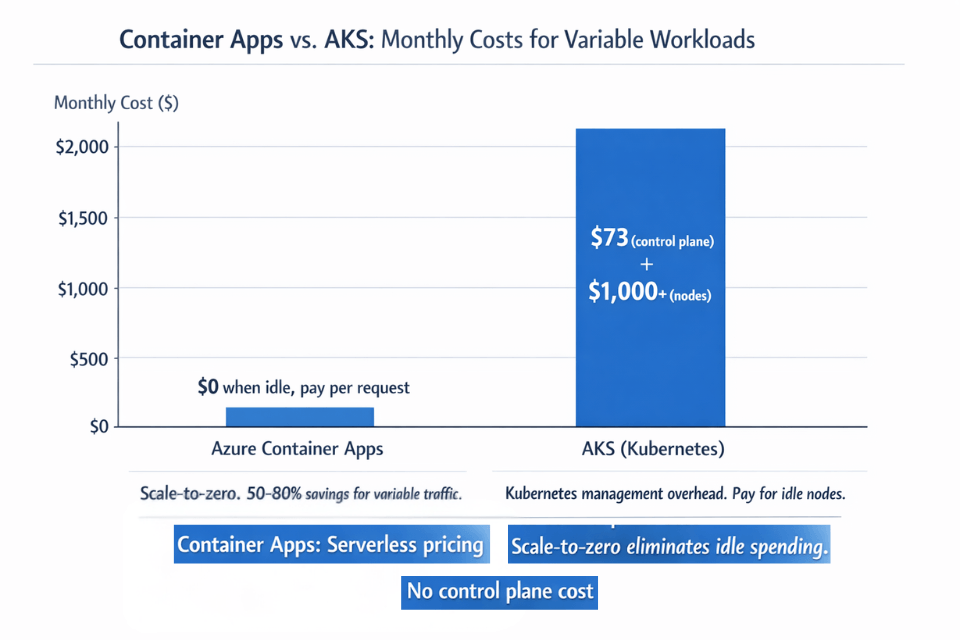
Organizations save 50-80% for workloads with variable traffic patterns. This guide covers deployment to Container Apps environment, advanced scaling configurations, blue-green deployments through revision management, cost optimization with scale-to-zero, and integration with Azure services.
Container Apps works best for variable traffic patterns, batch processing workloads, development and staging environments, cost-sensitive deployments, teams without Kubernetes expertise, and event-driven inference scenarios.
Deployment Configuration
Deploy LLM inference service to Container Apps environment.
Create Container Apps environment:
# Create resource group
az group create \
    --name ml-serverless \
    --location eastus

# Create environment
az containerapp env create \
    --name llm-environment \
    --resource-group ml-serverless \
    --location eastus \
    --logs-destination log-analytics \
    --logs-workspace-id "/subscriptions/.../workspaces/ml-logs"
Build and push container image:
# Dockerfile for vLLM inference
FROM nvidia/cuda:12.1.0-runtime-ubuntu22.04

RUN apt-get update && apt-get install -y python3-pip
RUN pip3 install vllm transformers torch

COPY inference_server.py /app/
WORKDIR /app

EXPOSE 8000

CMD ["python3", "inference_server.py"]
# Build and push
docker build -t llama-inference:latest .
docker tag llama-inference:latest myregistry.azurecr.io/llama-inference:latest
az acr login --name myregistry
docker push myregistry.azurecr.io/llama-inference:latest
Deploy container app:
az containerapp create \
    --name llama-inference \
    --resource-group ml-serverless \
    --environment llm-environment \
    --image myregistry.azurecr.io/llama-inference:latest \
    --registry-server myregistry.azurecr.io \
    --registry-identity system \
    --target-port 8000 \
    --ingress external \
    --min-replicas 0 \
    --max-replicas 10 \
    --cpu 4 \
    --memory 16Gi \
    --env-vars \
        MODEL_PATH="/models/llama-7b" \
        GPU_MEMORY_UTILIZATION="0.95"
Advanced Scaling Configuration
Configure autoscaling with multiple trigger types for responsive scaling behavior.
HTTP-based scaling responds to concurrent request load:
az containerapp update \
    --name llama-inference \
    --resource-group ml-serverless \
    --min-replicas 0 \
    --max-replicas 20 \
    --scale-rule-name http-rule \
    --scale-rule-type http \
    --scale-rule-http-concurrency 5
Scaling behavior follows these patterns. With 0-5 concurrent requests, system runs 1 replica. With 6-10 requests, scales to 2 replicas. With 11-15 requests, scales to 3 replicas. System scales up and down automatically based on traffic.
Queue-based scaling processes inference requests from Azure Storage Queue:
az containerapp update \
    --name llama-batch \
    --resource-group ml-serverless \
    --min-replicas 0 \
    --max-replicas 50 \
    --scale-rule-name queue-rule \
    --scale-rule-type azure-queue \
    --scale-rule-metadata \
        queueName=inference-requests \
        queueLength=10 \
        accountName=mystorageaccount \
    --scale-rule-auth secretRef=storage-connection
Multi-criteria scaling combines HTTP and CPU triggers:
# HTTP scaling
az containerapp update \
    --name llama-inference \
    --scale-rule-name http-rule \
    --scale-rule-type http \
    --scale-rule-http-concurrency 10

# CPU scaling
az containerapp update \
    --name llama-inference \
    --scale-rule-name cpu-rule \
    --scale-rule-type cpu \
    --scale-rule-metadata type=Utilization value=70
Combined behavior scales up when either rule triggers. Scales down only when all rules fall below thresholds. System becomes more responsive to traffic spikes.
Revision Management and Deployments
Deploy updates with zero downtime using Container Apps revision system.
Create new revision:
# Deploy new version
az containerapp update \
    --name llama-inference \
    --resource-group ml-serverless \
    --image myregistry.azurecr.io/llama-inference:v2 \
    --revision-suffix v2

# Split traffic for canary deployment
az containerapp ingress traffic set \
    --name llama-inference \
    --resource-group ml-serverless \
    --revision-weight llama-inference--v1=90 llama-inference--v2=10
Blue-green deployment pattern:
# Deploy green version
az containerapp update \
    --name llama-inference \
    --resource-group ml-serverless \
    --image myregistry.azurecr.io/llama-inference:v2 \
    --revision-suffix green

# Test green revision internally
curl https://llama-inference--green.internal.example.com/health

# Switch all traffic to green
az containerapp ingress traffic set \
    --name llama-inference \
    --resource-group ml-serverless \
    --revision-weight llama-inference--green=100

# Deactivate blue revision
az containerapp revision deactivate \
    --name llama-inference \
    --revision llama-inference--blue
Blue-green, canary, or rolling updates for serverless LLMs? We implement your strategy.
Canary: 10% → 90% traffic over time. Blue-green: deploy green revision, test internally, atomic traffic switch, deactivate blue.
We help you:
- Choose the right revision strategy – Based on model risk profile and traffic volume
- Implement canary deployments – Weighted traffic splitting with gradual rollout
- Test revisions internally – Use internal endpoint URLs before exposing to users
- Rollback instantly – Previous revision remains available for immediate switch
Cost Optimization Strategies
Maximize savings with serverless architecture and scale-to-zero capability.
Enable scale-to-zero for development environment:
az containerapp update \
    --name llama-dev \
    --resource-group ml-serverless \
    --min-replicas 0 \
    --max-replicas 5 \
    --scale-rule-name http-rule \
    --scale-rule-type http \
    --scale-rule-http-concurrency 3
Cost Savings examples:
| Scenario | AKS Cost | Container Apps Cost | Monthly Savings | Reduction |
|---|---|---|---|---|
| 20% utilization (variable traffic) | $1,500 | $300 | $1,200 | 80% |
| 7B model (100 hours/month active) | ~$150 | $27.12 | $122.88 | 82% |
Right-size resources based on model requirements:
# Small instances for 7B models
az containerapp update \
    --name llama-7b \
    --cpu 2 \
    --memory 8Gi

# Larger instances for 70B models
az containerapp update \
    --name llama-70b \
    --cpu 8 \
    --memory 32Gi
Example Calculation: 7B Model (100 hours/month active)
| Resource | Configuration | Cost Calculation | Monthly Cost |
|---|---|---|---|
| vCPU | 2 vCPU × 100 hours × 3600 seconds × $0.000024 | 720,000 vCPU-seconds | $17.28 |
| Memory | 8GB × 100 hours × 3600 seconds × $0.000003 | 2,880,000 GiB-seconds | $8.64 |
| Requests | 5 million requests (after 2M free) | 3M × $0.40/1M | $1.20 |
| Total | $27.12 |
Comparison: AKS node for same workload: ~$150/month → 82% savings
Azure Service Integration
Connect Container Apps to Azure ecosystem for storage, queuing, and security.
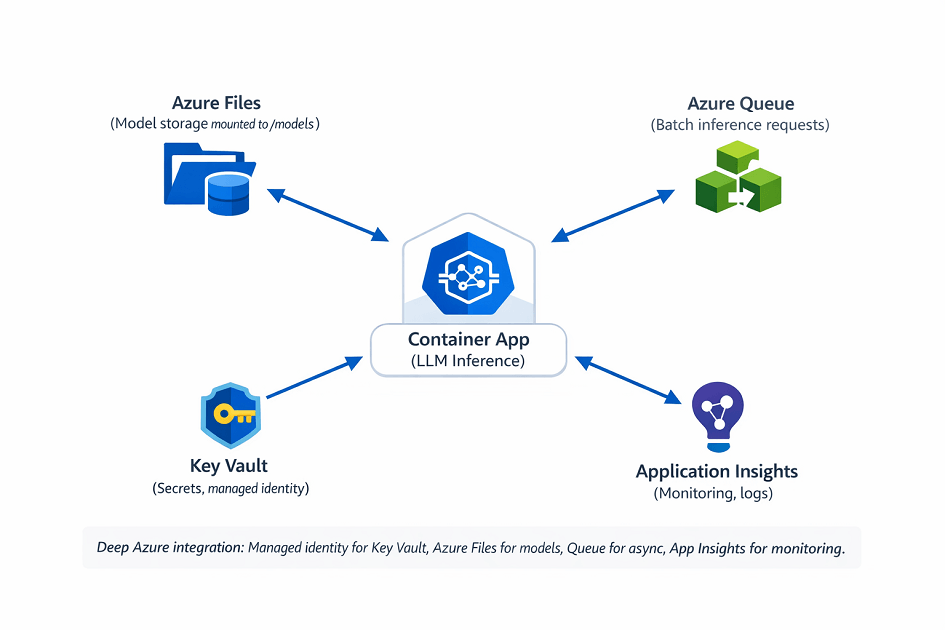
Mount Azure Files for model storage:
az containerapp update \
    --name llama-inference \
    --resource-group ml-serverless \
    --azure-file-volume-share models-share \
    --azure-file-volume-account-name mystorageaccount \
    --azure-file-volume-account-key "storage-key" \
    --azure-file-volume-mount-path /models
Azure Queue integration for batch processing:
from azure.storage.queue import QueueClient
import json

queue_client = QueueClient.from_connection_string(
    connection_string,
    queue_name="inference-requests"
)

while True:
    messages = queue_client.receive_messages(messages_per_page=10)

    for message in messages:
        request = json.loads(message.content)

        # Process inference
        result = model.generate(request["prompt"])

        # Store result
        result_queue.send_message(json.dumps({
            "request_id": request["id"],
            "result": result
        }))

        # Delete processed message
        queue_client.delete_message(message)
Enable managed identity for secure access:
# Enable managed identity
az containerapp identity assign \
    --name llama-inference \
    --resource-group ml-serverless \
    --system-assigned

# Grant Key Vault permissions
az keyvault set-policy \
    --name myvault \
    --object-id <identity-principal-id> \
    --secret-permissions get list
Monitor with Application Insights:
from opencensus.ext.azure.log_exporter import AzureLogHandler
import logging

logger = logging.getLogger(__name__)
logger.addHandler(AzureLogHandler(
    connection_string="InstrumentationKey=your-key"
))

# Log inference metrics
logger.info("Inference completed", extra={
    "custom_dimensions": {
        "latency_ms": latency,
        "tokens_generated": tokens,
        "model": "llama-7b"
    }
})
View logs with Azure CLI:
az containerapp logs show \
    --name llama-inference \
    --resource-group ml-serverless \
    --follow \
    --tail 100
Conclusion
Azure Container Apps delivers serverless LLM deployment with automatic scaling and zero infrastructure management. Scale-to-zero eliminates costs during idle periods. KEDA autoscaling responds to HTTP, queue, and custom metrics. Revision management enables blue-green deployments without downtime.
Organizations achieve 50-80% cost savings compared to traditional Kubernetes for variable workloads. Container Apps works best for CPU-based inference with small to medium models, development environments, and batch processing.
Start with basic HTTP scaling, enable scale-to-zero for cost optimization, implement queue-based scaling for batch workloads, and monitor with Application Insights. Your serverless deployment scales automatically while minimizing costs.
FAQs
1. When should I choose Container Apps over AKS for LLM inference?
| Criteria | Container Apps | AKS |
|---|---|---|
| Traffic pattern | Variable / bursty (scale-to-zero saves money) | Predictable 24/7 high-throughput (reserved instances cheaper) |
| Workload type | Batch processing (queue-triggered) | Real-time, high-throughput inference |
| Environment | Dev / staging | Production |
| Team expertise | No Kubernetes experience needed | Kubernetes expertise required |
| GPU support | Limited (small to medium quantized models) | Full (any GPU workload) |
| Autoscaling | Built-in, KEDA-based | Custom policies via HPA + Cluster Autoscaler |
| Multi-service sharing | Not optimal | One node pool shared across services |
| Access controls | Coarse | Fine-grained node-level |
Recommendations:
- Container Apps for: cost-sensitive deployments, dev/staging, variable traffic, batch jobs, CPU-based inference
- AKS for: large models (real-time high throughput), custom scaling logic, GPU workloads, strict access controls
2. How do I handle GPU-based inference with Container Apps?
| Aspect | Container Apps | AKS |
|---|---|---|
| GPU support | Limited (beta/regional) | Full (comprehensive) |
| Suitable models | Small to medium quantized (7B-13B, 4-bit/8-bit) | Any model size, any precision |
| Use case | CPU-optimized inference | Real-time, high-throughput production |
| Acceleration options | ONNX Runtime, Intel OpenVINO | Direct GPU, CUDA, TensorRT |
Bottom line: For production GPU workloads, use AKS with GPU node pools. Container Apps is acceptable for CPU-based quantized models in development or low-throughput scenarios.
3. How do I prevent cold starts when scaling from zero?
| Strategy | Configuration | Cost Impact | Cold Start Impact |
|---|---|---|---|
| Set min-replicas: 1 | One always-warm replica | ~$35/month | Eliminated |
| Aggressive scale rules | Scale at 3-5 concurrent requests | Same as normal usage | Reduced (more reactive) |
| Scheduled pre-warming | Azure Functions cron job (ping every 5 min during business hours) | Minimal (~$5/month) | Eliminated during hours |
| Model on Azure Files | Mount /models from file share |
~$0.10/GB/month | First replica loads, others mount (no re-download) |
Best practices for latency-sensitive workloads:
- Set
min-replicas: 1for production endpoints - Store models on Azure Files (shared volume across replicas)
- Avoid scale-to-zero for user-facing applications
Trade-off: min-replicas: 1 costs ~$35/month but eliminates cold starts entirely. Worth it for production endpoints. For dev/staging, scale-to-zero is fine.